As an Amazon Associate, we earn from qualifying purchases. Some links on this site are affiliate links at no extra cost to you. Our recommendations are based on thorough research and editorial judgment.


Using Tablets as Secondary Wireless Monitors: Ecosystem Lock-In Trends

Tablet ecosystem lock-in restricts wireless display connectivity through proprietary protocols; AirPlay functions exclusively within Apple devices, while Miracast lacks universal compatibility and exhibits latency issues. Apple, Android, and Windows ecosystems each impose switching costs through non-transferable apps, inaccessible digital libraries, and disrupted workflows. Wi-Fi 7’s open standards promise improved interoperability by 2027, yet current fragmentation demands careful evaluation of your existing hardware before committing to any platform, considerations that become increasingly significant as you examine vendor restrictions more thoroughly.
Key Takeaways
- Apple’s AirPlay provides seamless wireless screen sharing within its ecosystem but creates vendor lock-in and incompatibility with non-Apple displays.
- Android tablets offer superior cross-ecosystem flexibility for wireless connectivity compared to Apple, reducing ecosystem dependency for secondary monitor setups.
- Switching ecosystems incurs hidden costs including non-transferable apps, inaccessible digital libraries, and disrupted productivity workflows with tablet-dependent systems.
- Wi-Fi 7’s open standards will improve cross-platform wireless compatibility, reducing proprietary technology frustrations and vendor lock-in constraints for users.
- Tablet monitor market projected to exceed $112 billion by 2026, driven by remote work adoption and dual-screen setup demand.
What Is Ecosystem Lock-In? Why It Matters for Tablet Buyers
What Is Ecosystem Lock-In? Why It Matters for Tablet Buyers
Thinking about buying a tablet? You’ve probably noticed that choosing between Apple, Android, and Windows isn’t just about the device itself—it’s about locking yourself into an entire ecosystem. That’s ecosystem lock-in, and it affects everything from how your devices talk to each other to what apps you can use down the road.
Here’s what’s actually happening behind the scenes. Apple’s AirPlay lets you beam your screen across iPhones, iPads, and Macs without thinking twice. It just works. But if you own an Android phone and try to connect to an iPad? You’re stuck hunting for workarounds. Android devices use Miracast or Wi-Fi 6 standards instead, which require specific software support and aren’t always as smooth.
Why this matters for your real life:
You’re juggling remote work calls, trying to share your screen during video meetings, and needing your tablet to act like a wireless monitor for your laptop. If your tablet and phone don’t play nicely together, you’re wasting time and looking unprepared on camera. So, why does this matter? Because the tablet you buy today might frustrate you for years if it doesn’t sync with your other devices.
In my experience, people underestimate how often they’ll want to share content across devices. You think you’re just buying a tablet, but you’re really choosing which ecosystem you’re committing to. That decision affects software availability, app prices, and whether you can easily upgrade later without starting from scratch.
The best part is this: you can make a smarter choice by thinking ahead. Before you buy, ask yourself what other devices you own and what you actually use them for. If you’re already deep in Apple’s world, an iPad makes sense. Prefer Android? A Samsung tablet keeps everything consistent. Honestly, the worst position to be in is straddling two ecosystems—that’s when things get messy.
How AirPlay and Miracast Restrict Wireless Display Connectivity

Trying to share your screen across different devices? You’ve probably already hit the wall. Apple’s AirPlay works great if you’re all-in on iPhones and Macs, but the second you try connecting to a non-Apple device, you’re stuck. Miracast sounds like the universal solution, but it’s got its own problems—it needs the right software on both ends to work without lag, and even then, compatibility feels like a crapshoot between different manufacturers.
Here’s what’s really going on: these wireless protocols are technically solid, but they’re designed to keep you locked into one brand’s ecosystem. You pick up an iPad, a MacBook, and an Apple TV, and everything just works together. But mix in an Android phone or a Windows laptop? Suddenly you’re hunting for workarounds or settling for lower-quality connections.
The frustration gets worse when you add more devices to the mix. Smart TVs, streaming devices, tablets—each one has its own compatibility quirks. So when you’re shopping for your next device, you’re not just thinking about which one you actually want. You’re thinking about whether it’ll play nice with everything else you already own. That’s exhausting, frankly.
Why does this matter? Because you shouldn’t have to choose between a great product and one that works with your stuff. The market’s fragmented enough that you end up spending more money or settling for less-than-ideal options just to avoid the headache of incompatible devices.
The real question is: how much longer will we accept being locked into one ecosystem just to get a simple feature like screen sharing to work?
Recommended Products

Deliver captivating lessons — excellent image quality with 4K video resolution (1) output and 13 mega-pixel camera

16 inch 1920*1200 touchscreen supports playback of 4K video files:This protable car tv is equipped with 16inch, 1920*1200 resolution HD touch screen ,supports 4K HD video playback.Make the screen display super clearer and more delicate.16inch headrest monitor for car is compatible with MP4/ MPG/AVI/MKV/MOV/3GP/MP3/MAV/FLAC/AAC/OGG/OGA audio&video formats

✅【Android Car TV】This headrest monitor Car TV, adopts Android 16.0 system, supports WiFi 5G/2.4 GHz, and can be connected to the personal hotspot of the mobile phone. You can download and install APPs on Google Play Store or APKPure, such as YouTube, Netflix, Disney+, prime video, Tiktok and other video APPs.This car tv is great for car travel and your kids and family will love it.
Apple, Android, and Windows: Which Ecosystems Lock You In Most?

Why does ecosystem lock-in persist across Apple, Android, and Windows platforms, and what specific mechanisms enforce these boundaries?
You’ve probably noticed it before—you buy one Apple product, and suddenly everything else in your life needs to be Apple too. That’s not an accident. Apple uses proprietary protocols like AirPlay to make its devices work together so smoothly that switching feels impossible. Your iPhone talks to your Mac, your iPad, your Apple Watch—all without a hiccup. It’s convenient, sure. But that convenience comes at a cost: you’re locked in.
Android’s situation is messier, but in a different way. Because so many manufacturers make Android phones, the experience varies wildly. One Samsung phone won’t work the same as a OnePlus, which won’t work like a Google Pixel. You end up sticking with what you know works, even if it’s not the best option.
Windows dominates the office. If your job depends on specific enterprise software, you’re tied to Windows, full stop. Mobile integration? Forget about it. Your phone won’t play nice with your desktop in any meaningful way. So why does this matter? Because once you’re invested in one ecosystem, switching becomes expensive—not just in money, but in time and frustration.
Here’s the breakdown of what keeps you locked in:
- Apple enforces the tightest restrictions. Their closed system means everything’s compatible, but only if you stay within the Apple family.
- Android offers more flexibility through open standards, yet fragmentation pushes users toward established brands for stability.
- Windows owns the desktop but abandons mobile. Enterprise apps stick to Windows, while your phone operates in a completely separate world.
In my experience, the real problem isn’t technical superiority. It’s that these companies have built such seamless experiences within their own walls that leaving feels like starting over. Your photos, your passwords, your preferences—they’re all tied up in one ecosystem.
Honestly, there’s no easy answer. If you’re thinking about switching, go in with your eyes open. Know what you’ll lose and what you’ll gain. And ask yourself: is the convenience worth the cost?
Recommended Products

【Immersive 17.3-Inch Full HD Display】Boasting an expansive 17.3-inch Full HD screen, this display delivers ample workspace for seamless multitasking—ideal for managing complex spreadsheets, attending virtual lectures, or streaming your favorite shows. Its larger viewing area boosts productivity for study and work while elevating your entertainment experience.

Your purchase includes One Xantrex Freedom SW Series 815-2012 Inverter & Charger and one battery temperature sensor

16 Channel 12-Megapixel 6K NVR with (8) UltraHD 4K 8MP 2.7~13.5mm 4X Motorized Zoom H.265+ Outdoor/Indoor Waterproof Microphone Audio&Video PoE IP Dome Cameras
The Hidden Switching Costs of Changing Tablet Ecosystems

The Hidden Switching Costs of Changing Tablet Ecosystems
Thinking about ditching your iPad for an Android tablet? Or maybe you’re wondering if Windows tablets are worth the leap? Hold on—there’s more to consider than just the price tag.
Tablets occupy this weird middle ground. They’re not quite phones, not quite computers. You use them for work emails and spreadsheets, but also for streaming Netflix and reading books. That dual role means switching between Apple, Android, and Windows platforms creates real friction in your daily routine.
Here’s where it gets tricky: wireless display features like AirPlay (Apple) and Miracast (Android/Windows) don’t play nice across ecosystems. You can’t just connect your new Android tablet to your Apple TV without jumping through hoops. Software compatibility becomes a headache when you’re juggling devices from different manufacturers. Frankly, most people don’t realize this until they’ve already made the switch.
The costs of jumping ship are steeper than they seem:
- Apps you paid for on one platform won’t transfer to another
- Your digital library—ebooks, magazines, music—might be trapped in one ecosystem’s store
- Your wireless setup stops working the way you’re used to
- Productivity workflows that relied on seamless device syncing fall apart
So, why does this matter? Because tablets are becoming central to how people work. The tablet monitor market is expected to hit over $112 billion by 2026, meaning more professionals are betting on these devices for serious tasks. That growth reinforces the ecosystem lock-in problem—the more you invest in one platform, the harder it becomes to leave.
Before you switch, honestly ask yourself: Will you actually use those cross-platform features enough to justify the switching headaches? The answer often isn’t as simple as picking a device with better specs.
Recommended Products

💯【Conta.ct us for Support Directly】If you met any issues about: Language Changing/ Received a registered device/ Function not Support/ Subscription Fee or explore [additional Useful Accessory], please conta.ct us via 📞autelsupply @outlook.com🛣️. Our professional team will provide perfect solution for you.
![LANRUO GPD Win 5 [AMD AI Max+ 395-64GB+2TB] 7-inch 120Hz Display Mini Handheld Win 11 PC Game Console, Removable Battery, Radeon 8060S Graphics,1920X1080 Touchscreen Laptop Tablet PC](https://m.media-amazon.com/images/I/51uYg9GnO0L._SL500_.jpg)
GPD WIN 5 CPU: AMD Ryzen AI Max+ 395 processor, 16 Cores/32 Threads. Base Frequency 3 GHz Max Turbo Frequency Up to 5.1 Ghz Graphics: Radeon 8060S Graphics card. 96GB VRAM, Eliminating VRAM Anxiety, Surpassing NVIDIA RTX 4060 Mobile

【Powerful AI & RDNA3 Graphics Capability】Packed with AMD Ryzen 7 8745HS, RDNA3 Radeon 780M onboard graphics and 45W TDP tuning, this laptop delivers steady AI computing and fluid graphic rendering. It smoothly runs office forms, 3D modeling, data simulation, design software and mainstream casual AAA games, ideal for designers, students and home gamers tackling diverse daily tasks.
Wireless Display Software: The Real Source of Vendor Lock-In

Stuck trying to get your phone to show on your TV? You’re probably running into the same wall millions of people hit—and it’s not actually about your hardware.
The real problem is software. AirPlay, Miracast, and Wi-Fi 6 work on completely different systems that just don’t talk to each other. Apple locks AirPlay into its own world, while Miracast needs specific software to keep the picture smooth and lag-free. So why does this matter? Because you end up trapped. Buy an iPhone, and you’re basically committed to Apple’s ecosystem. Switch to Android, and suddenly your wireless setup doesn’t work the same way.
Here’s what’s actually happening: The software side of wireless displays is projected to grow 12% per year through 2032. Companies keep improving Wi-Fi 6 and Miracast, but they’re doing it in their own corners. Nobody’s building bridges between them.
Now add real life into the mix. You’ve got a smartphone, maybe a tablet, probably a laptop. Throw in remote work, and suddenly you need wireless connectivity that actually works across everything you own. Instead, you get fragmented software that keeps you locked into one brand’s ecosystem. Switching costs you time, money, and frustration—way more than the hardware itself ever would.
Frankly, until someone builds software that works across platforms instead of against them, you’re stuck choosing sides. The question isn’t which device to buy—it’s which ecosystem you’re willing to commit to for the long haul.
Recommended Products


Share what's on your tablet, laptop, smartphone, or Surface onto an HDTV or monitor. Works with all Miracast enabled Windows 10 phones, tablets, and laptops, including the Surface line up.
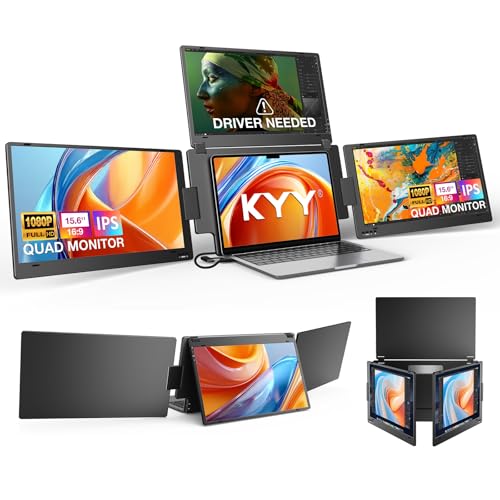
Quad Monitor for Laptop Productivity - Triple screen laptop extender allows programmers, financial analysts, and sellers to manage manage multiple applications and workflows for code, spreadsheets, and data analysis, charts, dashboards, and communication at once. Wide Compatibility Portable Monitor for modern 12–17.3” laptops running macOS, Windows, Linux(ONLY ubuntu), or Android (driver needed), ideal for cross-platform work professionals.
Can You Use Tablets Across Different Ecosystems? (The Honest Answer)
Can You Use Tablets Across Different Ecosystems? (The Honest Answer)
When you’re shopping for a tablet, you’ve probably wondered: will this lock me into buying all Apple products (or Samsung, or Microsoft)? It’s a fair question, and frankly, the answer is more complicated than it should be.
The short version? Your tablet won’t trap you the way your phone might, but you’ll run into real limits when you try to connect it to other devices. Think of it like this: your tablet wants to talk to your TV, your laptop, and your monitor, but sometimes they’re all speaking different languages.
Here’s where things get messy
Apple’s AirPlay works beautifully if you’re all-in on Apple gear. But the second you try to connect an iPad to a non-Apple display? You’re stuck. Android tablets use something called Miracast, which also works with Windows and other systems—but compatibility isn’t always smooth in practice.
So, why does this matter? Because you might buy a tablet thinking you can connect it anywhere, only to find out your specific setup doesn’t play nice together.
The real-world breakdown
iPad to other devices: Don’t expect plug-and-play. You’ll likely need adapters or third-party apps.
Android tablets: They’re more flexible than iPads when it comes to different ecosystems. You can usually find a way to make them work with Windows devices and non-Apple monitors.
Windows tablets: These give you the most cross-platform breathing room. They connect to other Windows gear easily, and they handle Android and Mac devices better than you’d think—though results vary depending on what you’re trying to connect.
Truth is, even with modern “standards” that supposedly make everything compatible, different manufacturers build things their own way. A Samsung tablet’s wireless display might work differently than an LG tablet’s, even though they’re both Android.
The takeaway? You’re not completely locked down like you are with phones, but you’re not totally free either. Pick a tablet based on what you actually own right now, and test the connections before you commit.
Do Enterprise Wireless Display Systems Face Different Lock-In Risks?
Enterprise wireless display systems come with a real catch that most companies don’t see coming. You might think standardizing on one brand—say, all Samsung displays with LG tablets, or going all-in on Apple—would make your life easier. And it does, in a way. But it also locks you in harder than you’d expect.
Here’s what happens: Consumer setups use open standards like Miracast and AirPlay because they have to play nice with hundreds of different device makers. Your company, though? You pick one ecosystem and stick with it. You get great compatibility within that bubble, sure. But the moment you want to switch vendors, you’re in trouble.
Why does this matter? Because proprietary wireless systems aren’t just about hardware. You’re paying for software licenses, training your team on specific tools, and sometimes even reworking your office infrastructure. Once you’ve gone down that road, switching costs a fortune—not just in money, but in time and disruption.
The remote work boom through 2032 is making this worse. Companies are rolling out standardized wireless solutions across multiple locations and distributed teams. You think you’re being efficient, but you’re actually deepening your dependence on one vendor.
That said, there’s some good news here. The software side of wireless display is growing at about 12% per year, and that growth is pushing for better interoperability. More options are becoming available that work across platforms. So if you’re buying a system today, you’ve got more flexibility than you did five years ago.
Try this approach: Before you commit to a system, ask hard questions about your contract. How long is the lock-in period? What happens if you want to integrate different devices in five years? Can the system talk to other brands, or are you stuck? These conversations upfront save you serious headaches later.
The best part is that you can still get the standardization benefits your company needs without painting yourself into a corner. You just need to be intentional about it.
Recommended Products

【86" Smart Board with Google EDLA-Certified】Fully certified for Google Workspace, Education Suite, and the Play Store, this smart board lets you access thousands of apps—from educational tools to productivity software—right out of the box. Enterprise-grade privacy protects user data, while regular OTA updates ensure your device stays secure and future-proof. No compromises, just pure Google power.

POWERFUL AMD RYZEN 7 PERFORMANCE: Equipped with AMD Ryzen 7 7735HS processor (8-core, 16-thread, 3.20GHz base up to 4.80GHz boost, 4MB L2/16MB L3 cache) paired with AMD Radeon 680M graphics. This ThinkPad E16 Gen 2 delivers exceptional multitasking power for demanding business applications, content creation, and seamless productivity. Superior build quality compared to ThinkBook series ensures reliability for professionals working from office, home, or on-the-go.
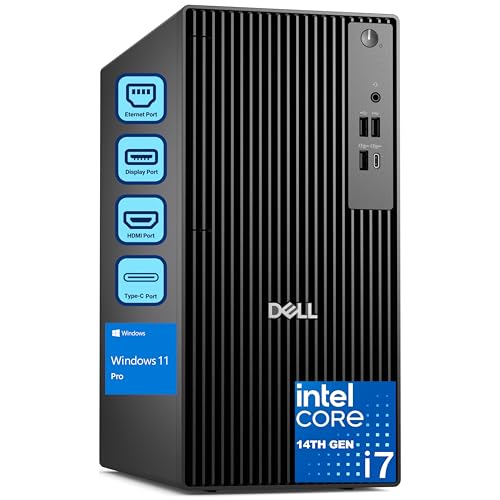
Processor & performance: Intel Core i7-14700 processor with 20 cores and up to 5.4 GHz boost clock delivers workstation-class performance for 4K video editing, 3D rendering, financial modeling, CAD work, and software development.
Open Standards and Wi-Fi 7: Breaking Free From Ecosystem Dependence by 2027
Tired of being locked into one company’s ecosystem just to get your displays and tablets to talk to each other? Yeah, me too. That’s where Wi-Fi 7 comes in, and honestly, it’s a bigger deal than most people realize.
For years, Wi-Fi 6 did a solid job of improving wireless connectivity through 2026. But Wi-Fi 7 is different—it’s built on open standards instead of proprietary tech. Translation: your Apple devices, Android tablets, and Windows computers can finally work together without fighting each other. No more AirPlay limitations. No more “this only works with that brand” frustrations.
Why does this matter for your actual work? Because when you’re juggling a distributed team or managing multiple office locations, vendor lock-in becomes a real headache. You’re forced to stick with expensive ecosystem solutions even when better alternatives exist. With Wi-Fi 7, you don’t have that problem anymore.
The technical benefits are solid:
- Lower latency means your video calls and screen sharing feel smooth and responsive
- Higher bandwidth means you can push more data without slowdowns
- Better reliability means fewer dropped connections during critical presentations or meetings
If you adopt Wi-Fi 7–compliant equipment by 2027, here’s what changes: you spend less money overall because you’re not buying premium-priced devices just for compatibility. You can mix and match hardware from different manufacturers. Your team can use whatever device works best for their job, not whatever fits your current vendor.
Frankly, this flexibility is what sustainable competitive advantage actually looks like in remote work environments. You’re not betting your infrastructure on one company’s roadmap.
Frequently Asked Questions
What Display Technologies Like OLED and Mini-Led Offer the Best Wireless Connectivity Performance?
I’ve found that OLED advantages include superior efficiency and lower costs for mid-range tablets, while Mini LED performance enhances premium LCD tablets’ HDR capabilities. Notably, 120Hz refresh rates became standard by 2026, greatly improving wireless display responsiveness and user experience.
How Do Rugged Tablets With Ip66/Ip67 Ratings Handle Wireless Display in Harsh Field Environments?
I’ve found that rugged tablets with IP66/IP67 ratings maintain wireless display functionality through their sealed construction and weather-resistant design. You’ll appreciate how they deliver field flexibility across marine and harsh environments while preserving rugged durability for reliable screen-sharing in demanding conditions.
Which Tablet Monitor Manufacturers Dominate the Market for Secondary Wireless Display Solutions?
I’ve found that JDI, BOE, Innolux, Samsung, and LG dominate tablet monitor manufacturing. They’re driving market trends with advanced display technologies—OLED efficiency, Mini-LED enhancement, and 120Hz refresh rates—positioning themselves as key tablet manufacturers shaping secondary wireless display solutions.
Why Does Tablet Market Share Remain at Only 1.36% Despite Wireless Display Growth Opportunities?
I’d say tablet adoption faces significant market limitations because mobile and desktop dominate user preferences. Despite wireless display growth, tablets struggle as primary devices—they’re positioned between smartphones and laptops, making them less essential for most consumers’ workflows.
How Do 120HZ Refresh Rates and Foldable Displays Affect Wireless Connectivity Latency Issues?
I find that 120Hz refresh rates and foldable displays drive latency reduction through performance optimization, enabling smoother wireless connectivity. However, you’ll notice they don’t inherently solve latency—compatible software like Wi-Fi 6 and Miracast are essential for achieving truly responsive screen-sharing experiences.