As an Amazon Associate, we earn from qualifying purchases. Some links on this site are affiliate links at no extra cost to you. Our recommendations are based on thorough research and editorial judgment.


The Demographic Shift: Older Gamers Adopting Larger 32-inch 4K Formats

Older gamers increasingly adopt 32-inch 4K displays because larger screens enhance peripheral vision, reduce eye strain during extended sessions, and deliver sharper visuals with superior detail visibility compared to smaller alternatives. The sweet spot between 27 and 32 inches balances immersion with ergonomic comfort, particularly for open-world gaming where screen size considerably impacts engagement. Console advancements like PS5 and Xbox Series X enable true 4K performance, making this demographic shift viable. Understanding GPU requirements, desk space constraints, and refresh rate specifications reveals whether this upgrade matches your setup and preferences.
Key Takeaways
- Larger 32-inch displays improve peripheral vision and immersion, appealing to older gamers seeking enhanced visual experiences and immersive gameplay.
- 4K resolution provides sharper visuals and greater detail visibility, benefiting aging eyes that require clearer images for comfortable gaming sessions.
- 27-32 inch range offers optimal ergonomic comfort, reducing neck strain and eye fatigue during extended gaming sessions for older players.
- Modern consoles like PS5 and Xbox Series X enable true 4K gaming, making high-resolution displays more accessible and practical for casual older gamers.
- Growing 4K monitor market projected to reach $5.6 billion by 2032 reflects increasing adoption across demographics, including mature gaming audiences.
Why Older Gamers Are Upgrading to 32-Inch 4K Displays
Why Older Gamers Are Upgrading to 32-Inch 4K Displays
Ever notice how your favorite games just don’t feel the same on an old monitor anymore? A lot of seasoned PC gamers are making the jump to 32-inch 4K displays, and it’s not just because bigger is better.
After spending years staring at smaller screens with lower resolution, these gamers are discovering what they’ve been missing. The difference isn’t subtle—it’s about actually seeing what the developers intended. You get better immersion, sharper graphics, and a wider view of the game world, especially in open-world titles where you need to see more of what’s around you.
So, why does this matter? Honestly, it comes down to what games have become. Modern games demand visual precision. The jump from 1080p to 4K isn’t just more pixels; it’s clearer text, smoother edges, and details you couldn’t spot before. Yes, you’ll pay more for a 32-inch 4K monitor, and your PC might need some tweaking to handle it. But for gamers who’ve been in the hobby for decades, the trade-off makes sense.
The 32-inch sweet spot works because it’s:
- Big enough to feel immersive without taking over your entire desk
- Practical for gaming sessions that go longer than an hour
- Affordable compared to even larger displays
Console upgrades have pushed this trend forward too. The PS5 and Xbox Series X can actually deliver true 4K gaming now. For older gamers who remember when high definition was a luxury, this is a chance to experience games the way they’re meant to look.
Truth is, you don’t have to upgrade if you don’t want to. But if you’re spending real time in detailed game worlds, a 32-inch 4K monitor might just be the refresh your setup‘s been waiting for.
Recommended Products

32-inch 4K (3840 x 2160) QD-OLED gaming monitor with 240Hz refresh rate and 0.03ms response time (GTG) for immersive gaming

LuxPixel AGLR 31.5" 6K HDR (6016 x 3384) display with 178° wide angle IPS panel and 98% DCI-P3 and 100% sRGB wide color gamut, always have maximum color accuracy
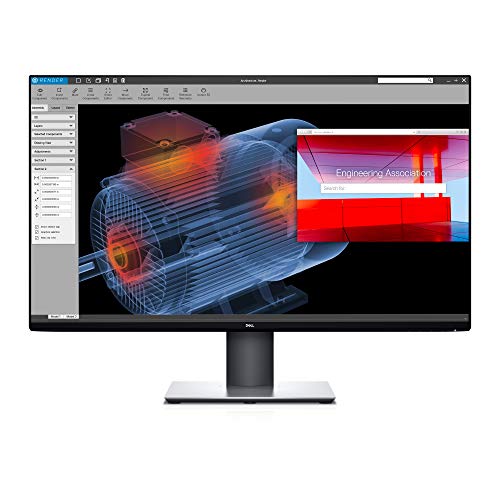
Experience four times more detail than Full HD with 3840x2160 Ultra HD 4K resolution.
How Screen Size Affects Gaming Immersion and Comfort

Ever sit down for a gaming marathon and realize two hours in that your neck’s killing you or you can’t quite see what’s happening on the far edges of the screen? Screen size matters way more than people think.
The sweet spot for most gamers is somewhere between 27 and 32 inches. That’s the range where you actually get the immersion boost from a bigger display without turning your setup into something that doesn’t fit in a normal room. Anything in that zone gives you enough screen real estate to catch what’s happening in your peripheral vision, which makes open-world games feel a lot more natural. You’re not constantly swiveling your eyes to track movement.
Here’s the thing about going bigger—and I mean genuinely bigger. A 4K display at 32 inches stays sharp and readable because you’ve got room for all those pixels to breathe. Text stays crisp, small details pop, and you can actually see whether that’s an enemy or just a shadow in the distance. Better visibility means less eye strain over long sessions, which is honestly what comfort comes down to.
Now, what happens when you push past 32 inches? Reality sets in pretty fast. You’re running into two real problems:
- Your desk probably isn’t deep enough to sit at a comfortable distance
- The monitor takes up so much physical space it creates awkward angles and neck strain
- Prices jump dramatically, and the practical benefits don’t match the cost
So why does this matter? Because an immersive display that leaves you uncomfortable defeats the whole purpose. You want something that pulls you into the game without making you regret the purchase after a few weeks.
If you’ve got the desk space and viewing distance to match, 32 inches is genuinely the practical limit where everything still works. Go bigger, and you’re fighting against your own setup instead of enjoying it.
What’s your current setup, and are you finding yourself wishing you had more screen or less?
32-Inch 4K vs. 27-Inch 1440p: What You Actually Get

32-Inch 4K vs. 27-Inch 1440p: What You Actually Get
Trying to pick between a 32-inch 4K monitor and a 27-inch 1440p one? You’re basically deciding between two different philosophies—and honestly, it comes down to what matters most to you right now.
Here’s what you need to know: a 32-inch 4K display gives you sharper text and finer detail because it crams more pixels into the same space. That extra pixel density is real, and you’ll notice it in everything from spreadsheets to open-world games. But here’s the trade-off—your GPU has to work about 33 percent harder to push all those pixels around.
The 27-inch 1440p monitor, running at 2560×1440, doesn’t demand as much from your hardware. So why does this matter? Because if you’re running a mid-range GPU, you actually get to *use* it efficiently without constantly hitting performance walls.
The practical side:
- 4K means sharper visuals across the board, but also higher GPU costs
- 1440p runs smoother on budget-friendly setups and lets you max out game settings
- Size matters too—27 inches feels comfortable for most desks; 32 inches can feel a bit much if you’re sitting close
Frankly, if you want the immersive feel of a bigger screen *and* you’ve got the GPU power, go 4K. You’re getting serious visual detail. But if you’re trying to keep your setup balanced without dropping serious money on a new graphics card, 1440p is honestly the smarter move. You’ll still get a great-looking picture without the performance headaches.
Recommended Products

SUPERIOR 4K SCREEN: This floor standing digital signage display has 4K UHD(Ultra High-Definition) resolution screen and 350nits brightness, which offers extraordinary clarity and color variation. The 178°Ultra-wide viewing angle cover a wide range of angles, ensures excellent viewing experience. And 2 powerful 8Ω 5W speakers allows it to play stereo sound.

Ultra-fast 240Hz refresh rate for virtually lag-free gaming

QUANTUM DOT OLED The MAG 321CUP QD-OLED gaming display combines 10-bit Quantum Dot color conversion with self-emitting OLED pixels for unmatched blacks and exceptional response time; the 1700R curvature is ideal for a large format.
Can Your GPU Handle 32-Inch 4K Gaming?

Can Your GPU Actually Handle 32-Inch 4K Gaming?
So you’re thinking about upgrading to a massive 32-inch 4K monitor, but you’re not sure if your graphics card is up to the job. That’s a smart question to ask—because honestly, not every GPU can keep up with that kind of resolution and refresh rate.
The real answer depends on three things: how much memory your card has, what generation it is, and what frame rates you’re actually happy with. When you’re pushing 3840×2160 pixels at 120Hz or higher, you’re asking your GPU to do a lot more work than it would with a 1440p display. It’s not just a small bump in performance—it’s substantially more demanding.
What about older cards?
Cards like the AMD RX580 are still out there, and they technically support 4K. But here’s the thing—they’re struggling. With less than 2% of the 4K-capable GPU market, these older processors can’t keep steady frame rates when you’re cranking up the visual settings. If you’re using something from that generation, you’re going to either accept lower frame rates or dial back the graphics quality.
Truth is, you want at least 12GB of VRAM if you’re serious about 4K gaming at high settings. Mid-range cards from recent generations can handle it, but they won’t always deliver maximum visual fidelity in demanding games. Why does this matter? Because buying a beautiful 32-inch 4K monitor only to run games at medium settings kind of defeats the purpose.
The connection matters too
DisplayPort 2.1 is your best friend here. It gives you enough bandwidth to actually use those high refresh rates—we’re talking 240Hz—without hitting any bottlenecks. If your monitor and GPU both support it, you’re in good shape.
Bottom line: check your card’s specs, make sure it’s got enough VRAM, and verify your cable supports the bandwidth you need. What’s your current GPU, and what games are you hoping to play?
Recommended Products

Multiple connectivity options include DisplayPort 1.4 (DSC), HDMI 2.1 and USB-C with 15W power

WORLD'S 1ST DUAL UHD MONITOR: 57" DUHD resolution brings you a display as wide as 2 UHD monitors with incredibly detailed, pin-sharp images and a wide field of view; See more of the action and play with conviction, knowing you won't miss a thing

Lenovo ThinkVision P32UD-40 LED Monitor - 3840 x 2160 4K @ 120 Hz - IPS - 350 cd/m² - 1500:1 - HDR10 - 4ms - 2 Thunderbolt 4, 2 x DisplayPort, HDMI, USB-C - Raven Black
Space, Ergonomics, and Setup: Will It Fit Your Room?

Your GPU’s capability determines what you can display, but here’s what most people overlook: the physical space where you’ll actually put that 32-inch 4K monitor matters just as much. Larger panels ranging from 27 to 32 inches need real desk depth, proper viewing distance, and enough room to move around comfortably. Skip this step, and you’re setting yourself up for neck pain and eye fatigue.
So, why does viewing distance matter so much? Honestly, it comes down to how your eyes work. Monitors above 32 inches demand a minimum viewing distance of 24 to 36 inches to prevent eye strain and let your peripheral vision work the way it’s supposed to. Position your screen too close, and you’ll feel the difference within an hour.
Setting up ergonomically isn’t complicated, but it does require a little planning:
- Align your monitor height so the top of the screen sits at or slightly below eye level
- Clear enough desk space for your keyboard, mouse, and other gear
- Plan out cable routes so wires don’t create clutter or tripping hazards
Before you buy that huge monitor, take a hard look at your actual setup. Measure your desk depth, figure out how far back your chair sits from the monitor, and check if your room layout even allows for the viewing distance you need. Frankly, I’ve seen people impulse-buy big displays only to realize they can’t sit far enough away without repositioning everything.
The best part is that spending 15 minutes on this now saves you from buyer’s remorse later. What does your current workspace actually look like?
Price vs. Performance: Finding Your Real Budget Sweet Spot
Once you’ve confirmed your desk can handle a larger monitor, it’s time to face the money question. 4K gaming displays run the gamut—you can spend moderately or drop serious cash, and honestly, the price difference usually means real performance differences.
So here’s where most people get stuck: entry-level 32-inch 4K monitors are way cheaper than the fancy stuff with 240Hz refresh rates, QD-OLED panels, and response times under 0.03ms. If you’re just gaming casually on weekends, a mid-range option will do the job fine. But if you’re chasing competitive esports? You’ll want to hunt for DisplayPort 2.1 and color accuracy specs that actually matter for your games.
The real reason premium monitors cost what they do comes down to manufacturing. Better components cost more to make, and those costs get passed straight to you at checkout. That’s just how it works. For price-conscious buyers, this means you might need to pick your battles—maybe you sacrifice some refresh rate for resolution, or skip the cutting-edge panel tech.
Truth is, the sweet spot depends on what matters most to *you*. Think through what actually affects your gaming: Do you need 4K resolution more than fast refresh rates? Are you willing to spend extra for color accuracy? What’s your actual budget range? Once you nail down your priorities, the choice gets a lot clearer.
Recommended Products

OLED display provides an immersive gaming experience with rich colours, high contrast ratio and fast response time.
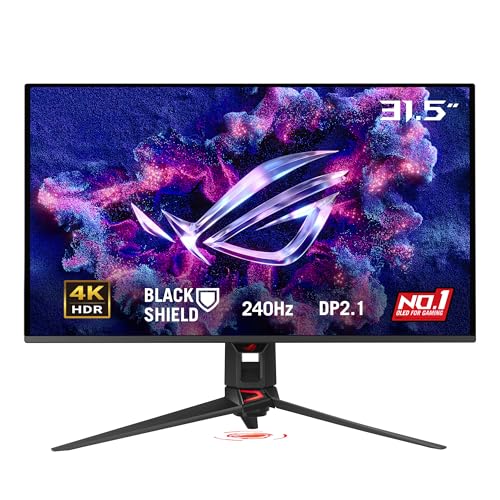
32-inch 4K (3840 x 2160) QD-OLED gaming monitor with 240 Hz refresh rate and 0.03ms response time

The 240Hz OLED gaming monitor that’s Ahead of the (800R) Curve -The huge 45” WQHD OLED with a steep 800R curve and up to 1300 nits (APL 1.5%) peak brightness pulls you deep into the action, while a 240Hz refresh rate and 0.03ms response time keep gameplay insanely fast and smooth.
Best 32-Inch 4K Gaming Monitors: Specs and Pricing
If you’re shopping for a 32-inch 4K gaming monitor, you’ve probably noticed the prices get pretty steep. Thing is, that screen size hits a sweet spot—big enough to actually feel immersive without taking over your entire desk. Let me walk you through two monitors that people actually talk about.
The ASUS ROG Swift OLED PG32UCDM came out in early 2026, and it’s built on QD-OLED technology that’s genuinely fast. We’re talking 240Hz refresh rates and 0.03ms response times. If you play competitive games and want zero lag, this is the kind of spec sheet that matters. Samsung got there first with the Odyssey G85NB back in 2022—it was the original 240Hz 4K option in the 32-inch space, which was a big deal at the time.
Both monitors lean on solid panel tech and support DisplayPort 2.1 connectivity. They also come with burn-in protection software (OLED Care), which honestly is important if you’re dropping this much money. But here’s the real talk: these aren’t budget picks. You’re paying for top-tier performance, and that means your wallet has to be ready for it.
Should You Upgrade Now or Wait for Next-Gen Models?
Should You Upgrade Now or Wait for Next-Gen Models?
Got a gaming monitor that’s getting long in the tooth? Or maybe you’re eyeing one of those fancy 32-inch 4K displays like the ASUS ROG Swift OLED PG32UCDM or Samsung Odyssey G85NB and wondering if now’s the right time to pull the trigger? Yeah, that’s a tough call.
The thing is, current 32-inch 4K gaming monitors are actually pretty solid right now. You’re looking at 240Hz refresh rates, response times under 0.03ms, and DisplayPort 2.1 connections. These aren’t experimental specs anymore—they’re proven tech that does what it promises for competitive gaming. If you buy one today, you’re not betting on vaporware.
But here’s where it gets interesting. The 4K gaming monitor market is exploding. We’re talking growth from $1.2 billion in 2023 to $5.6 billion by 2032. That sounds huge until you realize something: only 1.74% of PC gamers actually own a 4K monitor right now. So why does this matter? Because that gap between the money being invested and the number of people actually buying tells you innovation is still cooking. Better panel longevity, more efficient displays, and cheaper manufacturing are all on the horizon.
So what should you actually do?
If you’re the type who wants the best gaming experience *right now* and can afford it, buying today makes sense. You’ll get years of use out of a quality monitor, and honestly, the performance is already excellent. Don’t wait just to wait.
On the flip side, if you’re watching your budget or you’re okay using what you have for another year or two, patience might pay off. Next-gen models could offer real improvements—not just minor tweaks—and prices will likely drop as competition heats up.
The real question: how much are you gaming right now, and how much would upgrading actually change your experience?
Frequently Asked Questions
What Multi-Monitor Configurations Do Older Gamers Typically Use With 32-Inch 4K Displays?
I’ve found that 74.82% of multi-monitor setups pair 4K horizontally with 1080p vertically—a configuration older gamers favor. They’re drawn to multi-monitor benefits like enhanced immersion and multitasking. These older gamer preferences reflect wanting practicality alongside visual fidelity in their gaming spaces.
How Does OLED Burn-In Risk Affect Long Gaming Sessions for Aging Enthusiasts?
I’ll tell you—OLED burn-in risk shouldn’t worry you during gaming sessions. Modern 32-inch 4K OLED monitors include OLED Care software that mitigates burn-in, allowing you to enjoy extended play without concern for permanent damage.
Are Console Gamers (Ps5, Xbox Series X) Adopting 32-Inch 4K Monitors Faster Than PC?
I’d say console gamers are adopting 32-inch 4K monitors faster based on current console market trends. PS5 and Xbox Series X’s native 4K capabilities are driving their gaming preferences toward larger displays, outpacing PC gamers’ slower shift to premium specs.
What Displayport 2.1 and HDMI 2.0 Compatibility Issues Should Legacy Systems Address?
I’d say legacy systems are like old bridges—they can’t handle modern traffic. You’ll need DisplayPort 2.1 for 4K@240Hz bandwidth, while HDMI 2.0 caps performance. Your gaming hardware must support these display technology standards or you’re bottlenecked.
How Does the 1.7% Esports Growth in 4K Monitors Compare Across Age Demographics Globally?
I’ve found that the esports market’s 1.7% growth in 4K monitors isn’t evenly distributed across age demographics globally. Younger competitive gamers dominate adoption in Europe, North America, and East Asia, while older players show emerging interest in larger formats—a notable shift in age preferences.