As an Amazon Associate, we earn from qualifying purchases. Some links on this site are affiliate links at no extra cost to you. Our recommendations are based on thorough research and editorial judgment.


Ambient Light Sensors in Desktop Monitors: Adapting to Circadian Rhythms

Your monitor’s ambient light sensors measure luminance in lux, color temperature in Kelvin, and flicker frequency to automatically adjust display brightness and color output within approximately 600 microseconds. These real-time adjustments align your screen’s lighting with your circadian rhythm, reducing eyestrain while maintaining color accuracy across varying environments. By adapting display settings to match natural daylight patterns during day and dimmer tones at night, sensors help regulate melatonin production and support healthier sleep cycles. Understanding how these sensors function reveals the sophisticated technology optimizing your visual comfort and biological alignment.
Key Takeaways
- Ambient light sensors automatically adjust display brightness and color temperature to match surrounding light conditions throughout the day.
- Bright daytime display settings promote wakefulness, while dim evening settings help preserve melatonin production and support natural sleep cycles.
- Automatic adaptations reduce eye strain and improve comfort during extended screen time without requiring manual brightness adjustments.
- Sensors enable seamless transitions between different lighting environments while maintaining consistent color accuracy across varying light conditions.
- Display settings synchronized with natural light patterns help align internal body clocks with circadian rhythms, enhancing overall sleep quality.
What Ambient Light Sensors Measure: Luminance, Color Temperature, and Flicker
What Ambient Light Sensors Measure: Luminance, Color Temperature, and Flicker
Ever notice how your monitor’s brightness shifts throughout the day, but you’re not manually adjusting it? That’s your ambient light sensor doing the heavy lifting in the background.
Your monitor’s sensors actually track three main things about the light around you. First, they measure how bright your room is using a unit called lux—basically, they’re checking if you’re sitting in dim office lighting or bright sunlight. Second, they analyze what *type* of light you’re under. Sunlight, fluorescent bulbs, and old-school incandescent lights all have different color temperatures measured in Kelvin, and your display needs to know the difference to show you accurate colors. Third, they pick up on flicker from artificial lighting, which typically ranges from 50 to 120 times per second.
So why does this matter? Because all this detection happens incredibly fast—in about 600 microseconds or less. Your display doesn’t lag or guess. It uses color filters and special optical components to figure out what’s happening in your space and adjust brightness and color right away.
Honestly, the real benefit is that you get less eyestrain. When your screen matches your surroundings instead of fighting against them, your eyes don’t have to work as hard. You’re not constantly squinting at a too-bright display in a dark room, and you’re not straining to see a dim screen in daylight.
Does your current setup feel more comfortable now that you know what’s actually happening behind the scenes?
Why Your Circadian Rhythm Depends on Light: The Biology Behind Screen Adaptation

Why Your Circadian Rhythm Depends on Light: The Biology Behind Screen Adaptation
Ever notice how you feel wired at 11 PM even though you’ve got an early meeting? Your body’s internal clock—your circadian rhythm—might be the culprit. This biological clock runs on roughly a 24-hour cycle and controls when you sleep, how your hormones behave, and even your body temperature. Light exposure is the main signal that keeps this clock ticking right.
Here’s how it works: bright light during the day tells your body to pump the brakes on melatonin, that sleepy hormone. This keeps you alert and sharp when you need to be. When the sun goes down and light fades, your body ramps up melatonin production, signaling it’s time to wind down.
So, why does this matter? Because your body’s rhythms depend on consistent light-dark patterns to function properly. Throw off that pattern—say, by staring at bright screens until midnight—and you’re asking for trouble.
This is where screen settings come in. Modern monitors have ambient light sensors built in that pick up on the lighting around you and adjust the display’s color temperature automatically. Think of it as your screen trying to mimic what natural daylight looks like. The best part is that when your screen aligns with your actual environment, it’s easier for your body to stay on schedule.
Try this: pay attention to your screen brightness throughout the day. Dimmer, warmer tones in the evening can make a real difference in how you sleep that night. Frankly, most people don’t realize how much their screens contribute to keeping them up late.
The takeaway? Your circadian rhythm isn’t fighting against you—it’s just responding to the light signals it’s getting. Keep those signals consistent, especially in the evening, and you’ll likely notice better sleep and more stable energy throughout the day.
How Ambient Light Sensors Adjust Brightness in Real-Time
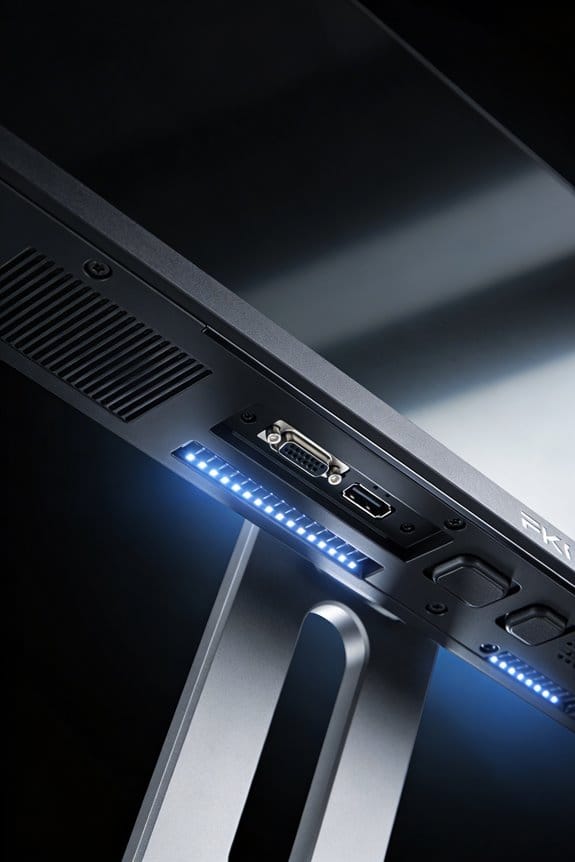
Ever noticed how your screen looks way too bright when you’re working in a dark room, but then the text gets hard to read when you step outside? That’s where ambient light sensors come in—they’re basically your monitor’s way of adjusting to what’s happening around you without you having to fiddle with brightness settings constantly.
So here’s what’s actually happening: your monitor’s got a sensor that’s constantly checking how bright it is where you are. It picks up on the light levels, the color temperature (like whether it’s warm sunlight or cool artificial light), and other light characteristics. All that data gets sent to your monitor’s processor, which figures out the perfect brightness for your current situation. The conversion happens crazy fast—we’re talking 600 microseconds. That’s fast enough that you won’t notice any lag when the sun suddenly comes out or you flip off the overhead lights.
Why does this matter? Because trying to manually adjust brightness all day is annoying, and it usually means your display either washes out colors or strains your eyes.
The monitor uses built-in color filters to measure how bright things are and what the color temperature looks like. Think of it like your monitor’s taking a quick temperature reading of the light around you. Once it has that info, the processor runs some smart calculations to figure out what settings work best.
Here’s the trick: sophisticated algorithms analyze all that incoming light data, compare it to preset thresholds, and then adjust the backlight immediately. It’s all happening in the background while you’re working, so you get consistent visibility and color accuracy whether you’re dealing with natural sunlight pouring through a window or just your desk lamp.
The best part is you basically get set-it-and-forget-it performance. Your display stays easy to read and colors stay accurate, no matter what lighting changes happen around you.
Recommended Products
Ultra High Definition 4K (3840x2160) FOUR TIMES the resolution of 1080P! 32 Channel 6K 12MP NVR Security Camera System with (32) H.265+ 4K (8MP) @20FPS Weatherproof 135° Diagonal Field of View Lens PoE IP Turret Cameras (Built-in Microphone)
【SMART AUTO-BRIGHTNESS SENSOR FOR ALL-DAY VISIBILITY】 The built-in ambient light sensor automatically adjusts screen brightness based on surrounding lighting conditions. During bright daylight hours, the display increases brightness to maximize visibility. In lower-light environments, it intelligently reduces brightness to save energy, reduce eye strain, and extend panel lifespan. This ensures optimal display performance and lower operating costs throughout the day.

Primary RGB Tandem with ThermalFlow: The new OLED panel with Aaerodynamic ThermaFlow Cooling System significantly Increases brightness and color gamut, delivering stunning brilliant visuals.
How Sensors Detect and Shift Color Temperature Throughout Your Day

Ever notice how your screen looks different at 6 AM versus 6 PM? That’s not your imagination. Light changes throughout the day—from that cool, blue morning glow to the warm, golden evening tones—and your monitor’s actually working hard to keep up.
Monitors with color temperature sensors are constantly measuring what’s happening around you. They’re tracking how the light shifts, whether it’s natural sunlight streaming through your window or the fluorescent buzz of office lighting. Why does this matter? Because your eyes perceive colors differently depending on what’s lighting your space. Without adjustment, your screen would look way too blue in the morning and way too orange at night.
Here’s how it works: These sensors measure color temperature in Kelvin units—basically a way to describe how “warm” or “cool” light is. The sensor picks up on these shifts and tells your display to adjust its settings automatically. It’s constantly fine-tuning things so your screen stays accurate no matter what time it is.
The best part is you don’t have to think about it. The system figures out the difference between sunlight and indoor lighting on its own. Your display makes gradual changes throughout the day, so nothing feels jarring or sudden. Try this: Pay attention to how your eyes feel at the end of a workday. If your monitor’s doing this right, you’ll notice less strain because the colors match your surroundings better.
Honestly, this technology makes a real difference if you’re staring at screens all day. Your eyes aren’t fighting against clashing light sources. The display adapts smoothly as the sun moves across the sky and your environment changes.
Recommended Products

8th Gen Intel Core i7-8550U Processor, 1. 8GHz (8M Cache, Turbo up to 4. 0GHz)

39.7'' Curved UltraWide 5K2K Nano IPS Monitor with Thunderbolt 4 Connectivity

The new Fire TV experience (2026 release) – Our biggest update to Fire TV has a new, modern design that gets you to your entertainment fast. Browse dedicated content categories, pin more of your favorite apps, and get personalized recommendations from Alexa+. Spend less time scrolling, and more time watching.
How Sensor-Driven Adaptive Brightness Reduces Eyestrain

How Sensor-Driven Adaptive Brightness Reduces Eyestrain
Ever notice how your eyes feel like they’re working overtime when you’re staring at your phone indoors, then you step outside and everything feels backwards? That’s because your screen brightness isn’t keeping up with what’s actually happening around you.
Here’s what’s really going on: when your eyes see a bright screen in a dim room (or vice versa), your pupils have to constantly adjust. It’s like your eye muscles are doing bicep curls all day long. Ambient light sensors fix this by automatically turning your display brighter or dimmer based on the actual light around you. This keeps the contrast between your screen and your surroundings balanced, so your pupils don’t have to work so hard.
The real benefit? Your eyes stay more comfortable during those long work sessions or scrolling marathons. When your display brightness matches your environment, you’re not creating that strain that builds up over hours. Instead of fighting constant brightness shifts, your visual system can relax and just… work normally.
What makes this even better is how fast it happens. We’re talking about adjustments in microseconds—quick enough that you don’t notice the change happening at all. Your eyes perceive it as smooth and natural, not jarring.
Try this: pay attention next time you’re outside with adaptive brightness on versus off. You’ll probably notice your eyes feel less tired by the end of the day.
Truth is, there’s also a bonus most people don’t think about. When your display isn’t blasting harsh light at your eyes all night, you’re actually helping your body stay in sync with natural day-night rhythms. Your eyes stay better hydrated too, since constant strain dries them out faster.
So, why does this matter? Because eye comfort adds up. Small improvements throughout the day mean you’re not ending your evening with that familiar headache or that gritty feeling behind your eyelids.
The takeaway: letting your phone do the brightness work for you is genuinely one of the easiest ways to take care of your eyes. Have you noticed a difference with adaptive brightness on your own devices?
Recommended Products

Ultra High Definition 4K (3840x2160) FOUR TIMES the resolution of 1080P! 16 Channel 12MP 6K NVR Security Camera System with (16) H.265+ 4K (8MP) @20FPS Weatherproof 2.8mm 135° Wide Angle PoE IP Dome Cameras (Built-in Microphone)

49 inches ultrawide 32: 9 dual QHD (5120 X 1440) Display

【Flexible Multimedia Playback】This outdoor digital signage supports split-screen playback of advertisements, playback via USB flash drive plug-and-play, WiFi or wired connection, allows you to easily manage and display a variety of advertising content to enhance the effectiveness of advertising
Why Adaptive Displays Save Power and Extend Monitor Life
Why Adaptive Displays Save Power and Extend Monitor Life
Ever notice how your monitor gets hot after a few hours of use? That heat’s coming from your backlight, which is basically the power hog of the whole setup. When you turn on automatic dimming through ambient light sensors, your screen gets smarter about brightness—it dials things down when the room gets darker, which cuts your energy use right away.
Here’s the thing that most people miss: less brightness means less heat, and less heat means your display actually lasts longer. You’re not just saving money on your electric bill; you’re also protecting the components inside. The LED or LCD backlight, along with all the circuitry around it, degrades slower when it’s not constantly running at full power. Think of it like this—would you rather run your car engine at full throttle all day or at a steady pace?
The numbers add up fast when you think about extended usage:
- Reduced thermal stress on backlights and circuits
- Slower phosphor degradation
- Lower electricity costs over months and years
- Less environmental impact from energy consumption
Modern monitors have made these adaptive systems almost invisible. Your display adjusts brightness smoothly in the background without you noticing any flicker or weird visual jumps. So why does this matter? Because you get the best of both worlds—a display that looks great *and* actually stays healthy longer.
Frankly, the combination of automatic dimming, cooler operation, and extended lifespan is hard to ignore once you understand what’s happening. If you’ve got a monitor with ambient light sensors built in, you’re already sitting on a smarter investment than you might realize.
Recommended Products

Brightness: 300 cd/m2 (standard) | Response time: 8ms (normal mode), 5ms (fast mode) Dell UltraSharp 40 Curved Thunderbolt Hub Monitor - U4025qw Screen Coating: Anti-Glare...
BenQ, ASUS, and Dell: How Major Brands Implement Ambient Light Sensors
BenQ, ASUS, and Dell: How Major Brands Implement Ambient Light Sensors
Ever get tired of squinting at your monitor in bright sunlight or straining your eyes in a dim room? You’re not alone. The good news is that BenQ, ASUS, and Dell have all tackled this problem differently—and understanding their approaches might help you pick the right monitor for your setup.
BenQ’s approach centers on something called Brightness Intelligence. Basically, it detects how bright your room is and adjusts your screen brightness automatically. The system uses what they call Luminance and Color Engines to figure out how intense your content actually is, then tweaks things in real-time. So your screen stays comfortable whether you’re working by a window or in a cave-like office.
ASUS went a different direction with their Ambient Light Sensor technology. What makes theirs interesting? They didn’t just stop at brightness adjustment. They also threw in Light Effect controls for backlight tweaking and something called Adaptive Color settings that handle color temperature compensation. On higher-end models like the PA32UCXR, you get manual override options too—meaning you’re not locked into automatic mode if you don’t want to be.
Dell’s philosophy is a bit more methodical. They position their ambient light sensors at the bottom edge of the LCD panel, which lets them make small, gradual brightness changes over longer periods instead of sudden jumps. Truth is, this approach tends to feel less jarring to your eyes.
So why does this matter? Because each brand’s priorities are different. Here’s what you should know:
- BenQ focuses on detecting content intensity alongside room brightness
- ASUS emphasizes giving you control while still offering automation
- Dell prioritizes smooth, incremental adjustments
The takeaway: if you want a set-it-and-forget-it solution, BenQ’s system is solid. If you like tweaking things yourself, ASUS gives you more buttons to push. And if you prefer your monitor to play it safe with gradual changes, Dell’s your pick. What matters most for your workflow—convenience, control, or subtlety?
What Privacy Risks Come With Always-On Ambient Light Sensors?
What Privacy Risks Come With Always-On Ambient Light Sensors?
Your monitor’s brightness sensor is always watching—even when you don’t know it’s there. Most people assume these little light detectors just adjust screen brightness automatically. Honestly, that’s only part of the story.
Researchers at MIT uncovered something pretty unsettling: hackers can actually figure out what you’re doing on your screen just by watching how light bounces off it. They’re not using cameras or breaking into your system. Instead, they’re reading the tiny changes in light intensity that happen when you swipe, tap, or move your cursor across the display.
Here’s how it works. When you interact with your screen, the light reflecting back changes in specific patterns. The ambient light sensor picks up these variations, and sophisticated algorithms can map them into a picture of your movements—swipes, gestures, even which parts of the screen you’re touching. Without needing camera permissions, attackers have a backdoor view into your activity.
So, why does this matter?
The scary part is the combination. Your sensor runs 24/7 without asking permission. Someone with access could pair that sensor data with analysis of what’s actually displaying on your screen, essentially reconstructing a pixelated version of what you’ve been doing. Try this: think about all the sensitive stuff you do on your monitor—passwords, banking, personal messages.
Manufacturers like BenQ, ASUS, and Dell haven’t built in strong protections against this kind of attack. Right now, most devices don’t give you any warning or control over how sensor data gets used.
What can you do? Check if your monitor has privacy settings (many don’t). If you’re really concerned, you might consider covering the sensor or using an external monitor with stronger security built in. At minimum, stay informed about what’s on your device and demand better transparency from manufacturers about how they’re protecting your data.
Frequently Asked Questions
Can I Manually Override Ambient Light Sensor Adjustments if I Prefer Custom Brightness Settings?
Yes, I’ll help you take control. You can absolutely override ambient light sensor adjustments—most monitors like BenQ and ASUS let you disable automatic features in settings. This gives you full command of custom brightness settings and ambient light overrides, tailoring your display exactly how you’d prefer.
Do Ambient Light Sensors Work Effectively Behind Screen Protectors or Tempered Glass Covers?
I’d say ambient light sensors work reasonably well behind screen protectors, though they’re somewhat compromised. Tempered glass covers can reduce sensor efficiency by filtering light, but most modern sensors feature strong infrared rejection for reliable display protection without considerably sacrificing performance.
How Do Ambient Light Sensors Perform in Mixed Lighting Environments With Multiple Light Sources?
I’d love to tell you ambient light sensors handle mixed lighting perfectly—they don’t! I’ve found they struggle with multiple sources, creating calibration headaches. You’ll need manual sensor calibration techniques to address these mixed lighting challenges effectively.
What Is the Typical Lifespan of an Ambient Light Sensor Before It Requires Replacement?
I’d say ambient light sensors typically last 5-10 years without needing replacement. You won’t usually encounter replacement frequency issues during normal monitor use since they’re durable components. However, sensor lifespan depends on environmental conditions and usage intensity.
Are Ambient Light Sensors Compatible With External Monitors Connected via USB-C or Displayport?
I’d say most external monitors with USB-C Compatibility and DisplayPort Functionality don’t inherently support ambient light sensors since they’re typically built into native displays. You’d need the monitor itself to have this feature integrated for it to work properly.