As an Amazon Associate, we earn from qualifying purchases. Some links on this site are affiliate links at no extra cost to you. Our recommendations are based on thorough research and editorial judgment.

The Death of 1080p for Content Creation and the Shift to 4K Baselines

While 4K has gained prominence due to streaming platforms and client expectations for native footage with 8.3 million pixels versus 1080p‘s 2.1 million, the format hasn’t definitively replaced 1080p for most projects. The infrastructure demands—requiring upgraded processors, storage capacity four times larger, and extended rendering periods—create significant cost barriers. A hybrid workflow capturing 4K source material while editing at 1080p reduces processing load by approximately 75%, delivering professional results without full 4K infrastructure investment. Understanding when each format actually serves your project needs reveals nuanced considerations beyond resolution metrics alone.
Key Takeaways
- 4K provides four times more detail than 1080p, meeting rising client expectations shaped by streaming platforms like Netflix.
- 1080p remains viable for quick turnaround and high frame-rate projects where processing speed outweighs resolution demands.
- Hybrid workflows capture 4K while editing at 1080p, reducing processing load by 75% without sacrificing quality.
- 4K requires quadruple storage space and upgraded hardware, significantly impacting project budgets and infrastructure costs.
- Most real-world projects succeed with high-quality 1080p delivery, eliminating unnecessary pressure to adopt 4K unless contractually required.
4K vs. 1080p: Which Should You Shoot?
4K vs. 1080p: Which Should You Shoot?
Stuck deciding between 4K and 1080p for your next project? You’re not alone—this choice trips up a lot of content creators, and honestly, there’s no one-size-fits-all answer.
The real difference comes down to what you’re actually making and what you’re working with. 4K gives you way more pixels to work with—3840×2160 of them, to be exact. That extra real estate means you can crop, zoom, and reframe your footage in post-production without things looking mushy or pixelated. If you’re doing detailed work like color grading, precision keying, or tight close-ups, those extra pixels become your best friend.
Now, 1080p isn’t bad—it’s just different. At 1920×1080, it’s got limitations. You can’t push it around in editing as much without losing quality, and it’ll look rough on bigger screens. But here’s the thing: 1080p is faster to work with and shoots higher frame rates if you need slow-motion or smooth video.
So, why does this matter for your specific project?
Think about your actual constraints:
- Storage space (4K eats up way more room)
- How fast your computer processes video (4K requires real horsepower)
- Where your audience will actually watch it (phone, TV, theater?)
- Your timeline (do you have weeks or days?)
Frankly, if you’re working on a quick turnaround project or you need high frame rates, 1080p gets the job done without bogging you down. But if you want editing flexibility and you’ve got the gear to handle it, 4K gives you more options down the road.
What’s your biggest constraint right now—time, storage, or processing power?
Recommended Products

[CPU] AMD Ryzen Threadripper PRO 9995WX (96 Cores, 192 Threads, 2.5 GHz Base Clock Speed up to 5.4 GHz Max Boost Clock Speed) delivers unmatched reliable full spectrum performance with enterprise class security features, manageability, and unrivaled expandability. | [STORAGE] 4TB T710 PCIe NVMe Gen5 M.2 SSD - Experience Hyper-Fast Bootup and Data Transfer thats up to 30x Faster Performance than a Traditional Hard Drive. Store all of your files on the included 12TB 7200rpm 3.5" Hard Disk Drive.

[High-Performance AI & Machine Learning] The AMD Ryzen 9 9950X3D paired with the RTX PRO 6000 (96GB VRAM) makes this workstation ideal for AI model training, deep learning, and neural networks.
Extreme AI & Machine Learning Performance Powered by the Intel Core i9-14900K and RTX PRO 6000 with 96GB VRAM, this workstation is optimized for deep learning, neural networks, and advanced AI workloads with CUDA acceleration.
The Real Cost of Upgrading: Storage, Processing Power, and Time

The Real Cost of Upgrading: Storage, Processing Power, and Time
So you’re thinking about jumping into 4K? Yeah, I get it—the footage looks incredible. But before you take the plunge, let’s talk about what actually happens to your wallet and your workflow when you make that switch.
Storage is the first thing that’ll hit you. Your hard drives are going to fill up fast. A 4K file takes up roughly four times the space of a 1080p file, which means you’re either buying more drives or constantly shuffling files around. It adds up quick.
Then there’s your computer. Here’s the thing—and I’m being real with you—editing 4K isn’t just about hitting play and hoping for the best. You need serious hardware. We’re talking about a beefier processor, more RAM, a better graphics card. All of that costs money, and sometimes a lot of it.
Processing times get rough too. When your computer’s working with larger files, everything takes longer. Rendering a timeline? You’re waiting. Exporting? You’re waiting some more. Your project deadlines don’t change, but your timeline definitely does. Why does this matter? Because time is money, especially if you’re on a client schedule.
Here’s what you might not think about: 1080p cameras run cooler and more stable. They put less stress on your equipment. 4K? Your gear works harder, runs hotter, and you’re basically asking for trouble if you don’t have proper cooling and ventilation.
Frankly, it’s not just one problem—it’s all of them stacked together. More storage. Better equipment. Longer waits. Hotter machines. For plenty of creators working with tight budgets or tight deadlines, that’s just too much to handle right now.
Before you upgrade, ask yourself: Do your clients actually need 4K, or do you just want it?
Recommended Products

[Massive Memory, Lightning Fast] Featuring a 64GB DDR5 UDIMM for seamless multitasking across various apps and browser sessions; coupled with a 2TB PCIe M.2 SSD for quick boot times and speedy data access.

Eight universal 2.5 or 3.5-inch SSDs/HDDs drive bays w/ Dual Thunderbolt 3 ports (Thunderbolt 2/Thunderbolt backward compatible)

Flagship Performance Combination: equipped with Intel Ultra 9 275HX processor (maximum acceleration frequency 5.4GHz) and NVIDIA RTX 5080 graphics card (16GB GDDR7), powerful performance, easy to handle 3A masterpieces, 4K video rendering and other heavy tasks, AI acceleration technology support, multi-tasking and high-load scenes are smooth and stable
When 4K Delivers ROI (and When 1080p Still Works)

So you’re wondering if it’s time to drop the cash on 4K gear, or if your 1080p setup is still doing the job. It depends on three specific things: what your client’s asking for, how big your project is, and where people are actually watching it.
When a client specifically wants 4K in the contract, the decision’s already made for you. You’re not guessing about the future—you’re just delivering what they paid for. That’s the easiest scenario to justify the investment.
Here’s the trick with 4K: it gives you room to breathe in post-production. You can crop, reframe, and zoom without losing quality. Think of it like having extra insurance for your footage. This flexibility means one shoot can work across different platforms and formats without looking rough around the edges. So, why does this matter? Because you’re getting more value out of every hour you spend filming.
That said, 1080p still makes total sense in plenty of situations:
- Quick turnaround projects where speed matters more than pixel count
- Daily vlogs and content you’re pushing out frequently
- High frame-rate work (60fps, 120fps) where processing power becomes the bottleneck
Frankly, if you’re just starting out, stick with 1080p. You’ll learn faster without wrestling with massive file sizes and expensive storage. Get comfortable with your editing workflow, master your camera, and figure out what you actually need before you commit to the 4K infrastructure. Once your clients start requesting it and you’ve got the technical chops to handle it, that’s when you make the jump.
The real question isn’t whether 4K is better—it’s whether it’s better *for your situation right now*.
Recommended Products

Sony USA Authorized. Bundle Includes: Sony FX6 Digital Cinema Camera Kit with 24-105mm Lens + Sony FE 70-200mm f/2.8 GM OSS II Lens, Sony 160GB CFexpress Type A TOUGH Memory Card, Sony BP-U35 Battery, 3 Piece Filter Kit, Graduated Color Filter Kit, Tulip Lens Hood, Large Bag, Memory Card Wallet, Cleaning Kit, HDMI Cable, Lens Cap Keeper

Items Include: 1 x Sony FX6 Full-Frame Cinema Camera (Body Only), 1 x Lilliput A7S 7" Full HD Monitor, 1 x Sony 80GB CFexpress Type A TOUGH Memory Card, 1 x Sony MDR-7506 Hreadphones, 1 x Sony ECM-VG1 Electret Condenser Shotgun Microphone, 2 x Sony BP-U35 Battery, 1 x LED Light, 1 x Pro Camcorder Case, 1 x Deluxe Cleaning Set, 1 x HDMI Cable, 1 x Memory Card Wallet

10.2MP 4K full-frame back-illuminated Exmor R CMOS sensor
Why Client Expectations Shifted Toward Native 4K

Why Client Expectations Shifted Toward Native 4K
Your clients are asking for 4K now. Maybe they weren’t two years ago, but they are now. Why? Because they’re watching Netflix, Disney+, and YouTube in 4K on their own TVs at home, and they expect the same quality from you.
The math is simple. A 4K image packs 8.3 million pixels compared to 1080p‘s 2.1 million. That’s roughly four times the detail. When you’re looking at both side-by-side, the difference is obvious—sharper text, clearer faces, less fuzziness overall.
So what’s changed in the industry? Streaming platforms made 4K the standard for their premium tiers. Your clients consume that content every evening. They see how crisp it looks. Then they turn around and expect the same from their documentaries, interviews, or corporate videos.
Here’s the thing that really matters: native 4K isn’t the same as upscaled 4K. When you take 1080p footage and blow it up to 4K, you get compression artifacts and softness that clients can spot immediately. Native 4K eliminates that problem. You’re working with the real pixel data from the start.
Try this perspective—think about post-production flexibility. With 4K footage, you’ve got room to crop, reframe, and zoom in during editing without losing quality. With 1080p, you’re limited. That matters for documentaries where you might need to adjust framing later, or interviews where you want to punch in on a detail.
Frankly, 4K is becoming the baseline expectation for anything “detailed” or professional-looking. It’s not just about resolution anymore. It’s about what clients consider acceptable work.
Does this mean you need to shoot 4K for every project? Not necessarily. But if you’re working with larger clients or productions that need post-production flexibility, 4K is the safer choice.
Hybrid Workflows: Getting 4K Quality Without the 4K Cost

Want to shoot 4K without watching your hard drive fill up or your computer grind to a halt? There’s a middle ground that actually works.
Honestly, the hybrid approach is what I’d recommend to anyone drowning in footage. You shoot native 4K to capture all that detail and flexibility, then edit and deliver in 1080p. The result? You cut your processing load by roughly 75 percent compared to a full 4K workflow. Your computer doesn’t hate you, your storage bills don’t skyrocket, and you still get professional-quality output.
Here’s why this matters: 4K capture gives you real advantages on set. You can crop and reframe in post without losing quality. You can zoom into a shot or pull out wider—all in editing. That flexibility is worth something. But then you don’t need to carry that 4K file size all the way through color grading and final delivery.
Try this setup: work with a 1080p timeline. Your editing software will run faster. Your scrubbing won’t lag. Rendering takes hours instead of days. And you’re working with roughly 2.1 million pixels instead of 8.3 million—that’s a massive difference in what your system has to handle.
The best part is you’re not sacrificing the final product. The 1080p delivery still looks sharp because it came from a higher-quality source. Your clients see polished work. You see reasonable render times and a full night’s sleep.
So why doesn’t everyone do this? Some creators feel like they need to output 4K to seem professional or future-proof their work. But unless you’re specifically hired for 4K delivery, this hybrid method handles 99 percent of real-world projects.
If storage and processing speed are eating into your productivity right now, this approach is worth testing on your next project. You might be surprised how much smoother production becomes.
Recommended Products

DIGIC X PROCESSOR WITH 8K VIDEO: Offers outstanding definition and realism with 16x the resolution of FHD video and an ISO range of 100-51200 (expandable to 102400) for crisp and vibrant photos and movie-theater-quality videos at up to 8K/60P

Bundle Includes: Sony Alpha FX3A Cinema Line Full-Frame Camera (Body Only) and 920 Molded Interior Hard Case with Foam Insert and Lid Organizer
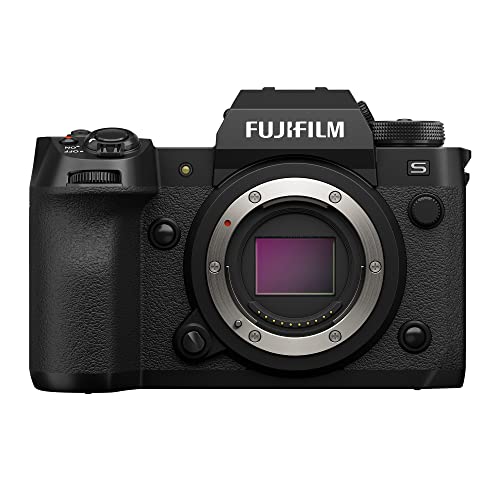
X-H2S is the first X Series camera to feature the 26.1-megapixel, X-Trans 5 stacked back-illuminated sensor. The unique X-Trans color filter array that minimizes moiré and false colors, placing the sensor’s circuitry on a separate layer from the pixels delivers outstanding image quality thanks to expanded low light capabilities and up to 14-stops of dynamic range. The new X-Processor 5, offers lightning-fast performance for the most demanding situations. Capable of handling vast amounts of data, X-Processor 5 delivers next-level performance enhancements in video and stills processing capabilities and intelligent autofocus functionality that’s 3x faster than Fujifilm’s preceding X-T4 model.
Frequently Asked Questions
Can Upscaled 1080P Content Ever Truly Match Native 4K Quality on Modern Displays?
I’d say upscaled quality falls short of native resolution. While upscaling “enhances” 1080p, it can’t genuinely recreate the detail native 4K delivers. You’ll still notice compression artifacts where true 4K shines with crisp clarity on modern displays.
What Frame Rate Limitations Does 4K Impose Compared to 1080P Shooting?
I’ll tell you straight: 4K typically caps at 60fps while 1080p gives you frame rate advantages up to 180fps on full sensors. You’re trading motion clarity for resolution—1080p’s higher frame rates deliver smoother action, whereas 4K excels with static, detailed shots.
How Does HDR Format Integration Affect the 4K Versus 1080P Comparison?
I’ve found that HDR’s transformative impact absolutely revolutionizes 4K’s superiority. You’ll witness color depth that makes 1080p look utterly washed out. Native 4K with HDR delivers vibrant, lifelike colors and dynamic range that 1080p simply can’t match, fundamentally reshaping how I approach professional productions.
Are There Specific Camera Models That Handle 4K Workflows More Efficiently?
I’d recommend exploring cameras like the Sony FX30 or Canon R5C for their efficient 4K cameras that balance processing power with manageable file sizes. These efficiency comparisons show they handle workflows better than budget models, though your computer specs matter equally.
What Compression Artifacts Appear When Displaying Upscaled 1080P on 4K Screens?
When I upscale 1080p on a 4K screen, I notice blocking artifacts and soft edges from compression techniques. You’ll see pixelation, color banding, and loss of detail—artifact visibility becomes obvious because the display stretches limited pixel data across more space.