As an Amazon Associate, we earn from qualifying purchases. Some links on this site are affiliate links at no extra cost to you. Our recommendations are based on thorough research and editorial judgment.

Power Delivery (PD) Over USB-C: the Move Towards 140w+ Monitor Charging

USB Power Delivery over USB-C is advancing from 100W limits toward 140W Extended Power Range technology, addressing constraints where monitor operation consumes 65–90W, leaving insufficient capacity for simultaneous device charging. Current market adoption remains limited, though 140W-capable monitors are emerging with proper e-marked cables, PD 3.1 adapters, and AVS-compatible components. The shift stems from high-resolution displays, high-refresh-rate monitors, and professional workstations demanding greater power allocation. Widespread 140W availability is projected within 18–24 months, with 240W EPR anticipated by 2026–2026 as EU regulations drive manufacturer adaptation and compatibility verification becomes essential for peak performance outcomes.
Key Takeaways
- USB PD 3.1 with Extended Power Range (EPR) enables up to 140W delivery, overcoming USB PD 2.0’s 100W limitation for modern high-power monitors.
- E-marked cables and PD 3.1 certified power adapters are essential components for safe, stable 140W charging without overheating or equipment damage risks.
- High-resolution displays (4K/5K) and high-refresh monitors (144Hz+) require 140W capability to simultaneously power the display and charge connected devices efficiently.
- Widespread 140W monitor availability is expected within 18-24 months as manufacturers gradually adopt EPR technology amid EU regulatory influences and market evolution.
- Verifying AVS compatibility on monitors, PD 3.1 support on adapters, and EPR functionality across all components prevents costly compatibility issues in setups.
Why USB-C Monitor Charging Needs 140W and Beyond
Ever plugged in your laptop to a USB-C monitor and wondered why it won’t charge both your screen and your device at the same time? You’re not alone. That frustration comes down to a power problem that’s been quietly limiting USB-C monitors for years.
The issue boils down to this: a single USB-C cable has to do three jobs at once—power your display, run the monitor’s internal brain, and charge your laptop. That’s a lot to ask from one connection. Older USB standards, like USB PD 2.0, topped out at 100W. Sounds like plenty, right? Honestly, it’s not. Most modern monitors need 65–90W just to run themselves. That leaves almost nothing left over for charging your device.
So, why does this matter? Because it means you’re stuck choosing: either charge your laptop slower or dim your display. That’s not a real solution.
The good news is that Extended Power Range (EPR) technology fixed this problem. It pushes 240W through your cable using 48V and 5A, which sounds technical but basically means your monitor can run at full brightness while charging your device at full speed simultaneously. The trick is using properly certified e-marked cables that can handle these higher voltages without overheating.
Try this: if you’re shopping for a USB-C monitor, check whether it supports EPR. If it does, you’ve solved the power puzzle. No more compromises, no more slow charging, no more picking between your screen and your device.
Can You Actually Get 140W Monitor Charging Right Now?

Can You Actually Get 140W Monitor Charging Right Now?
Want to charge your laptop and run your monitor through one cable? Sounds great in theory, but here’s the reality: it’s not quite there yet for most people.
Right now, you’re looking at two tiers. Most USB-C monitors top out at 100W using what’s called Standard Power Range. That’s fine if you’ve got a smaller laptop, but if you’re working with a bigger machine or need to power multiple devices at once, it leaves you short. A few pricier monitors do offer 140W through Extended Power Range technology, but they’re not exactly sitting on store shelves everywhere.
The compatibility mess****
Here’s the thing about EPR monitors—and this is important—they don’t just work with any power adapter or cable you’ve got lying around. You need e-marked cables (cables that talk to your devices to make sure they’re safe) and a compatible power adapter. Manufacturers haven’t really settled on a standard approach yet, so what works with one brand might not work with another. It’s frustrating, frankly.
What power levels actually exist today?
- 65W adapters cover most standard laptops
- 100W is the current sweet spot for mid-range monitors
- 140W is available but limited to high-end displays
- Larger workstations with lots of peripherals still need more
So why does this matter? Because jumping to 140W sounds impressive until you realize you might not find cables or adapters to support it.
The real timeline
In my experience talking to tech folks, widespread 140W+ support is probably 18 to 24 months away. That timeline depends on two things: better cable standards and more chargers actually hitting the market. Right now, availability is the bottleneck. You could buy a 140W monitor today, but good luck finding the right power adapter to match it.
The best part is, things are moving in the right direction. Once cables and chargers become standardized, the whole ecosystem will work together smoothly. But we’re not there yet.
Is it worth waiting, or should you grab a 100W monitor now? That depends on what you’re actually plugging in.
Recommended Products

ULTIMATE SELF-SUSTAINING HOME KIT – 4096Wh capacity + dual 240W panels. Complete off-grid backup for prolonged outages.

1000W DUAL-USE ANDERSON DC CONNECTOR – Route power efficiently with a 12-80V, 30A port that outputs up to 1000W DC or accepts solar input. Directly powers ham radios, marine electronics, emergency pumps & off-grid battery banks with zero inverter energy loss. Built for preppers, marine users & homeowners who need reliable, direct-current flexibility during outages.

Power More Than Ever - DJI Power 1000 V2 is a high-capacity solar generator that powers 99% [11] of appliances like kettles, cookers, projectors, saws, and drills—ideal for camping, DIY, and outdoor work.
When Does Your Monitor Really Need 140W?

So you’re looking at a monitor that needs 140W, and you’re wondering if that’s actually something you need to worry about. Honestly, it depends almost entirely on what you’re plugging into it through that USB-C connection.
Let me break this down. A basic monitor for everyday office work—think 1080p or 1440p—doesn’t pull anywhere near that much power. You’re looking at way less. But jump up to a 4K or 5K professional display, and things change fast. Those bigger, sharper screens demand more electricity just to do their job.
Here’s the thing about modern monitors: LED backlighting has gotten really efficient over the last few years. That’s helped bring power consumption down across the board. So why does this matter? Well, it means you’ve got more breathing room with your setup before you actually need to max out that 140W capacity.
But there are some scenarios where you genuinely do need all 140W:
- You’re charging a powerful laptop *and* running a high-resolution monitor at the same time
- Your display supports high refresh rates (like 144Hz) combined with brightness levels cranked up
- You’re working with a workstation that needs serious power for both the screen and the connected devices
The real answer? Stop thinking about the monitor alone. Instead, add up what everything connected to that USB-C port actually draws. Your laptop charging, the monitor itself, any other peripherals—that’s your real number.
In my experience, most people don’t actually hit 140W unless they’re doing serious professional work. But if you’re unsure, it’s better to have that capacity sitting there than to wish you had it later.
Safe High-Power Charging: Cables and Testing Standards

Now that you know what power your devices actually need, let’s talk about the stuff that makes safe, high-power charging actually work: the cables and testing standards that keep things from catching fire, melting, or just breaking down.
E-marked cables are the real deal here. If you’re pushing 5 amps at voltages over 20V, you need them. They’ve got chips built right in that basically talk to your devices and say, “Hey, here’s what I can safely deliver.” Without that conversation happening, you’re flying blind.
USB PD 3.2 brought SPR AVS testing into the mix for anything over 27W. So if you buy a charger or cable that meets the standard, you know it’s been put through actual testing. Frankly, there’s a grace period until March 2026, but honestly? If you’re buying new stuff now, it should already comply. Don’t stress too much about the timeline.
Why does all this matter? Because when you’re charging a monitor at 140W—yeah, that’s real now—you’re moving serious power through a cable. Without proper testing and E-marking, you’re risking thermal meltdown, voltage swings that fry your equipment, or connector damage that’ll leave you stranded.
The best part is: when cables and devices meet these standards, everything just works. Your monitor charges without getting hot. Your laptop doesn’t see weird voltage drops. Your connectors don’t corrode. It’s protection that actually does its job in the background.
Recommended Products

E-marked Certified 0.9M USB-C (USB 3.2 10GB/S) Cable
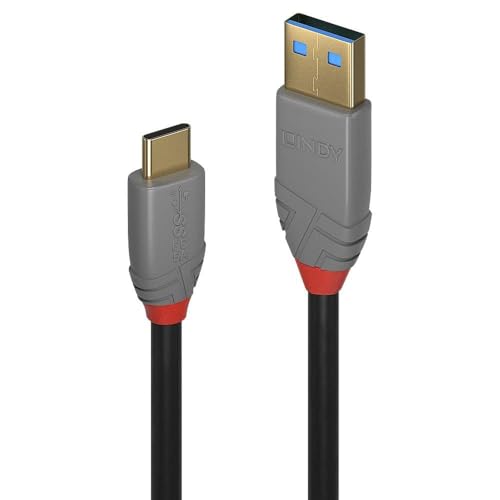
Professional choice USB 3.2 Gen 2 Type A to C, 5A (100W), cable for commercial and high performance AV and IT installations

【Support Multiple of Protocols】QC PD2.0/3.0/3.1 FCP AFC voltage trigger output. Ajustable voltage 5V/9V/12V/15V/20V/28V trigger output.
EPR Monitor Adoption Timeline: 2026–2026 Expectations

EPR Monitor Adoption Timeline: 2026–2026 Expectations
Wondering why your monitor cables keep becoming obsolete? You’re not alone. Extended Power Range technology is changing what monitors can actually do—they can now pull up to 240W through a single 48V connection at 5A. That’s huge if you’re juggling multiple devices, but it also means manufacturers are in a tight spot right now, and you need to understand what’s happening between 2026 and 2026.
Here’s what’s really going on: the market’s at a crossroads. By spring 2026, new EU laptop regulations kick in, and that deadline is forcing everyone’s hand. Manufacturers have to make some tough calls fast. They can’t just jump all-in on EPR monitors and abandon their existing product lines. It’s not that simple.
The technical side gets messy.
You’ve probably heard about e-marked cables and AVS testing—but these aren’t just buzzwords. They’re actual requirements hitting hard by March 2026. Cable standardization alone is a headache. Manufacturers need to make sure cables work across 28V, 36V, and 48V setups at the same time. Add bidirectional power flow into the mix, and you’re looking at real engineering work, not just a software update.
So, why does this matter to you? Cable availability. If e-marked cables don’t hit the market fast enough, adoption crawls. Right now, the supply chain is playing catch-up. You might be ready to buy an EPR monitor, but the cables you need might not exist yet.
Frankly, adoption’s going to be gradual. Don’t expect every monitor on the shelf to have EPR by next year. What you should expect is the ecosystem slowly maturing as manufacturers work through the standards. The companies that get ahead now will lead the market. The ones that wait? They’ll scramble later.
The bottom line: if you’re planning your tech setup for 2026 and beyond, keep an eye on which manufacturers are already pushing EPR implementation. The infrastructure’s building right now, and early movers usually win.
Building Your 140W-Ready Monitor Setup Today
Building Your 140W-Ready Monitor Setup Today
So you’ve got a newer monitor that’s supposed to handle 140W, but you’re not sure if your cables and power adapter are actually up to the job. That’s a legit concern, because not all setups work together—and you don’t want to buy new gear only to find out it doesn’t deliver the power you paid for.
Most monitors you see today max out at 100W. But newer Extended Power Range (EPR) technology changes that by letting a single cable push 140W or more through a 48V connection running 5A. The catch? You need the right parts working together.
What you actually need:
- An e-marked cable rated for EPR voltages
- A power adapter with PD 3.1 certification
- A monitor designed to handle AVS profiles between 15V and 48V
Why does this matter? Because a great cable alone won’t cut it. Your power adapter has to explicitly support EPR standards, and your monitor’s firmware needs to recognize dynamic voltage adjustment protocols. Miss any of these, and you’re stuck at the old 100W limit no matter what.
Frankly, the easiest way to avoid headaches is to check the manufacturer specs for AVS capability before you buy. Look for mentions of PD 3.1 support on your adapter and EPR compatibility on your monitor. It takes five minutes and saves you from compatibility issues down the road.
The best part is that once you’ve verified everything lines up, you get that full 140W delivery without any workarounds. No adapter swaps, no cable replacements—just plug it in and go. Have you checked whether your current setup supports these standards yet?
Frequently Asked Questions
Are Older USB PD 2.0 Monitors Backward Compatible With USB PD 3.1 EPR Chargers?
Yes, I’d say older USB PD 2.0 monitors are like bridges built for yesterday’s traffic—they’ll still stand when newer roads arrive. They’re backward compatible with PD 3.1 EPR chargers, though compatibility concerns arise since they’ll only negotiate up to 100W, not the full charging standards EPR offers.
What’s the Difference Between SPR and EPR Cables for High-Power Monitor Charging?
I’ll explain the key differences. SPR cables max out at 100W with 20V/5A limits, while EPR cables handle 240W through higher voltages—28V, 36V, or 48V. EPR’s e-marked design improves your power efficiency and safety for demanding monitors.
Do Non-E-Marked Cables Support 140W Charging Safely Over USB-C Connections?
No, I’d caution you against non-e-marked cables for 140W charging—it’s coincidentally where safety fails. They’re not certified for such power ratings, and cable safety becomes critical. You’ll need e-marked cables rated for 5A at higher voltages to safely deliver that power.
Can a Single USB-C Port Deliver 140W While Simultaneously Transferring Video Data?
I can tell you that a single USB-C port can’t simultaneously deliver 140W power delivery while transferring video data. You’ll need to choose between high-power charging or video transmission, as they’re incompatible on one port.
What EU Regulations Mandate USB-C Charging on Monitors by Specific Dates?
I can tell you that EU regulations mandate USB-C compliance on laptops starting spring 2026, though I don’t find specific monitor charging deadlines in the current framework. The December 2026 requirement applies primarily to mobiles and tablets under EU regulations.