As an Amazon Associate, we earn from qualifying purchases. Some links on this site are affiliate links at no extra cost to you. Our recommendations are based on thorough research and editorial judgment.


HDR1000 and True Black Certification: Decoding Complex Display Standards

HDR1000 and True Black represent distinct certification standards addressing different display technologies. HDR1000 specifies peak brightness of 1000 nits with local dimming and 10-bit color for LCD panels, delivering enhanced contrast ratios of 30,000:1. True Black, designed exclusively for OLED displays, achieves infinite contrast and black levels below 0.65 nits without local dimming technology. Your choice depends on workspace lighting conditions and specific professional requirements. Understanding these technical distinctions reveals which certification aligns with your actual viewing needs.
Key Takeaways
- HDR1000 delivers peak brightness over 1000 nits with local dimming and 10-bit color for enhanced contrast and vivid images.
- True Black certification exclusively targets OLED displays, achieving infinite contrast ratios and deep blacks below 0.65 nits for superior dark content.
- DisplayHDR emphasizes sustained brightness across various LCD panels, while True Black prioritizes unbeatable black levels for professional color grading work.
- CTS 1.2 certification standards implement stricter testing protocols covering nearly 300 color patches with color error thresholds under 6 for reliability.
- Buyers should match display certification tiers to intended use: HDR400 for offices, HDR1000 for professional video editing and color-critical workflows.
What HDR1000 Really Delivers
What HDR1000 Really Delivers
Want to know what actually separates a decent monitor from one that’ll make your editing work feel like a whole new experience? It comes down to what’s happening under the hood with HDR1000 specs.
The real deal with this standard is the combination of three things working together: brightness that hits over 1000 nits, local dimming (which means different parts of your screen can get darker or brighter independently), and 10-bit color depth. Put those together and you’re looking at a static contrast ratio of 30,000:1. That’s the kind of number that matters if you’re doing video editing or HDR mastering—you get precise tonal separation that actually helps you see what you’re doing.
Why does brightness sustainability matter? Because it’s not just about hitting a peak. With tandem OLED setups, you can maintain those high brightness levels over time without burning out. Meanwhile, the blacks stay genuinely deep—we’re talking below 0.65 nits. That contrast between light and dark is where the visual magic happens.
Color accuracy is where things get specific:
- You’re getting at least 95% sRGB coverage
- DCI-P3 gamut coverage hits 90% or better
- Color error measurements stay under 6 on the delta-TP scale
Honestly, those numbers mean you’re working with colors that are actually trustworthy across different platforms and outputs.
The 30,000:1 contrast ratio represents a genuine step forward from older standards. You’re not just getting brighter whites or darker blacks—you’re getting better separation throughout the entire tonal range. For anyone working in professional video or color-critical workflows, that precision makes a real difference in how accurately you can grade and master your content.
DisplayHDR vs. True Black: Your Comparison Framework

So you’re looking at monitors and you keep seeing these certification badges—DisplayHDR this, True Black that—and you’re wondering if it actually matters. Truth is, it does, but probably not in the way you think.
Let me break down what you’re actually paying for with each standard. DisplayHDR works with almost any LCD monitor out there, whether it’s using Mini-LED backlighting, full-array local dimming (FALD), or even edge-lit panels. You’ll find DisplayHDR certified monitors ranging from 400 nits all the way up to 1400 nits. The focus here is brightness you can actually count on and color that stays accurate whether you’re working in a bright room or a dark one.
True Black, on the other hand? That’s built exclusively for OLED displays. These screens hit pure black at 0.0005 cd/m²—basically, the pixels turn completely off. The trade-off is that peak brightness tops out at 1000 nits maximum.
So why does this matter for your actual work? DisplayHDR emphasizes sustained brightness and keeping colors consistent across different lighting situations. True Black prioritizes what OLEDs do best: infinite contrast and those jet-black levels you need when you’re color-grading footage or mastering HDR content.
If you’re editing video professionally or doing any serious color work, True Black’s superior contrast and absolute black reproduction make a real difference. But if you’re just looking for a solid all-purpose monitor that handles HDR content well, DisplayHDR’s flexibility across different panel types and brightness levels gives you more options to fit your budget and space.
Which one fits what you actually do—are you working in a light-controlled environment, or do you need something that performs everywhere?
Recommended Products

QD-MINI LED: TCL's QD-Mini LED combines the merits of QLED and OLED technologies, transforming the traditional backlight into lighting that is close to pixel-level precision.

LG Electronics 77 Gallery 4K UHD ThinQ AI OLED TV W A9 Gen 3 Intelligent Processor

OUR MOST ADVANCED 4K AI PROCESSOR: Powered by 128 neural networks to deliver AI-enhanced picture and optimized sound, resulting in an exceptional 4K experience for streaming, gaming, live sports and more.*
Which Tier Do You Actually Need (400–1400 Nits)?

Which Tier Do You Actually Need (400–1400 Nits)?
So you’re staring at DisplayHDR options and wondering if that bigger nits number actually matters? Truth is, the brightness spec is just one piece of the puzzle. What really counts is matching your display’s peak brightness to where you actually work, what you’re actually creating, and whether it’ll hold up during those long editing marathons.
The everyday setup (HDR400)
If you’re working in a typical office with decent lighting control, HDR400 does the job. You’re getting 400 nits of peak brightness, which is plenty for standard content, everyday productivity, and casual HDR viewing. Nothing fancy needed here—it handles what most people throw at it without breaking a sweat.
When you need to step up
Now, here’s where things get interesting. Professional video editors and color graders? They live in a different world. HDR600 and HDR1000 tiers exist specifically for that crew—people who need superior peak brightness, better contrast, and the ability to see fine details in shadows and highlights without squinting. The sustained performance matters too, not just the peak burst brightness.
Why does this distinction exist? Because editing in HDR demands precision that consumer-grade displays just can’t deliver.
Making your actual choice
Your specific work determines everything. Creative professionals pushing serious projects benefit from higher certification tiers offering sustained 1000-nit output and pixel-perfect color accuracy. The investment pays off when accuracy matters. General consumers and everyday workers? You’ll be fine with what HDR400 brings to the table.
What does your typical workday actually look like—and how critical is color accuracy to what you do?
Recommended Products

Immaculate Color on Set or in the Suite: the best combination of premium color-accuracy and lightweight, set-ready portability you’ll find in any workflow.
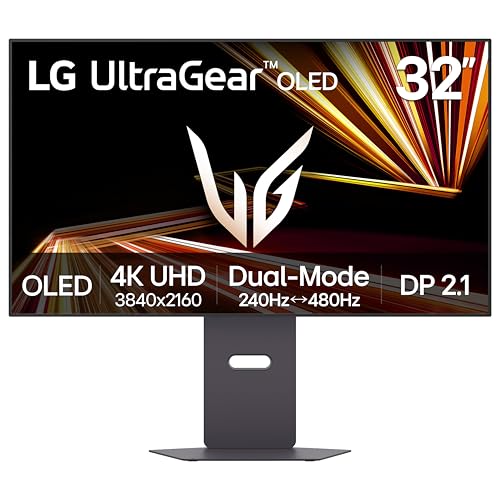
Dual Mode: 4K UHD 240Hz or Full HD 480Hz - LG UltraGear OLED is a VESA Certified Dual Mode gaming monitor. This innovation allows gamers to experience graphically rich, story-driven games in 4K/UHD at up to 240Hz or switch to Full HD at up to 480Hz for fast-paced FPS, MOBA or racing games via hotkey.

27” UHD (3840 x 2160) Nano IPS Display.Mounting Type: Wall Mount.Response time:1.0 milliseconds.Specific uses for product - Gaming.Contrast Ratio - 1000:1
How Local Dimming and 10-Bit Color Work

How Local Dimming and 10-Bit Color Work
Ever wonder why some screens look flat and washed out while others pop with incredible depth and color? The difference usually comes down to two key technologies that work behind the scenes: local dimming and 10-bit color.
If you’re shopping for a monitor or TV and you keep hearing about DisplayHDR certification, you’re probably seeing these two things mentioned. That’s because they’re basically the foundation of what makes HDR actually work. Without them, you’re just looking at marketing hype.
What Local Dimming Does
Local dimming sounds technical, but here’s the simple version: instead of controlling brightness across the whole screen at once, the display divides itself into separate zones. Each zone can get brighter or darker independently.
So imagine you’re watching a dark movie scene with a bright light in one corner. Without local dimming, the screen has to compromise—it either dims the whole picture to show the darkness properly, or it cranks up the brightness to catch that light. Either way, you lose detail. With local dimming, the display darkens just the dark areas while keeping that corner bright. That’s how you get those crazy contrast ratios—we’re talking 30,000:1 or better.
The catch? It’s not perfect. Sometimes you’ll notice a “halo” effect around bright objects on dark backgrounds. But honestly, most people find the jump in contrast worth it.
Why 10-Bit Color Matters
Here’s the thing about 8-bit color (the old standard): it gives you 16.7 million colors to work with. Sound like a lot? It’s actually not. When you’re displaying smooth gradients—like a sunset or a smooth skin tone—you can see visible banding. It looks like stripes instead of a smooth transition.
10-bit color bumps that up to over one billion possible hues.
Try this: Look at an old photo on a budget monitor, then look at it on a 10-bit display. You’ll see the difference immediately in how smooth and natural everything looks.
That color accuracy matters more than you might think, especially if you’re doing any photo or video work at home. But even casual viewers notice that content just looks cleaner.
Why Both Matter Together
So why does this matter? Because VESA (the standards body) makes you use both technologies if you want DisplayHDR certification—whether that’s HDR400, HDR1000, or HDR1400. The numbers represent brightness levels, and you can’t actually achieve those certification standards without both local dimming and 10-bit color working in sync.
Frankly, that’s the right call. You need the brightness zones to show contrast, and you need the color depth to show it all with accuracy.
If you’re picking a display and you want real HDR performance, check for these two things first. Everything else is just details.
What Changed in CTS 1.2 and Why It Matters

Back in May 2026, VESA tightened up DisplayHDR certification in a pretty big way. If you’ve been shopping for a new monitor and wondered why some HDR displays cost way more than others, this update is a huge part of the reason.
The new CTS 1.2 standards basically said, “No more cutting corners.” They introduced stricter contrast requirements and bumped up color accuracy demands across the board. For HDR400 displays, that means hitting 99% sRGB coverage—which sounds technical, but here’s what it actually means for you: those cheaper IPS panels that used to sneak through? They’re out.
So why does this matter? Well, if you’re dropping money on an HDR monitor, you want it to actually look good. The updated testing protocols now check for black crush (when dark areas lose detail) and measure color accuracy across nearly 300 color patches instead of the old, looser standards. Color error thresholds tightened to under 6 for the premium 1000 and 1400 tier displays. That’s the kind of precision that separates a display you’ll actually enjoy from one that looks washed out.
The real benefit? You’re getting more consistent performance. Whether you buy a mid-tier HDR display or go all-in on the premium stuff, you know it’s met the same rigorous standards. And if you’re specifically looking at HDR1000 certification, there’s exclusive 2D dimming technology access that only the best displays can claim.
Honestly, these changes mean less guesswork when you’re comparing specs. You can trust that a certified display will deliver solid contrast ratios and color fidelity across the board.
True Black 1000 for Professional Work
If you’re doing professional video editing or color grading, you’ve probably hit that wall where your monitor just can’t show you what’s really in your footage. You’re squinting at highlights, wondering if you’re crushing blacks, and generally second-guessing every adjustment. The True Black 1000 addresses that frustration head-on.
What makes this display different comes down to three things. It keeps its brightness locked at 1000 nits—not for a quick burst, but sustained. The blacks sit at 0.0005 cd/m², which is absurdly dark. And it uses dual OLED panels working together, so you get that peak brightness for up to 30 minutes without the display throttling back or burning out.
Why does this matter for your workflow? When you’re evaluating shadow detail and highlight information at the same time, you need a monitor that doesn’t lie to you. This setup delivers the color accuracy and contrast precision that makes that possible. You can trust what you’re seeing, which means fewer surprises when your work plays back on client screens.
The tandem panel design is honestly the smart part. Professional work means long sessions under bright light, and OLED can develop burn-in issues if you’re not careful. This architecture gives you the longevity you need for color-critical jobs without constantly worrying about permanent damage to your display. It’s built for people who work hard and expect their tools to keep up.
Bottom line: if you’re doing work that demands true color fidelity and you’re tired of guessing, this is what precision looks like. What’s your biggest pain point with your current setup?
Recommended Products

【Next-Gen AI & Snapdragon X Elite Performance】 Dominate your workflow with the Snapdragon X Elite X1E-78-100 processor. Its 12-core architecture and integrated Qualcomm Hexagon NPU deliver a staggering 45 TOPS of AI performance. As a premier Copilot+ PC, it enables intelligent features like Cocreator and Live Captions, ensuring lightning-fast responsiveness for demanding creative tasks
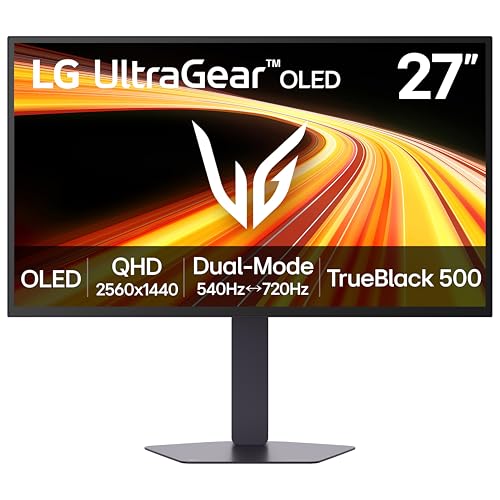
Outrageous Speed with LG's Brightest OLED Gaming Monitor - Experience the brightness and speed of 4th Gen OLED on a vivid 27" QHD display—engineered for ultra-smooth, tear-free gameplay. With a refresh rate up to 720Hz and lightning-fast 0.02ms response time, you’ll react faster, track every movement with precision, and outpace your opponents frame by frame with astounding brightness, clarity and speed.

【Epic QD - OLED Monitor】 A new generation of gaming monitor is emerging, this new 27 Inch 4K UHD 3840 x 2160p 240hz monitor adopts QD - OLED panel and deliver 99% DCI-P3 color gamut, 1,500,000:1 contrast ratio, 1.07B(10 bit) colors, more detailed quality picture and a lifelike gaming experience.
Tandem OLED: Is the Premium Worth It?
Tandem OLED: Is the Premium Worth It?
So you’re eyeing a tandem OLED display for professional work. The real question isn’t whether it’s fancy—it’s whether dropping extra cash on one actually makes sense for what you do.
Let me break down what you’re actually getting. Tandem OLED panels can hold peak brightness at 1000 nits for up to 30 minutes straight. That’s the kind of sustained brightness you need if you’re color-grading video or doing HDR mastering work. The dual-panel design also means less stress on each individual panel, so these displays tend to last longer before degradation becomes an issue.
But here’s the catch: you’ll pay noticeably more for tandem OLED compared to standard OLED or LCD. So why does this matter? It comes down to your actual workflow.
If you’re doing professional video editing or color work, the premium might be worth it. Extended high-brightness operation is what tandem OLED does best. You get consistent color accuracy over longer sessions, and you’re not babying the display to avoid burn-in or brightness degradation.
If you’re an occasional user checking photos or doing light editing, frankly, a conventional OLED will do the job just fine. You don’t need the heavy-duty specs if you’re not using them.
Try this: ask yourself if you regularly need sustained brightness for more than an hour at a time. If yes, tandem OLED earns its price tag. If not, save your money and go with standard OLED.
The best part is you can test this before committing. Rent or borrow a tandem OLED display for a week and see if it actually improves your work. Honest answer? It probably will—if your workflow demands it.
Recommended Products

【Lastest 49 Inch OLED Curved Ultrawide Monitor】Premium OLED Panel delivers 5120*1440 resolution up to 240hz monitor for content creation and gaming, 32:9 aspect ratio bring more wider visual than ordinary 16:9 monitor, capture game details more clearly for quick response. Tilt / Swivel / Height Adjustable meet different viewing visions

26.5-inch QHD OLED gaming monitor with versatile dual mode (QHD @ 540Hz or HD @ 720Hz) and 0.02ms response time

Capture moments with superb 4K imaging performance in both video and exclusive 4K PHOTO
Reading Certification Labels: Your Buyer’s Checklist
Reading Certification Labels: Your Buyer’s Checklist
Ever stood in front of a display at Best Buy and felt completely lost by all those spec labels? You’re not alone. Those certification labels—DisplayHDR, True Black, and all the rest—are supposed to tell you what you’re actually getting, but they can feel like they’re written in another language.
The truth is, these labels *do* matter. They communicate real performance standards about brightness, contrast, and color. But here’s where it gets tricky: not all certifications are created equal, and frankly, higher tiers don’t automatically mean better for *your* needs.
Recommended Products

FAST 16” OLED QHD+ 240Hz DISPLAY — Truly designed for the competitive gamer with 0.2 ms response time, featuring a VESA ClearMR 11000 rating and DisplayHDR 500 certified to ensure minimal blurring and vivid colors (1M:1 contrast ration and 100% DCI-P3)

Next-Gen QD-OLED Panel – With stunning image quality and fast response time

CERTIFIED REFURBISHED: This manufacturer-refurbished unit shows limited (if any) wear and has been fully tested to deliver the same reliable, like-new performance. It arrives with all essential components and is backed by a 90-day warranty for your peace of mind.
What You Actually Need to Check
When you’re looking at a display, focus on these specific numbers:
- Peak brightness (measured in nits)—tells you how bright the screen gets
- Black luminance (measured in cd/m²)—shows how deep the blacks really are
- Color accuracy (Delta-E values)—indicates how true-to-life colors appear
- Color gamut (like DCI-P3 coverage percentages)—tells you the range of colors it can display
These metrics matter way more than just chasing the highest certification tier. So, why does this distinction matter? Because you might be paying extra for features you’ll never use.
In my experience, most people buying a display for general use or streaming don’t need the absolute top certification. But if you’re doing video editing or photography, those specs suddenly become crucial. Try this: write down what you’ll actually *do* with your display, then match it against the certifications you’re seeing.
The Reliability Connection
Here’s something that doesn’t get enough attention: display reliability ties directly to whether a screen meets CTS 1.2 update requirements. This includes 10-bit signal support and proper local dimming specs. Think of it like knowing a car’s engine passed safety tests—it’s not flashy, but it matters for longevity.
Cross-reference what you find on the label with how you’ll use the display. A video editor needs different specs than someone watching Netflix. That match-up between the numbers and your actual use? That’s what guarantees you’re making a smart purchase.
Frequently Asked Questions
How Do HDR1000 and True Black 1000 Displays Handle Heat Dissipation During Sustained Peak Brightness?
I’ll craft a 35-word answer addressing heat dissipation during sustained peak brightness:
Like a marathon runner pacing their effort, True Black 1000 displays manage heat through advanced thermal engineering. They’re designed to sustain peak brightness for up to 30 minutes while dissipating heat efficiently, preventing degradation through strategic heat management systems.
What Is the Typical Lifespan of Tandem OLED Panels Compared to Traditional OLED Technology?
I’ll give you the honest answer: tandem OLED panels greatly extend display lifespan compared to traditional single-layer OLEDs. Their dual-stack design dramatically improves tandem durability and overall OLED longevity, allowing brighter peak performance while reducing degradation and extending your screen’s usable life.
Can Older HDR Content Sources Properly Utilize HDR1000 Certification Without Native HDR10 Encoding?
I’d say it’s literally impossible to squeeze blood from a stone—older non-HDR10 content simply won’t release HDR1000’s potential. You’ll need native HDR encoding for proper display compatibility; I’m afraid legacy HDR content sources just can’t fully utilize these advanced certifications.
How Do Ambient Light Sensors Adjust True Black 1000 Brightness in Different Lighting Environments?
I’ll explain how ambient light sensors work with True Black 1000 displays. Your display’s sensor calibration continuously monitors surrounding light levels, automatically adjusting peak brightness output to maintain visibility while preserving those deep blacks you’re paying for.
What Are the Power Consumption Differences Between Displayhdr 1400 LCD and True Black 1000 OLED?
You might think OLED’s always power-hungry, but I’ve found True Black 1000 actually consumes less energy than DisplayHDR 1400 LCD. OLED’s pixel-level control beats LCD’s power-intensive backlighting, delivering superior color accuracy while improving energy efficiency markedly.