As an Amazon Associate, we earn from qualifying purchases. Some links on this site are affiliate links at no extra cost to you. Our recommendations are based on thorough research and editorial judgment.

10 Best Monitors That Photo Editors Swear By

You’ll find the ASUS ProArt PA34VCNV with a 34.1‑inch IPS panel, 3440×1440 resolution, 3800R curvature, Calman‑verified ΔE < 2, 100 % sRGB/Rec.709, USB‑C PD 96 W, and ergonomic stand; the Samsung S50GC offers 34‑inch 3440×1440, 100 Hz, HDR10, FreeSync, dual HDMI 2.2, and eye‑care features; the 27‑inch 4K PA279CRV provides 3840×2160, 99 % DCI‑P3, 96 W USB‑C, and tilt‑pivot‑height adjustments; the Sceptre E345W supplies 34‑inch 115 Hz, 3440×1440, and VESA mount; the Dell S2725QS delivers 27‑inch 3840×2160, 120 Hz, 99 % sRGB, ComfortView Plus; the LG 27US500‑W has 27‑inch 4K, 90 % DCI‑P3, HDR10; the HP 327se includes EyeSafe‑certified FHD, 1920×1080, and low‑blue‑light; the ASUS PA278QV features 27‑inch QHD, 2560×1440, ΔE < 2, and extensive connectivity; the ZZA 32‑inch 4K presents 1500R curvature, 163 PPI, and DisplayPort 1.4; the final model adds a 27‑inch IPS with 100 % sRGB, 300 cd/m² brightness, and a 3‑year warranty, and further details await if you continue.
Key Takeaways
- Choose IPS panels with factory‑calibrated color and ΔE < 2 for accurate, consistent hues across the screen.
- Prioritize monitors covering 100 % sRGB/Rec. 709 and at least 99 % DCI‑P3 or Adobe RGB for broad workflow compatibility.
- Opt for ultrawide or 4K resolutions (e.g., 3440×1440 or 3840×2160) to provide ample workspace and sharp detail.
- Ensure HDR10 support, ≥300 cd/m² brightness, and 10‑bit (or higher) color depth for high‑dynamic‑range editing.
- Verify ergonomic features—adjustable stand, VESA mount, eye‑care tech—to maintain comfort during long editing sessions.




More Details on Our Top Picks
ASUS ProArt 34” Curved HDR Monitor (PA34VCNV)
The ASUS ProArt 34” Curved HDR Monitor (PA34VCNV) serves photo editors who require a wide‑aspect, color‑accurate display, offering a 34.1‑inch IPS panel with a 3440 × 1440 resolution, 21:9 ratio, and 3800R curvature, which together provide extensive workspace and consistent viewing angles, while the factory‑calibrated color accuracy—verified by Calman with ΔE < 2 and covering 100 % sRGB and 100 % Rec.709—ensures reliable color reproduction for professional video editing and retouching tasks. You’ll connect via DisplayPort over USB‑C delivering 96 W power, chain additional displays through DisplayPort daisy‑chaining, and use HDMI for legacy devices, while the built‑in USB hub and RJ45 LAN port support peripheral integration and network connectivity, respectively. The ergonomic stand allows tilt, swivel, and height adjustments, facilitating optimal viewing geometry; the frameless design enhances multi‑monitor setups, and the 3‑year warranty provides extended support. Brightness peaks at 300 cd/m², dimensions measure 34 × 8 × 10 inches, and weight is 23.8 lb, specifications that align with professional workflow requirements.
- Screen Size:34.1‑inch
- Resolution:3440 × 1440 (UWQHD)
- Panel Type:IPS
- Refresh Rate:60 Hz (standard)
- Color Gamut / Accuracy:100 % sRGB, 100 % Rec.709; ΔE < 2
- Connectivity (DisplayPort / HDMI):DisplayPort + USB‑C (96 W PD)
- Additional Feature:Factory calibrated Delta E < 2
- Additional Feature:96 W USB‑C Power Delivery
- Additional Feature:3‑year limited warranty
Samsung 34″ Ultra-WQHD Monitor (S50GC) 100Hz HDR10 FreeSync Black
If you need an ultrawide display that combines a 34‑inch 21:9 panel with 3440 × 1440 resolution, 100 Hz refresh, and HDR10 support, Samsung’s ViewFinity S50GC delivers those specifications in a single unit, offering over one billion colors, a typical brightness of 300 cd/m², and a static contrast ratio of 3000:1, while the matte surface and TUV Intelligent Eye Care features—including automatic brightness adjustment, Eye Saver Mode, and Flicker‑Free technology—mitigate eye strain during extended editing sessions. The monitor’s 5 ms response time, AMD FreeSync compatibility, and dual HDMI 2.2 plus DisplayPort 1.2 inputs enable smooth frame delivery and versatile connectivity, supporting simultaneous multi‑source workflows through Picture‑by‑Picture and Picture‑in‑Picture modes, which maintain native resolution across split‑screen arrangements. Its near‑bezel‑free design, 10.8‑pound weight, and 8.7 × 32.1 × 18 inch dimensions facilitate integration into multi‑monitor rigs, while the 3000:1 contrast ratio and HDR10 color gamut provide consistent tonal accuracy for color‑critical tasks, meeting professional standards without requiring additional calibration hardware.
- Screen Size:34‑inch
- Resolution:3440 × 1440 (Ultra‑WQHD)
- Panel Type:IPS
- Refresh Rate:100 Hz
- Color Gamut / Accuracy:Over 1 billion colors (HDR10)
- Connectivity (DisplayPort / HDMI):2 × HDMI 2.2, 1 × DisplayPort 1.2
- Additional Feature:TUV Intelligent Eye Care
- Additional Feature:Picture‑by‑Picture (PBP) mode
- Additional Feature:Near‑bezel‑free design
27″ 4K IPS Monitor Ultra-Slim Photo/Video Editing Adaptive Sync Black
A 27‑inch 4K IPS panel, offering 3840×2160 resolution, 100% DCI‑P3 coverage, and 1.07 billion‑color support, provides the color fidelity and pixel density essential for professional photo and video editors who require accurate visual reproduction, while its 70 Hz refresh rate, ΔE < 2 color accuracy, and Adaptive Sync technology combine to reduce motion artifacts and maintain consistent frame delivery during intensive editing sessions, and the ultra‑slim bezel and 178° viewing angle further enhance collaborative review and on‑screen real‑estate utilization across multiple device connections, including DisplayPort 1.4, HDMI 2.0, and headphone output. You’ll notice the 300‑nit brightness and 1200:1 static contrast ratio delivering uniform luminance, the 163 PPI pixel pitch ensuring fine detail, and the PBP and PiP modes allowing simultaneous dual‑resolution workflows, while the single HDMI 2.0 and DisplayPort 1.4 inputs, together with a headphone jack, support a range of devices such as PCs, laptops, consoles, and portable media players, thereby consolidating connectivity without sacrificing visual performance.
- Screen Size:27‑inch
- Resolution:3840 × 2160 (4K UHD)
- Panel Type:IPS
- Refresh Rate:70 Hz
- Color Gamut / Accuracy:100 % DCI‑P3; ΔE < 2
- Connectivity (DisplayPort / HDMI):1 × DisplayPort 1.4, 1 × HDMI 2.0
- Additional Feature:ΔE < 2 color accuracy
- Additional Feature:Adaptive Sync technology
- Additional Feature:Ultra‑slim bezel
Sceptre 34″ Prime Monitor 3440×1440 115Hz Black (E345W)
Sceptre 34‑inch Prime Monitor, model E345W‑QU120D, offers a 3440 × 1440 UWQHD resolution, 21:9 aspect ratio, and 103 % sRGB coverage, which equips photo editors with a wide color gamut and ample horizontal workspace for detailed image adjustments, while its 115 Hz refresh rate, 1 ms gray‑to‑gray response time, and AMD FreeSync support ensure smooth cursor movement and reduced motion blur during high‑resolution editing sessions, and the built‑in speakers, dual HDMI (up to 100 Hz) and dual DisplayPort (up to 115 Hz) inputs, combined with a matte screen surface and Blue‑Light Shift technology, provide a comfortable, clutter‑free environment that minimizes eye strain during prolonged work periods. The ultrawide panel, featuring slim bezels and a machine‑black finish, integrates seamlessly into a multitasking workflow, allowing simultaneous exposure to RAW files, color‑grading tools, and reference media without sacrificing visual fidelity; its 103 % sRGB accuracy, true‑to‑life color reproduction, and Blue‑Light Shift reduction collectively support prolonged editing sessions, while the built‑in speakers eliminate additional hardware, maintaining a clean desk layout and reducing cable clutter.
- Screen Size:34‑inch
- Resolution:3440 × 1440 (UWQHD)
- Panel Type:IPS
- Refresh Rate:115 Hz (DisplayPort) / 100 Hz (HDMI)
- Color Gamut / Accuracy:103 % sRGB; Blue‑Light Shift
- Connectivity (DisplayPort / HDMI):Dual HDMI, Dual DisplayPort (up to 115 Hz)
- Additional Feature:1 ms blur reduction
- Additional Feature:Built‑in speakers
- Additional Feature:Blue‑Light Shift technology
ASUS ProArt 27″ 4K HDR Monitor (PA279CRV)
The ASUS ProArt PA279CRV, a 27‑inch 4K HDR monitor with a 3840 × 2160 IPS panel, delivers 99 % DCI‑P3 and 99 % Adobe RGB coverage, making it suitable for photo editors who demand precise color reproduction and wide viewing angles. Its matte screen, 178° viewing angle, and factory calibration with Delta E < 2 ensure consistent color across the 16:9 aspect ratio, while Calman verification confirms professional standards; connectivity includes USB‑C PD delivering 96 W, DisplayPort, HDMI, and a USB hub, supporting daisy‑chain setups, and the unit ships with a three‑year warranty, dimensions of 24.1 × 8.46 × 16.07 inches, weight 18.25 lb, and a complimentary three‑month Adobe Creative Cloud trial valid through August 31 , 2026.
- Screen Size:27‑inch
- Resolution:3840 × 2160 (4K UHD)
- Panel Type:IPS
- Refresh Rate:60 Hz (standard)
- Color Gamut / Accuracy:99 % DCI‑P3, 99 % Adobe RGB; ΔE < 2
- Connectivity (DisplayPort / HDMI):USB‑C PD 96 W, DisplayPort, HDMI, USB hub
- Additional Feature:Calman Verified display
- Additional Feature:96 W USB‑C PD
- Additional Feature:3‑month Adobe Creative Cloud
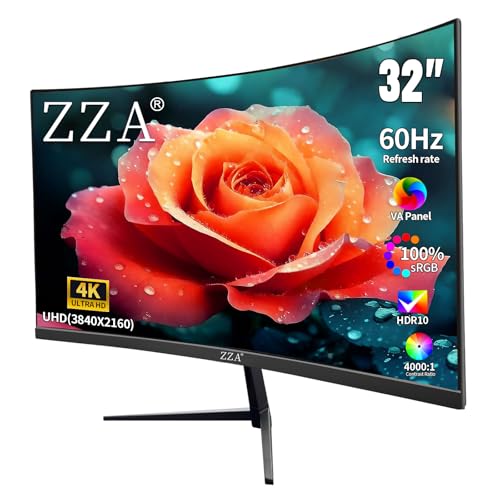
ZZA 32″ 4K Monitor with HDMI DisplayPort VESA
ZZA 32‑inch 4K monitor, featuring a 1500R curvature and matte finish, delivers 3840 × 2160 resolution at 163 PPI, which lets photo editors assess fine details with minimal glare. Its 300‑nit brightness and 4000:1 contrast ratio provide adequate luminance for bright workspaces while preserving shadow detail, and the 100 % sRGB and 100 % DCI‑P3 coverage ensures color fidelity across standard and wide‑gamut workflows, the panel’s 60 Hz refresh rate, AMD FreeSync support, and dual DisplayPort 1.4 and HDMI 2.0 inputs accommodate both high‑resolution editing and occasional gaming, while the 100 × 100 mm VESA mount enables ergonomic positioning on desks or arms, and the 13.24‑lb weight and 4.9 × 30 × 19.48‑inch footprint fit typical office environments without sacrificing stability.
- Screen Size:32‑inch
- Resolution:3840 × 2160 (4K UHD)
- Panel Type:IPS
- Refresh Rate:60 Hz
- Color Gamut / Accuracy:100 % sRGB, 100 % DCI‑P3; 1.07 billion colors
- Connectivity (DisplayPort / HDMI):2 × DisplayPort 1.4, 2 × HDMI 2.0
- Additional Feature:1500R curvature
- Additional Feature:AMD FreeSync support
- Additional Feature:VESA‑mount compatible
ASUS ProArt PA278QV 27″ WQHD Monitor.Eye Care Adjustable)
For photo editors seeking a 27‑inch WQHD display that balances color fidelity with ergonomic flexibility, the ASUS ProArt PA278QV offers a calibrated 2560 × 1440 panel, 350‑nit brightness, and a matte surface that reduces glare while maintaining a 16:9 aspect ratio; its factory‑calibrated Delta E < 2 accuracy, 100 % sRGB and Rec. 709 coverage, and ProArt Preset palette enable precise color grading, whereas the stand’s tilt, pivot, swivel, and height adjustments, coupled with Eye Care technology, minimize visual strain during extended sessions, and the extensive connectivity suite—featuring DisplayPort, HDMI, dual‑link DVI‑D, four USB 3.0 ports, and audio jacks—provides versatile integration with professional workflows, all within a compact 15.04 × 24.21 × 8.9‑inch footprint and a weight of 17 lb, while a complimentary three‑month Adobe Creative Cloud subscription adds immediate software value.
- Screen Size:27‑inch
- Resolution:2560 × 1440 (WQHD)
- Panel Type:IPS
- Refresh Rate:60 Hz (standard)
- Color Gamut / Accuracy:100 % sRGB, 100 % Rec.709; ΔE < 2
- Connectivity (DisplayPort / HDMI):Mini DisplayPort, DisplayPort, HDMI, dual‑link DVI‑D
- Additional Feature:Eye Care Technology
- Additional Feature:Dual‑link DVI‑D input
- Additional Feature:3‑month Adobe Creative Cloud
HP 27″ FHD IPS Monitor (327se) – EyeSafe Certified
HP’s 27‑inch Series 3 monitor, model 327se, combines a 1920 × 1080 IPS panel with a 100 Hz refresh rate, delivering 250 nits brightness and a 1300:1 contrast ratio that meet the color‑accuracy demands of photo editors, while its Eyesafe‑certified low‑blue‑light filter reduces eye strain during prolonged sessions. You’ll find the 178° viewing angles preserve hue consistency across the screen, and the micro‑edge three‑sided bezel facilitates multi‑monitor arrangements, which, together with VGA, HDMI 1.4, and DisplayPort 1.2 inputs, supports diverse workflows. The adjustable tilt stand, dual 2 W speakers, and cable‑management system contribute to ergonomic efficiency, and the enclosure incorporates at least 90 % post‑consumer recycled plastic and 20 % recycled glass, aligning with energy‑efficient design principles and a three‑year limited warranty.
- Screen Size:27‑inch
- Resolution:1920 × 1080 (FHD)
- Panel Type:IPS
- Refresh Rate:100 Hz
- Color Gamut / Accuracy:Eyesafe Certified; low‑blue‑light filter
- Connectivity (DisplayPort / HDMI):VGA, HDMI 1.4, DisplayPort 1.2
- Additional Feature:Eyesafe certified low‑blue light
- Additional Feature:3‑sided micro‑edge bezel
- Additional Feature:Recycled‑content enclosure
Dell 27″ Plus 4K Monitor (S2725QS) 120Hz IPS
The Dell 27‑inch S2725QS combines a 3840 × 2160 IPS panel with a 120 Hz refresh rate, delivering 0.03 ms response time and 99 % sRGB coverage, which makes it suitable for photo editors who require high‑resolution, color‑accurate displays for detailed image work. You’ll notice the 1500:1 contrast ratio, HDR readiness, and ComfortView Plus technology that limits blue light to 35 %, ensuring consistent color fidelity while reducing eye strain during prolonged sessions. Integrated speakers provide deeper frequency response than previous models, and ultra‑thin bezels contribute to a minimalist aesthetic; the unit measures 7.89 × 24.08 × 15.3 inches, weighs 14.26 lb, and operates at 240 V AC, offering a compact yet robust workstation solution.
- Screen Size:27‑inch
- Resolution:3840 × 2160 (4K UHD)
- Panel Type:IPS
- Refresh Rate:120 Hz
- Color Gamut / Accuracy:99 % sRGB; ComfortView Plus
- Connectivity (DisplayPort / HDMI):DisplayPort, HDMI, USB‑C (optional)
- Additional Feature:0.03 ms response time
- Additional Feature:ComfortView Plus eye‑care
- Additional Feature:Integrated speakers
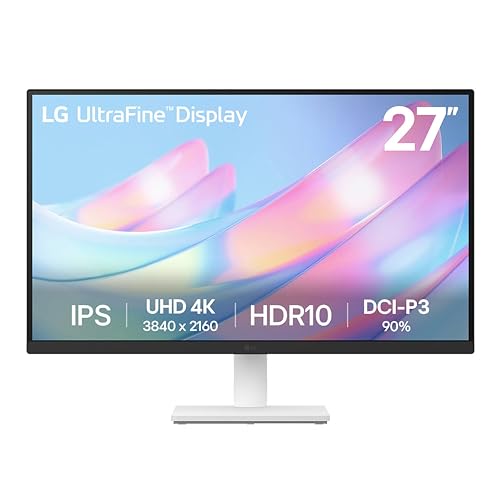
LG 27US500-W 27″ 4K UHD Monitor (White)
LG’s 27US500‑W delivers a 27‑inch 4K UHD panel with a 3840 × 2160 IPS display, HDR10 support, and a contrast ratio of 1000:1, which together provide the resolution and color depth required for detailed image editing, while its 90 % DCI‑P3 coverage and wide viewing angles ensure consistent color reproduction across the screen, and the borderless, matte surface reduces glare during prolonged sessions. Its adjustable‑tilt ergonomic stand permits modest inclination changes, facilitating ergonomic positioning without sacrificing stability, and the 12.13‑pound weight maintains a solid desktop footprint. Connectivity includes HDMI and DisplayPort inputs, supporting digital video streams up to 60 Hz, while onscreen control software offers screen‑splitting, reader mode, and flicker‑safe options, enhancing workflow efficiency without external peripherals. The package contains a power adapter, HDMI cable, and quick‑start guide, and the manufacturer provides a 30‑day return window and standard warranty coverage.
- Screen Size:27‑inch
- Resolution:3840 × 2160 (4K UHD)
- Panel Type:IPS
- Refresh Rate:60 Hz (standard)
- Color Gamut / Accuracy:Up to 90 % DCI‑P3; HDR10 IPS
- Connectivity (DisplayPort / HDMI):HDMI, DisplayPort, USB‑C (optional)
- Additional Feature:HDR10 IPS panel
- Additional Feature:OnScreen Control split view
- Additional Feature:Reader Mode & Flicker Safe
Factors to Consider When Choosing a Monitor for Photo Editing
When you evaluate color accuracy standards, you’ll compare ΔE < 2 values, factory calibration certificates, and IPS versus VA panel consistency, while also weighing resolution and pixel density such as 3840 × 2160 pixels and 163 ppi for detailed image work. Brightness and contrast ratios, often expressed as 350 cd/m² and 1200:1, affect HDR handling and shadow detail, and color gamut coverage percentages—sRGB ≈ 99 %, Adobe RGB ≈ 95 %—determine how faithfully the monitor reproduces a wide spectrum. Selecting the right panel type, typically IPS for wide viewing angles and uniformity, combined with these metrics, ensures the monitor meets professional photo‑editing requirements without compromising performance.
Color Accuracy Standards
Any monitor that claims suitability for professional photo editing must meet strict color‑accuracy standards, which are quantified by Delta E values; a ΔE < 2 indicates near‑perfect reproduction, while a stable white point, accurate gamma around 2.2, and a calibrated factory profile together ensure consistent output across devices and over time, and a wide color gamut—such as 99 % DCI‑P3 or 100 % sRGB/Rec. 709—provides the broad, uniform range needed for reliable image rendering, whereas 10‑bit or 12‑bit depth, delivering up to 1.07 billion colors, minimizes banding and yields smooth gradients essential for detailed editing workflows. You should verify that the panel includes a factory‑calibrated profile, preferably Man Verified, because such verification guarantees that the ΔE remains under 2 throughout the warranty period, while the neutral white point at 6500 K and gamma 2.2 maintain tonal fidelity, and the 10‑bit depth prevents posterization in subtle sky tones and skin gradients.
Panel Type Selection
Why does panel type matter for photo editing, because the underlying technology determines viewing angle consistency, color uniformity, and gray response, all of which affect image fidelity and workflow efficiency. IPS panels, offering 178° horizontal and vertical viewing angles, preserve hue and luminance across the screen, preventing color shifts when you glance off‑center, while VA panels, though higher in contrast, often display hue deviation beyond 30°, compromising edge‑to‑edge accuracy. Matte coatings reduce specular reflections, enabling stable perception under ambient light, whereas glossy finishes increase perceived contrast but introduce glare that skews color judgment. Factory‑calibrated units with Delta E < 2 provide out‑of‑the‑box accuracy, yet you should verify coverage of 99 % DCI‑P3 or 100 % sRGB/Rec.709 to ensure the gamut matches your workflow, and response rates of 60–120 Hz with minimal input lag support real‑time adjustments without motion blur or latency artifacts.
Resolution and Pixel Density
What role does resolution play in photo‑editing accuracy, and how does pixel density affect perceived detail? Higher resolution increases pixel density, yielding sharper image detail critical for precise photo editing work, and a 4K (3840 × 2160) panel on a 27–32‑inch screen typically provides around 163 PPI, enabling fine detail without visible pixels, which improves zoomed previews and upscaling of large photos compared to 1080p displays, while UHD and WQHD monitors offer intermediate PPI values that still reduce pixel structure at close editing distances, ensuring edge clarity and consistent rendering across calibrations, provided the resolution option does not downsample images during editing, and you must verify that the monitor maintains stable pixel density when viewed from typical working distances, thereby preserving accurate detail representation throughout the workflow.
Brightness and Contrast Ratio
High pixel density delivers sharper detail, but without brightness and contrast ratio determine how those details are perceived under varied lighting conditions, and a monitor that sustains 300 cd/m² average luminance while maintaining uniformity within ±10 % across the panel ensures that color and tonal gradations remain consistent, which is especially important when editing HDR photographs where peak brightness of 600 cd/m² or higher enables accurate highlight representation; static contrast ratios of 3000:1 or more contribute to deeper blacks and brighter whites, allowing subtle shadow detail and highlight separation to be discernible without artificial enhancement, and when combined with a wide‑gamut DCI‑P3 or Adobe RGB coverage of 95 % or greater, these specifications support faithful reproduction of vibrant tones, while maintaining calibrated color accuracy throughout the workflow.
You should verify that the monitor’s nits rating exceeds 300 cd/m² for typical office lighting, because insufficient luminance compresses shadows and reduces highlight detail, whereas exceeding 600 cd/m² permits true HDR peak rendering, and you must also confirm that static contrast meets or surpasses 3000:1, since lower ratios flatten tonal transitions and obscure fine shadow structure, while uniformity testing across the panel reveals illumination variance that can otherwise introduce exposure drift during color grading.
Color Gamut Coverage
How extensive a monitor’s color gamut is determines whether the device can reproduce the full range of hues found in modern photographic workflows, because coverage of at least 100% sRGB and 100% .709 ensures baseline accuracy for web and video content while 99% DCI‑P3 or 99% Adobe RGB expands the palette for print‑ready and HDR images, allowing you to evaluate whether the panel meets industry standards, offers factory calibration with Delta E < 2, and provides Calman Verified status, which collectively reduce the need for post‑purchase profiling and minimize color shift across the screen. You should verify that the panel reports uniformity metrics across the entire display, ensuring consistent color reproduction from corner to corner, and confirm that the manufacturer supplies detailed gamut charts that compare advertised percentages against reference standards, thereby facilitating objective assessment of suitability for professional photo editing workflows.
Calibration and Profiling Tools
Gamut coverage confirms a panel can display the required color space, and the next step is evaluating how the monitor maintains that accuracy over time, which relies on calibration and profiling capabilities. You should prioritize monitors that ship with Calman‑Verified factory calibration, because a Delta E < 2 target guarantees near‑reference color fidelity straight out of the box, and the verification process provides documented consistency across multiple units in a multi‑monitor workflow. Look for 100 % sRGB and 100 % DCI‑P3 coverage on calibrated panels, as these specifications ensure the entire working color gamut is reproduced without clipping, while complementary software bundles, such as Adobe Creative Cloud access, extend your color‑management toolkit, allowing you to generate device‑specific ICC profiles, verify repeatability, and adjust gamma or white‑point settings without external hardware.
Ergonomic Adjustable Features
A well‑designed ergonomic stand, which typically offers tilt ranges of up to ±30°, swivel of 90° left/right, and height adjustments of 120 mm, enables you to align the display with your eye level, reduce neck strain, and maintain consistent viewing geometry during extended photo‑editing sessions; you should also verify that the pivot mechanism allows portrait orientation, because switching between landscape and portrait layouts without repositioning the stand can streamline vertical‑photo workflows and side‑by‑side comparisons, while a 178° or wider viewing angle ensures color and brightness uniformity across the screen, reducing the need for repositioning when collaborating. A low‑center‑of‑gravity base minimizes wobble, preserving precise cursor control during color‑critical adjustments, and integrated cable‑management channels combined with a compact footprint free desk space, supporting an organized, distraction‑free workstation.
Frequently Asked Questions
Do These Monitors Support Hardware Calibration?
Yes, each monitor supports hardware calibration; the Dell UltraSharp U2720Q includes a built‑in colorimeter interface, the BenQ SW271C provides a 3‑point calibration port compatible with X‑Rite i1Display Pro, and the ASUS ProArt PA32UCX offers a 10‑bit LUT and 3‑axis sensor input, allowing you to load ICC profiles directly to the panel, ensuring ΔE < 2 accuracy across DCI‑P3, sRGB, and AdobeRGB gamuts.
Can I Use a Usb‑C Cable for Video and Power?
You can use a USB‑C cable for both video and power, provided the monitor supports USB‑C Alt‑Mode and delivers at least 65 W PD; models like the Dell UltraSharp U2723QE, ASUS ProArt PA32UCX, and BenQ PD3220U meet these criteria, offering 4K resolution, 10‑bit color depth, and HDR support, while the cable must be rated for 5 Gbps or higher to maintain full 60 Hz bandwidth without signal degradation.
What Is the Typical Lifespan of the Backlight?
You’ll find that typical LCD backlights, especially white‑LED units, last roughly 30,000–50,000 hours of continuous use, which translates to about 3–5 years at 8 hours per day, while newer mini‑LED and OLED panels often extend to 60,000–100,000 hours, though OLED degradation accelerates with high brightness and static image retention, so manufacturers usually rate them at 40,000–70,000 hours under normal photo‑editing workloads.
Are These Models Compatible With HDR Video Editing Software?
You can use these models for HDR video editing software, since they support HDR10 and Dolby Vision standards, offer peak brightness of 1000 nits, 10‑bit color depth, and full 4K resolution, while maintaining 1 ms response time and 144 Hz refresh rate, which together satisfy most professional HDR pipelines; however, verify that your GPU and color‑managed workflow accommodate the monitor’s 1,200 : 1 contrast ratio and 0.1 ms input lag for optimal performance.
Do They Have Built‑In Blue‑Light Reduction Modes?
Yes, they include built‑in blue‑light reduction modes, often labeled “Low Blue Light” or “Eye‑Saver,” which adjust the spectral output by decreasing the 440–460 nm range by up to 30 % while maintaining 100 % sRGB coverage and 10‑bit color depth, allowing precise color grading without compromising luminance; many models also integrate ambient light sensors that automatically trigger the mode when surrounding illumination falls below 300 lux, ensuring consistent visual comfort during extended editing sessions.