As an Amazon Associate, we earn from qualifying purchases. Some links on this site are affiliate links at no extra cost to you. Our recommendations are based on thorough research and editorial judgment.

10 Best 1440p Gaming Monitors That Level Up Every Play Session

You’ll find ten 27‑inch QHD monitors ranging from IPS panels with 99 % sRGB coverage and 120 Hz refresh to VA/WOLED models delivering 90–99 % DCI‑P3, 0.03–1 ms gray‑to‑gray response, and HDR10 or DisplayHDR 400 support, while HDMI 2.1 or DisplayPort 1.4 with DSC enables 240 Hz native or 260 Hz overclocked rates, G‑Sync/FreeSync compatibility ensures adaptive sync, VESA 100×100 mm mounts and height‑adjustable stands provide ergonomic flexibility, and three‑year warranties protect the investment, so you can compare each specification objectively and decide which monitor best matches your performance needs.
Key Takeaways
- Choose an IPS panel for wide viewing angles and near‑full sRGB coverage, ideal for color‑critical gaming and creative work.
- Opt for a VA or WOLED panel when you need high contrast ratios and deep blacks, especially for dark‑scene immersion.
- Prioritize refresh rates of 144 Hz or higher (up to 240 Hz) with low GTG/MPRT response times (≤1 ms) to ensure smooth motion and competitive advantage.
- Ensure the monitor supports adaptive‑sync (FreeSync Premium or G‑Sync) and has HDMI 2.1 or DP 1.4 with DSC for high‑bandwidth, high‑refresh HDR content.
- Look for ergonomic stands (tilt, height, swivel) and VESA‑compatible mounting, plus extra features like FPS counters, crosshair overlays, and warranty or subscription perks.
| Gawfolk 27″ QHD Gaming Monitor 120Hz Ultra‑Thin Frame |  | Ultra-Thin Design | Screen Size (inches): 27″ | Resolution (QHD): 2560×1440 | Refresh Rate (Hz): 120 Hz | VIEW LATEST PRICE | Read Our Analysis |
| ASUS ROG Strix OLED 27″ Gaming Monitor (XG27AQWMG) | OLED Premium | Screen Size (inches): 27″ | Resolution (QHD): 2560×1440 | Refresh Rate (Hz): 280 Hz | VIEW LATEST PRICE | Read Our Analysis | |
| SANSUI 27″ Curved Gaming Monitor 180Hz 1ms (Q-C1Q) |  | Curved Speedster | Screen Size (inches): 27″ | Resolution (QHD): 2560×1440 | Refresh Rate (Hz): 180 Hz | VIEW LATEST PRICE | Read Our Analysis |
| AOC Q27G41ZE 27″ QHD Gaming Monitor 240Hz HDR | 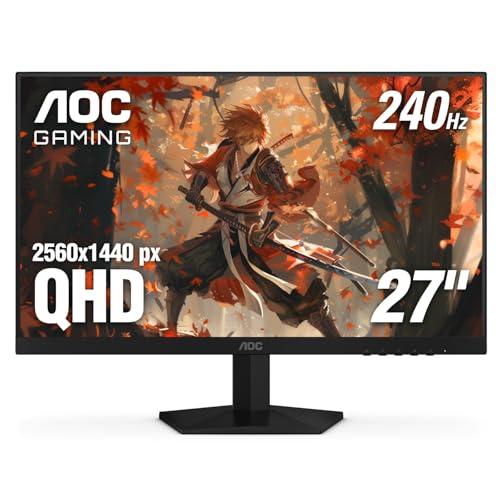 | High-Refresh Pro | Screen Size (inches): 27″ | Resolution (QHD): 2560×1440 | Refresh Rate (Hz): 240 Hz (260 Hz overclock) | VIEW LATEST PRICE | Read Our Analysis |
| LG 34″ Curved Gaming Monitor 240Hz 1ms FreeSync HDR400 Black |  | Ultra-Wide Immersion | Screen Size (inches): 34″ | Resolution (QHD): 3440×1440 | Refresh Rate (Hz): 240 Hz | VIEW LATEST PRICE | Read Our Analysis |
| Acer Nitro 27″ QHD Gaming Monitor 180Hz HDR |  | HDR Fast‑Lane | Screen Size (inches): 27″ | Resolution (QHD): 2560×1440 | Refresh Rate (Hz): 180 Hz | VIEW LATEST PRICE | Read Our Analysis |
| INNOCN 24.5″ 1440P 240Hz QHD Gaming Monitor | 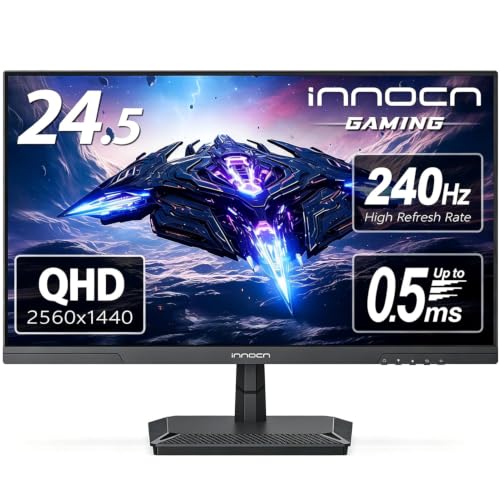 | Compact Powerhouse | Screen Size (inches): 24.5″ | Resolution (QHD): 2560×1440 | Refresh Rate (Hz): 240 Hz | VIEW LATEST PRICE | Read Our Analysis |
| ASUS ROG Strix 27″ OLED Gaming Monitor (XG27AQDMG) |  | OLED Elite | Screen Size (inches): 26.5″ | Resolution (QHD): 2560×1440 | Refresh Rate (Hz): 240 Hz | VIEW LATEST PRICE | Read Our Analysis |
| LG 27″ Ultragear QHD Gaming Monitor 240Hz 1ms HDR400 Black | 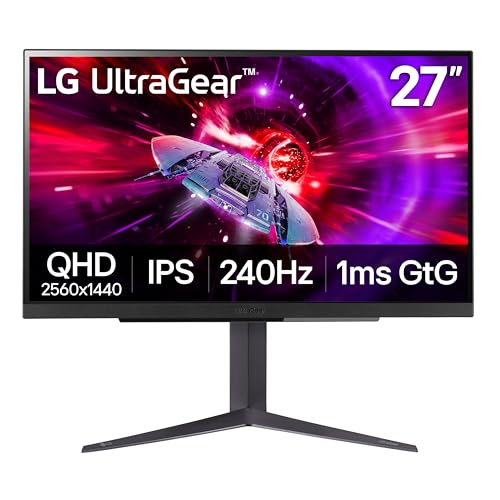 | G‑Sync Leader | Screen Size (inches): 27″ | Resolution (QHD): 2560×1440 | Refresh Rate (Hz): 240 Hz | VIEW LATEST PRICE | Read Our Analysis |
| AOC 27″ Curved Gaming Monitor 180Hz QHD FreeSync Adjustable Stand |  | Adjustable Comfort | Screen Size (inches): 27″ | Resolution (QHD): 2560×1440 | Refresh Rate (Hz): 180 Hz (144 Hz HDMI) | VIEW LATEST PRICE | Read Our Analysis |
More Details on Our Top Picks
Gawfolk 27″ QHD Gaming Monitor 120Hz Ultra‑Thin Frame
The Gawfolk 27‑inch QHD gaming monitor, model GF270A, targets gamers and professionals who require a 2560×1440 resolution, 120 Hz refresh rate, and IPS panel with 99 % sRGB coverage, offering smooth motion and accurate color reproduction, while its ultra‑thin zero‑frame design, matte screen surface, and 178‑degree viewing angles reduce visual distractions and maintain consistent image quality across wide angles. You’ll connect via HDMI 2.1 or DisplayPort 1.4, enabling compatibility with Xbox, PC, and laptops, and you can mount the unit on a wall using the 75 × 75 mm VESA pattern, while the adjustable tilt lets you fine‑tune ergonomics; the monitor’s dimensions, 8.26 × 24.17 × 21.65 inches, and weight of 7.28 lb, support desk placement without sacrificing stability, and the bezel‑less construction minimizes peripheral interference, allowing continuous visual flow during fast‑paced gameplay.
- Screen Size (inches):27″
- Resolution (QHD):2560×1440
- Refresh Rate (Hz):120 Hz
- Response Time (ms):1 ms (MPRT)
- Panel Type:IPS
- Adaptive‑Sync Support:HDMI 2.1 / DisplayPort 1.4 (no explicit sync listed)
- Additional Feature:Ultra‑thin zero frame
- Additional Feature:Wall‑mount ready
- Additional Feature:Adjustable tilt
ASUS ROG Strix OLED 27″ Gaming Monitor (XG27AQWMG)
ASUS ROG Strix OLED 27‑inch monitor, model XG27AQWMG, targets competitive gamers and visual‑performance enthusiasts who demand ultra‑fast response and high‑fidelity HDR, leveraging a TrueBlack Glossy WOLED panel that delivers 2560 × 1440 resolution, 280 Hz refresh, and 0.03 ms gray‑to‑gray response, while Tandem OLED technology raises peak brightness by 15 %, expands color volume 25 %, and extends panel lifespan 60 % relative to earlier WOLED units, all within a VESA DisplayHDR 500‑compliant framework that covers 99.5 % of DCI‑P3 and provides true 10‑bit color with Delta E < 2, and the integrated Neo Proximity Sensor under OLED Care Pro automatically blacks out the screen when no user is detected, mitigating burn‑in risk without manual intervention. You’ll connect via DisplayPort 1.4 DSC or HDMI 2.1, use the DisplayWidget Center to adjust OLED Care settings, and benefit from a three‑year warranty, a 30‑day return window, and three months of complimentary Adobe Creative Cloud, while the box includes necessary cables, a microfiber cloth, and a quick‑start guide.
- Screen Size (inches):27″
- Resolution (QHD):2560×1440
- Refresh Rate (Hz):280 Hz
- Response Time (ms):0.03 ms
- Panel Type:WOLED (TrueBlack Glossy)
- Adaptive‑Sync Support:G‑SYNC Compatible, Adaptive‑Sync
- Additional Feature:Neo Proximity Sensor
- Additional Feature:500 True Black HDR
- Additional Feature:3‑month Adobe Cloud
SANSUI 27″ Curved Gaming Monitor 180Hz 1ms (Q-C1Q)
SANSUI’s 27‑inch curved gaming monitor, model Q‑C1Q, targets competitive gamers who demand high‑refresh‑rate performance and low latency, offering a 180 Hz panel combined with a 1 ms MPRT response time, while its 1500R curvature and 2560 × 1440 WQHD resolution deliver sharp visuals and reduced eye movement; the monitor’s 120% sRGB and 90% DCI‑P3 color gamut, 300‑nit brightness, and 5000:1 contrast ratio support HDR content, and its 178° viewing angle ensures consistent color reproduction across wide perspectives, whereas connectivity includes two HDMI 2.0 ports limited to 144 Hz and two DisplayPort 1.2 inputs supporting the full 180 Hz, complemented by a matte surface and tilt‑adjustable stand (‑5° to +15°), VESA‑compatible mounting, and a 30‑day money‑back guarantee with a one‑year quality warranty and lifetime technical assistance.
- Screen Size (inches):27″
- Resolution (QHD):2560×1440
- Refresh Rate (Hz):180 Hz
- Response Time (ms):1 ms (MPRT)
- Panel Type:VA (curved)
- Adaptive‑Sync Support:FreeSync (implied)
- Additional Feature:1500R curvature
- Additional Feature:Earphone jack
- Additional Feature:Matte surface
AOC Q27G41ZE 27″ QHD Gaming Monitor 240Hz HDR
Looking for a 27‑inch QHD monitor that delivers ultra‑fast frame delivery without sacrificing color fidelity, the AOC Q27G41ZE offers a 2560 × 1440 IPS panel, 240 Hz native refresh (overclockable to 260 Hz), and 0.3 ms MPRT response, which together assure minimal motion blur and input latency for competitive gaming. You’ll notice the 300‑nit brightness and 1000:1 contrast ratio provide adequate luminance and depth, while the glossy surface enhances color vibrancy, though it may reflect ambient light. Adaptive‑Sync compatibility with AMD and NVIDIA GPUs eliminates tearing, and the built‑in Shadow Control and Game Mode Presets enable fine‑tuned visual adjustments, while the three‑sided frameless design, tilt range of –3° to +21°, and VESA 100 × 100 mm mounting support facilitate ergonomic placement and multi‑monitor setups. Connectivity includes DisplayPort 1.4, dual HDMI 2.0, and audio out, and the three‑year zero‑bright‑dot warranty underscores AOC’s confidence in panel reliability.
- Screen Size (inches):27″
- Resolution (QHD):2560×1440
- Refresh Rate (Hz):240 Hz (260 Hz overclock)
- Response Time (ms):0.3 ms (MPRT)
- Panel Type:IPS
- Adaptive‑Sync Support:Adaptive‑Sync (AMD & NVIDIA)
- Additional Feature:Overclockable to 260Hz
- Additional Feature:Shadow Control feature
- Additional Feature:Three‑sided frameless
LG 34″ Curved Gaming Monitor 240Hz 1ms FreeSync HDR400 Black
The LG 34G630A‑B, a 34‑inch ultrawide WQHD monitor with a 21:9 aspect ratio, delivers 240 Hz refresh and 1 ms gray‑to‑gray response, making it suitable for competitive gamers who demand ultra‑smooth motion and minimal ghosting. Its DisplayHDR 400 capability reaches up to 95 % DCI‑P3 coverage, providing vibrant color reproduction while the FreeSync Premium technology mitigates tearing and stuttering across HDMI 2.0 and DisplayPort 1.4 inputs, and the USB‑C port supports both video and data transfer, reducing cable clutter. The virtually borderless panel, adjustable height, tilt, and swivel stand, and slim profile enhance ergonomic comfort and immersion, while Dynamic Action Sync cuts input lag, Black Stabilizer brightens dark scenes, FPS Counter shows real‑time frame rates, and Crosshair overlay improves aiming precision for fast‑paced titles.
- Screen Size (inches):34″
- Resolution (QHD):3440×1440
- Refresh Rate (Hz):240 Hz
- Response Time (ms):1 ms (GtG)
- Panel Type:VA (curved)
- Adaptive‑Sync Support:FreeSync Premium
- Additional Feature:USB‑C display & data
- Additional Feature:Adjustable height stand
- Additional Feature:Black Stabilizer
Acer Nitro 27″ QHD Gaming Monitor 180Hz HDR
Acer’s Nitro KG271U N3bmiipx, a 27‑inch QHD monitor with a 2560 × 1440 resolution, targets gamers who demand high‑refresh‑rate performance and wide‑color‑gamut fidelity, offering 180 Hz refresh, 0.5 ms GTG response, and 95 % DCI‑P3 coverage; its DisplayPort 1.2 and dual HDMI 2.0 inputs, matte surface, and Zero‑Frame design combine to reduce input latency, minimize reflections, and support multi‑monitor configurations, while AMD FreeSync, flicker‑less technology, and low‑dimming backlight contribute to smoother motion and reduced eye strain, making it a technically robust choice for competitive and immersive gaming experiences. You’ll notice that the 27‑inch panel, measuring 8.28 × 24.2 × 18.14 inches and weighing 13.72 lb, fits standard desk setups, and the ComfyView coating further curbs glare, allowing sustained sessions without visual fatigue, and the 95 % DCI‑P3 coverage ensures color accuracy suitable for both gaming and content creation tasks.
- Screen Size (inches):27″
- Resolution (QHD):2560×1440
- Refresh Rate (Hz):180 Hz
- Response Time (ms):0.5 ms (GtG)
- Panel Type:VA (matte)
- Adaptive‑Sync Support:AMD FreeSync
- Additional Feature:Zero‑frame design
- Additional Feature:ComfyView anti‑glare
- Additional Feature:95% DCI‑P3 gamut
INNOCN 24.5″ 1440P 240Hz QHD Gaming Monitor
INNOCN’s 24.5‑inch 1440p 240Hz QHD monitor, model 25G2S, targets competitive gamers who demand ultra‑fast IPS panels, offering a 2560 × 1440 resolution, 1 ms response time, and G‑SYNC‑compatible 240 Hz refresh, while supporting additional rates of 120 Hz, 144 Hz, 165 Hz, and 180 Hz, which together reduce motion blur and input lag across FPS and RTS titles; the unit’s 99 % sRGB color gamut, HDMI 2.1 and DisplayPort 1.4 inputs, and VESA‑mountable metal stand with tilt adjustment further enhance flexibility for desktop PCs, gaming laptops, and consoles, and its ultra‑narrow three‑sided bezel, machine‑black chassis, and 8.98‑lb weight contribute to a compact, ergonomic setup that includes blue‑light reduction and flicker‑free eye‑care technologies, all backed by a one‑year product‑quality warranty and 24/7 customer support. You’ll notice the Fast IPS panel maintains consistent luminance across the 16:9 aspect ratio, while the 240 Hz refresh rate, synchronized with G‑SYNC, minimizes tearing during high‑speed combat; the 1 ms gray‑to‑gray response time, coupled with the 99 % sRGB coverage, ensures accurate color reproduction for detailed textures, and the HDMI 2.1/DisplayPort 1.4 ports accommodate both next‑gen consoles and high‑performance GPUs, allowing seamless integration into varied gaming rigs.
- Screen Size (inches):24.5″
- Resolution (QHD):2560×1440
- Refresh Rate (Hz):240 Hz
- Response Time (ms):1 ms
- Panel Type:IPS (Fast IPS)
- Adaptive‑Sync Support:G‑SYNC Compatible
- Additional Feature:Ultra‑narrow 3‑sided bezel
- Additional Feature:Blue‑light reduction
- Additional Feature:Flicker‑free tech
ASUS ROG Strix 27″ OLED Gaming Monitor (XG27AQDMG)
Looking for a 1440p monitor that delivers ultra‑fast response times, high refresh rates, and accurate color reproduction, the ASUS ROG Strix 27” OLED (XG27AQDMG) offers a 26.5‑inch QHD panel with 240 Hz refresh, 0.03 ms gray‑to‑gray response, and 99 % DCI‑P3 coverage, while its third‑generation WOLED technology provides enhanced brightness and motion clarity; the built‑in custom heatsink and advanced airflow design maintain thermal stability during sustained gaming sessions, and G‑SYNC compatibility ensures tear‑free visuals across compatible GPUs, making it a technically robust option for competitive and immersive play. Its glossy surface presents vivid contrast, the anti‑flicker system stabilizes frame timing, and the optional uniform brightness setting equalizes luminance across the screen, while DisplayWidget enables granular performance tuning, and the OLED Care suite mitigates burn‑in risk, delivering consistent image quality over long periods. The monitor weighs 14.8 lb, measures 8.62 × 23.82 × 20 in, includes a three‑year warranty, and provides a complimentary three‑month Adobe Creative Cloud subscription, reinforcing its value proposition for creators and gamers alike.
- Screen Size (inches):26.5″
- Resolution (QHD):2560×1440
- Refresh Rate (Hz):240 Hz
- Response Time (ms):0.03 ms
- Panel Type:WOLED
- Adaptive‑Sync Support:G‑SYNC Compatible, Adaptive‑Sync
- Additional Feature:Custom heatsink cooling
- Additional Feature:Uniform brightness mode
- Additional Feature:Anti‑flicker technology
LG 27″ Ultragear QHD Gaming Monitor 240Hz 1ms HDR400 Black
The LG 27‑inch UltraGear QHD monitor, featuring a 2560 × 1440 resolution, 240 Hz refresh rate via HDMI 2.1 or DisplayPort 1.4, and 1 ms GtG response time, targets competitive gamers who demand high frame‑rate performance and low input latency, while its VESA DisplayHDR 400 certification and 95 % DCI‑P3 color gamut provide sufficient dynamic range and color fidelity for visually intensive titles. You’ll find NVIDIA G‑SYNC compatibility, AMD FreeSync Premium, Dynamic Action Sync, and Black Stabilizer all integrated to reduce tearing, stutter, and input lag, while the on‑screen FPS Counter and Crosshair overlay deliver real‑time performance metrics. Ergonomically, the monitor offers tilt, height, and pivot adjustments, a three‑side virtually borderless chassis, and a 13.7‑pound footprint, complemented by three USB 2.0 ports, one USB 3.0 port, and a 4‑pole headphone jack with DTS Headphone:X for spatial audio.
- Screen Size (inches):27″
- Resolution (QHD):2560×1440
- Refresh Rate (Hz):240 Hz
- Response Time (ms):1 ms (GtG)
- Panel Type:IPS
- Adaptive‑Sync Support:NVIDIA G‑SYNC Compatible, AMD FreeSync Premium
- Additional Feature:DTS Headphone:X audio
- Additional Feature:Height‑adjustable stand
- Additional Feature:3‑side virtually borderless
AOC 27″ Curved Gaming Monitor 180Hz QHD FreeSync Adjustable Stand
AOC’s 27‑inch CQ27G4H delivers a 1500R curvature paired with a 2560 × 1440 QHD panel, which makes it a suitable candidate for gamers seeking immersive field‑of‑view without sacrificing pixel density. The monitor sustains a 180 Hz peak refresh rate via DisplayPort, while HDMI caps at 144 Hz, and its 0.5 ms response time reduces motion blur, enabling fluid visuals in fast‑paced titles, and its FreeSync Premium technology synchronizes frame output, mitigating tearing and stuttering. HDR readiness, high dynamic contrast ratio, and flicker‑free operation combine with low‑blue‑light settings to preserve eye comfort during extended sessions, while dual HDMI 2.0, DisplayPort 1.4, and earphone jack provide versatile connectivity, and the height‑adjustable, VESA‑compatible stand supports ergonomic positioning.
- Screen Size (inches):27″
- Resolution (QHD):2560×1440
- Refresh Rate (Hz):180 Hz (144 Hz HDMI)
- Response Time (ms):0.5 ms
- Panel Type:VA (curved)
- Adaptive‑Sync Support:AMD FreeSync Premium
- Additional Feature:Height‑adjustable stand
- Additional Feature:Flicker‑free tech
- Additional Feature:Low blue‑light mode
Factors to Consider When Choosing a Gaming Monitor 1440P
You should compare panel type and color gamut, because IPS offers wider viewing angles and sRGB coverage while VA provides higher contrast ratios, and you’ll need to match those characteristics to your game’s visual demands. Additionally, evaluate the rate and refresh rate, response time, input lag, and adaptive sync compatibility, as a 144 Hz (or higher) panel with 1 ms gray‑to‑gray response and G‑Sync or FreeSync support reduces motion blur and tearing. Finally, verify ergonomic adjustability and VESA mount options, ensuring tilt, swivel, height, and portrait modes are available while conforming to standard 100 mm×100 mm mounting dimensions.
Panel Rate Rate and Refresh Rate
Why does refresh rate matter for 1440p gaming monitors, given that they typically span 120 Hz to 240 Hz, which directly influences motion smoothness and input latency? A 1440p panel operating at 144 Hz delivers noticeably smoother motion than 120 Hz, yet a 240 Hz model reduces perceived blur and halves input lag, which benefits competitive shooters. GTG response times ranging from 0.03 ms to 1 ms complement high refresh rates by limiting ghosting during rapid scene changes, ensuring each frame registers cleanly. Overclocking can push a 165 Hz panel to 180 Hz or 240 Hz, but only if the display supports DisplayPort 1.4 or HDMI 2.1, because HDMI 2.0 caps at 144 Hz at 1440p. Consequently, verify the connection standard; otherwise, the monitor may default to a lower refresh rate, compromising the intended performance envelope.
Panel Type & Color Gamut
How does panel technology influence color fidelity and viewing consistency on a 1440p gaming monitor, given that IPS substrates typically provide 178° horizontal and vertical viewing angles, 0.5 ms gray‑to‑gray response times, and 99%–100% sRGB coverage, while WOLED/OLED panels deliver contrast ratios exceeding 1,000,000:1, true blacks, and DCI‑P3 ranges of 90%–95% but may suffer from potential burn‑in after prolonged static imagery? IPS panels give you uniform color across off‑axis positions, which matters when multiple viewers share a screen, and they maintain accurate hue reproduction within the sRGB space, ensuring that most games and productivity apps appear as intended. WOLED/OLED displays, by contrast, push contrast and HDR performance, offering deeper blacks and more saturated greens and reds thanks to DCI‑P3 coverage, while 10‑bit panels prevent banding by delivering smoother gradients, though their susceptibility to burn‑in requires careful static‑image management.
Response Time & Input Lag
What determines a 1440p monitor’s responsiveness is primarily its response time and input lag, because lower millisecond values—such as a 0.03 ms GTG rating—curb ghosting and motion blur while high refresh rates of 144 Hz to 240 Hz, when paired with those fast pixel transitions, further diminish perceived latency and improve overall gameplay fluidity. You should compare GTG, typically expressed in 0.1‑ms increments, with MPRT, which more directly reflects motion blur, noting that a 1 ms GTG and 4 ms MPRT combination still outperforms a 5 ms GTG/6 ms MPRT panel at the same refresh rate. Panel technology influences input lag; OLED and WOLED panels frequently achieve sub‑5 ms lag, whereas VA or IPS LCDs may register 8‑12 ms due to additional processing. When evaluating a monitor, verify that its native 1440p resolution, 144‑240 Hz refresh, and low response times are supported by minimal internal scaling or overdrive, ensuring that the total system latency remains within competitive thresholds.
Adaptive Sync Compatibility
Response time and input lag set the baseline for a monitor’s performance, but the next factor that determines smooth gameplay at 1440p is Adaptive Sync compatibility, which aligns the panel’s refresh rate with the GPU’s frame output to eliminate tearing and stuttering; AMD’s FreeSync and NVIDIA’s G‑SYNC (including G‑SYNC Compatible) are the primary standards, and they differ in required hardware, supported variable‑refresh ranges, and certification levels, so you must verify that the monitor’s DisplayPort 1.4 or HDMI 2.1 interface can sustain the advertised 144 Hz-240 Hz variable-refresh bandwidth without down-scaling, while also checking whether the firmware implements low-latency modes that preserve the sub-5 ms input lag measured in the previous section.
When evaluating a 1440p panel, confirm that its FreeSync range covers at least 48 Hz-144 Hz, because narrower ranges cause stutter at lower frame counts, and ensure that G-SYNC Compatible certification guarantees NVIDIA driver support without additional hardware; note that HDMI 2.1 models may offer 144 Hz at 1440p but could limit variable refresh to 120 Hz, whereas DisplayPort 1.4 typically maintains full 240 Hz range, thus requiring you to match cable quality and GPU output to avoid bottlenecks.
Ergonomic Adjustability & VESA Mount
Do you prioritize ergonomic flexibility when selecting a 1440p gaming monitor, because adjustable tilt, height, and swivel mechanisms directly influence visual comfort during extended sessions; a stand that offers a tilt range of ±15°, height adjustment up to 150 mm, and swivel rotation of 45° typically accommodates most desk configurations while maintaining a stable footprint, and when paired with a VESA-compatible mounting interface—commonly 100 × 100 mm—users can integrate the display into wall mounts or multi-monitor arms, provided the monitor’s total weight, often between 7 kg and 12 kg, and base dimensions, usually 300 mm × 250 mm, align with the mounting solution’s load capacity and clearance specifications. Verify that the stand’s adjustment mechanisms operate smoothly without excessive play, ensure the bezel thickness stays under 5 mm to reduce visual interruption in multi-monitor setups, and confirm that the weight distribution remains centered to prevent wobble when the arm extends.
Brightness, HDR & Contrast Ratio
Adjustable tilt, height, and swivel mechanisms improve ergonomic comfort, yet they also affect the monitor’s ability to maintain consistent luminance across viewing angles, making brightness, HDR support, and contrast ratio the next critical parameters; HDR standards such as DisplayHDR 400 or higher raise peak luminance to 300 nits or more, enabling clearer highlights in bright environments, while a contrast ratio of 1000:1 or greater separates dark and light zones, enhancing depth perception, and when paired with a DCI‑P3 color gamut covering 90–99 % of the spectrum, the combined effect on image fidelity becomes measurable across IPS, VA, and WOLED panels, which each exhibit distinct trade‑offs in response time, black level stability, and HDR rendering accuracy during fast‑paced 1440p gameplay. You should verify peak brightness values, ensuring at least 300 nits for daytime use, while checking that HDR implementation supports true 10‑bit color depth, because higher bit depth reduces banding and improves gradient smoothness, particularly in dark scenes where contrast ratio directly influences shadow detail and perceived depth, and you must consider panel‑specific characteristics; IPS panels typically deliver consistent luminance across angles but may lag in absolute contrast compared to VA, which offers deeper blacks at the cost of slower gray‑to‑gray response, whereas WOLED combines high contrast with rapid pixel response, making it ideal for high‑intensity HDR bursts in competitive titles.
Connectivity Options & Ports
Acknowledge that you prioritize a balanced mix of HDMI 2.0/2.1 and DisplayPort 1.4 when selecting a 1440p gaming monitor, since HDMI 2.1 delivers up to 144 Hz at 1440p while DisplayPort 1.4 supports 180–240 Hz with DSC, enabling both console and PC compatibility; guarantee at least one DisplayPort is present for maximum refresh potential, verify HDMI version for broader device support, and confirm USB-C/DP Alt-Mode availability if single-cable laptop connections are required, while also checking that the box includes the necessary cables and that audio-out or USB-hub functions meet peripheral needs. A monitor that supplies a DisplayPort 1.4 port, an HDMI 2.1 input, and a USB-C port with alternate mode enables direct connection to high-end GPUs, next-gen consoles, and USB laptops, reducing the need for adapters; inclusion of a 3.5 mm audio-out jack and a built-in USB 3.0 hub further consolidates peripheral wiring, while bundled DisplayPort and HDMI cables ensure immediate deployment without additional purchases.
Build Quality & Design Aesthetics
How does the monitor’s chassis affect both visual immersion and ergonomic flexibility? A thin, frameless chassis maximizes screen real estate, reduces bezel distraction, and allows the 27‑inch 1440p panel to dominate the field of view, while a 1500R curvature further wraps the image, enhancing perceived depth and reducing eye movement across the display. VESA‑compatible mounting (100 × 100 mm) enables wall or arm installation, granting height, tilt, and swivel adjustments—often ranging from –3° to +21°—which accommodate varied seating positions and reduce neck strain. Matte finishes mitigate ambient glare, whereas glossy surfaces increase reflectivity, impacting contrast in brightly lit rooms. Build materials, such as aluminum alloy frames, contribute to rigidity, decreasing vibration under high refresh rates, and ensuring consistent pixel alignment during rapid motion.
Frequently Asked Questions
How Does HDR Affect Gaming Performance on 1440P Monitors?
HDR boosts perceived brightness, contrast, and color depth on 1440p displays, allowing you to differentiate details in dark shadows and bright highlights, which can improve target tracking and environmental awareness, yet it adds processing overhead, potentially increasing input latency by 0.5–2 ms depending on panel refresh rate and GPU scaling. When combined with 144 Hz or higher refresh panels, HDR’s frame‑rate impact remains minimal, but on 60 Hz models the extra tone may reduce effective frames per second by roughly 5 % under demanding titles.
Can I Use a 1440P Monitor With a Console Like PS5 or Xbox Series X?
You can connect a PS5 or Xbox Series X to a 1440p monitor, provided the display supports HDMI 2.0 or higher, which both consoles use for 1440p/60 Hz output; for example, a monitor with 2560×1440 resolution, 1 ms response time, and a 144 Hz panel will accept the signal, though the console will cap at 60 Hz unless the monitor advertises 1440p/120 Hz via HDMI 2.1. Guarantee HDR10 is enabled to preserve color depth, and verify that the monitor’s variable refresh rate (FreeSync or G‑Sync) is compatible with the console’s HDMI‑VRR feature to avoid tearing.
What Is the Impact of Response Time on Competitive Shooters?
Response time directly influences frame‑to‑frame visual continuity, because a 1 ms pixel transition reduces motion blur compared to 5 ms, allowing you to detect enemy movement earlier; consequently, shooters with 0.5 ms GtG often register up to 15 % faster target acquisition, while higher latency can introduce ghosting that obscures precise aiming cues, especially at 1440p 144 Hz, where each frame persists 6.94 ms, demanding minimal lag to maintain competitive edge.
Do Curved Monitors Reduce Eye Strain During Long Sessions?
You’ll find that curved monitors can lessen eye strain during extended sessions, because their radius matches natural eye curvature, which reduces peripheral distortion, and the consistent focal distance minimizes accommodation effort, especially when panel sizes exceed 27 inches, curvature radii range from 1500 mm to 2000 mm, and refresh rates stay at 144 Hz or higher, while maintaining 2560×1440 resolution with 1 ms Gt response, providing stable luminance and reduced glare.
Are There Specific GPU Requirements for 240HZ 1440P Gaming?
You need a GPU that can sustain roughly 200–250 fps at 1440p, which typically means a graphics card with at least 8 GB VRAM, a 300 W power draw, and a PCIe 3.0 ×16 interface; RTX 3070, RX 6700 XT, or higher meet those criteria, while lower‑tier cards drop below 180 fps, causing frame‑time irregularities, and high‑refresh monitors will display stutter if the GPU cannot consistently deliver the required frame rate.