As an Amazon Associate, we earn from qualifying purchases. Some links on this site are affiliate links at no extra cost to you. Our recommendations are based on thorough research and editorial judgment.


10 Best OLED Gaming Monitors That Will Elevate Your Gameplay

To elevate your gameplay, consider the top OLED gaming monitors, such as the MSI MPG 341CQPX, featuring a 34-inch QD-OLED screen with a 3440 x 1440 resolution, 240Hz refresh rate, and 0.03 ms response time. The LG 27-inch Ultragear offers dual HDMI 2.1 ports, while the ASUS ROG Swift 32″ provides 4K UHD visuals. Additionally, monitors like the MSI MAG 272QP and ASUS ROG Swift OLED 27” cater to competitive gamers, optimizing performance and visual fidelity. Further details are available.
Key Takeaways
- Look for monitors with QD-OLED technology for superior contrast and vibrant colors, such as the MSI MPG 341CQPX and ASUS ROG Swift OLED 27”.
- Higher refresh rates, like 240Hz, significantly enhance gameplay smoothness and reduce motion blur, ideal for competitive gaming.
- Consider ergonomic features and adjustability in monitors like the LG 27-inch Ultragear for comfort during long gaming sessions.
- Ensure compatibility with G-SYNC and FreeSync technologies to minimize screen tearing, enhancing overall visual clarity in fast-paced games.
- Choose monitors with high resolution (3440 x 1440 or 4K) for sharper visuals and expansive gaming experiences, as seen in the MSI MAG 272QP and LG 32″ UltraGear.
| MSI MPG 341CQPX 34-inch Curved OLED Gaming Monitor | Best Immersive Experience | Screen Size: 34 inches | Resolution: 3440 x 1440 (UWQHD) | Refresh Rate: 240 Hz | VIEW LATEST PRICE | Read Our Analysis | |
| LG 27-inch Ultragear OLED Gaming Monitor | 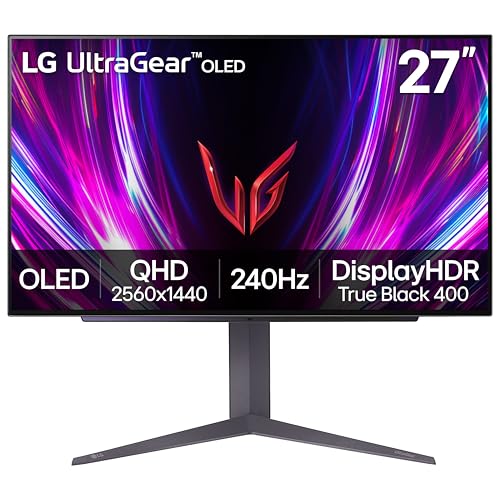 | Best Color Accuracy | Screen Size: 27 inches | Resolution: 2560 x 1440 (QHD) | Refresh Rate: 240 Hz | VIEW LATEST PRICE | Read Our Analysis |
| ASUS ROG Swift 32” 4K OLED Gaming Monitor | Most Comprehensive Features | Screen Size: 32 inches | Resolution: 3840 x 2160 (4K UHD) | Refresh Rate: 240 Hz | VIEW LATEST PRICE | Read Our Analysis | |
| LG 32″ UltraGear 4K Gaming Monitor (32GX850A-B) | Best Versatility | Screen Size: 32 inches | Resolution: 3840 x 2160 (4K UHD) | Refresh Rate: 165 Hz (can also support 330 Hz in Full HD) | VIEW LATEST PRICE | Read Our Analysis | |
| MSI MAG 272QP QD-OLED 27-inch Gaming Monitor | Best for Compact Spaces | Screen Size: 26.5 inches | Resolution: 2560 x 1440 (QHD) | Refresh Rate: 240 Hz | VIEW LATEST PRICE | Read Our Analysis | |
| Alienware 34-inch Curved QD-OLED Gaming Monitor |  | Best Curved Design | Screen Size: 34 inches | Resolution: 3440 x 1440 (WQHD) | Refresh Rate: 165 Hz | VIEW LATEST PRICE | Read Our Analysis |
| LG 27-inch Ultragear OLED Gaming Monitor | 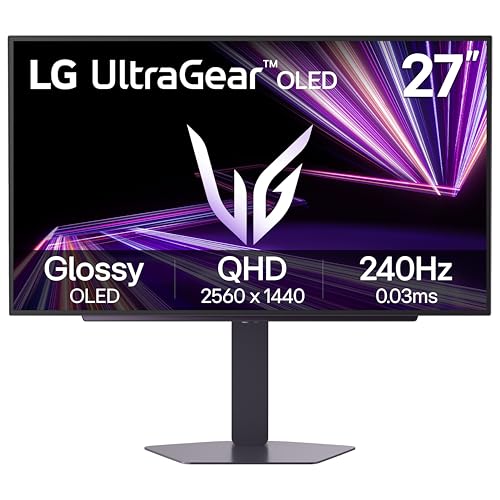 | Best Eye Comfort | Screen Size: 27 inches | Resolution: 2560 x 1440 (QHD) | Refresh Rate: 240 Hz | VIEW LATEST PRICE | Read Our Analysis |
| ASUS ROG Swift OLED 27” Gaming Monitor (PG27AQDP) |  | Highest Refresh Rate | Screen Size: 27 inches | Resolution: 2560 x 1440 (QHD) | Refresh Rate: 480 Hz | VIEW LATEST PRICE | Read Our Analysis |
| ASUS ROG Strix 26.5” QD-OLED Gaming Monitor (XG27ACDNG) | Best Cooling Technology | Screen Size: 26.5 inches | Resolution: 2560 x 1440 (QHD) | Refresh Rate: 360 Hz | VIEW LATEST PRICE | Read Our Analysis | |
| MSI MPG 321URX 32″ 4K QD-OLED Gaming Monitor |  | Best All-Rounder | Screen Size: 31.5 inches | Resolution: 3840 x 2160 (4K UHD) | Refresh Rate: 240 Hz | VIEW LATEST PRICE | Read Our Analysis |
More Details on Our Top Picks
MSI MPG 341CQPX 34-inch Curved OLED Gaming Monitor
The MSI MPG 341CQPX 34-inch Curved OLED Gaming Monitor is an excellent choice for gamers seeking high-performance displays that enhance visual fidelity; equipped with QD-OLED technology, this model provides superior contrast and vibrant color reproduction, essential for immersive gaming experiences. With a resolution of 3440 x 1440 and a 21:9 aspect ratio, it delivers expansive visuals. The monitor features a remarkable maximum refresh rate of 240Hz, ensuring smooth gameplay, while its response time of just 0.03 ms GtG greatly reduces motion blur. Additionally, it offers versatile connectivity options and ergonomic adjustability, tailoring to individual gaming preferences and comfort levels.
- Screen Size:34 inches
- Resolution:3440 x 1440 (UWQHD)
- Refresh Rate:240 Hz
- Response Time:0.03 ms (GtG)
- Color Gamut:Not specified
- HDR Certification:True Black HDR 400
- Additional Feature:True Black HDR 400
- Additional Feature:OLED Care 2.0
- Additional Feature:Gaming Intelligence APP
LG 27-inch Ultragear OLED Gaming Monitor
For competitive gamers seeking exceptional performance, the LG 27-inch Ultragear OLED Gaming Monitor stands out with a remarkable QHD resolution of 2560 x 1440 pixels, coupled with an impressive refresh rate of 240Hz and a response time of just 0.03ms (GtG). Its 1.5M:1 contrast ratio and VESA DisplayHDR True Black 400 certification guarantee vivid colors and deep black levels, considerably enhancing the gaming experience, especially in darker scenes. Additionally, the monitor supports adaptive sync technologies like NVIDIA G-SYNC and AMD FreeSync Premium Pro, which minimize screen tearing. The virtually borderless design optimizes desk space while offering height, tilt, and pivot adjustments.
- Screen Size:27 inches
- Resolution:2560 x 1440 (QHD)
- Refresh Rate:240 Hz
- Response Time:0.03 ms (GtG)
- Color Gamut:Up to 98.5% DCI-P3
- HDR Certification:VESA DisplayHDR True Black 400
- Additional Feature:Anti-glare screen
- Additional Feature:Virtually borderless design
- Additional Feature:Custom modes available
ASUS ROG Swift 32” 4K OLED Gaming Monitor
Designed for competitive gamers seeking unparalleled visual fidelity, the ASUS ROG Swift 32” 4K OLED Gaming Monitor (PG32UCDM) boasts a remarkable refresh rate of 240 Hz and a response time of just 0.03 ms (GTG), thereby ensuring an exceptionally fluid and responsive gaming experience. Featuring a QD-OLED display, this monitor offers 99% DCI-P3 color gamut and true 10-bit color depth, which provides vibrant and accurate colors. With G-SYNC compatibility and VESA DisplayHDR 400 True Black compliance, you can enjoy stunning contrast and smooth gameplay. Additionally, the custom heatsink and advanced airflow design reduce burn-in risks, enhancing longevity during extended use.
- Screen Size:32 inches
- Resolution:3840 x 2160 (4K UHD)
- Refresh Rate:240 Hz
- Response Time:0.03 ms (GTG)
- Color Gamut:99% DCI-P3
- HDR Certification:VESA DisplayHDR 400 True Black
- Additional Feature:Custom heatsink cooling
- Additional Feature:Delta E < 2 accuracy
- Additional Feature:3-month Adobe Creative Cloud
LG 32″ UltraGear 4K Gaming Monitor (32GX850A-B)
Requiring a high-performance display capable of meeting the demands of competitive gaming, the LG 32″ UltraGear 4K Gaming Monitor (32GX850A-B) excels with its impressive 165Hz refresh rate, adaptive sync technologies, and a rapid 0.03ms response time. This 32-inch UltraGear OLED offers a 4K UHD resolution of 3840 x 2160, ensuring sharp visuals, while its VESA DisplayHDR True Black 400 certification and DCI-P3 98.5% color gamut provide remarkable color accuracy and brightness levels typical at 275 nits. Additionally, features like Black Stabilizer and Dynamic Action Sync enhance gameplay immersion, minimizing lag and improving detail in dark scenes, consequently elevating your gaming experience.
- Screen Size:32 inches
- Resolution:3840 x 2160 (4K UHD)
- Refresh Rate:165 Hz (can also support 330 Hz in Full HD)
- Response Time:0.03 ms
- Color Gamut:98.5% DCI-P3
- HDR Certification:VESA DisplayHDR True Black 400
- Additional Feature:Dynamic Action Sync
- Additional Feature:Black Stabilizer feature
- Additional Feature:Ultra-thin design
MSI MAG 272QP QD-OLED 27-inch Gaming Monitor
The MSI MAG 272QP QD-OLED 27-inch Gaming Monitor stands out for its exceptional refresh rate of 240Hz and response time of 0.03ms (GtG), making it an excellent choice for competitive gamers seeking a fluid and responsive visual experience. With a QHD resolution of 2560 x 1440, its QD-OLED panel delivers vibrant colors, achieving Delta E≤2 for superior accuracy. Additionally, the monitor boasts a peak brightness of 1370.4 nits and is VESA ClearMR 13000 certified to minimize motion blur. Its ergonomic design includes adjustable tilt and height options and is VESA mount compatible, all while providing integrated audio through built-in speakers.
- Screen Size:26.5 inches
- Resolution:2560 x 1440 (QHD)
- Refresh Rate:240 Hz
- Response Time:0.03 ms (GtG)
- Color Gamut:Delta E ≤ 2 (QD Premium Color)
- HDR Certification:Not specified
- Additional Feature:Built-in speaker
- Additional Feature:VESA ClearMR 13000 certification
- Additional Feature:Adjustable tilt and height
Alienware 34-inch Curved QD-OLED Gaming Monitor
For gamers seeking an immersive experience, the Alienware 34-inch Curved QD-OLED Gaming Monitor (model AW3423DWF) stands out with its expansive 34-inch screen size and WQHD resolution of 3440 x 1440, which delivers stunning visuals at a 21:9 aspect ratio. The monitor utilizes Quantum Dot technology to achieve a remarkable color gamut of 99.3% DCI-P3, ensuring vibrant colors and true blacks. With a refresh rate of 165Hz via DisplayPort and support for HDR, it enables ultra-low latency gameplay. The 1800R curved design enhances immersion, while customizable RGB lighting provides aesthetic versatility, making it an excellent choice for serious gamers.
- Screen Size:34 inches
- Resolution:3440 x 1440 (WQHD)
- Refresh Rate:165 Hz
- Response Time:0.03 ms
- Color Gamut:99.3% DCI-P3
- HDR Certification:VESA DisplayHDR True Black 400
- Additional Feature:Customizable RGB AlienFX
- Additional Feature:360° ventilation design
- Additional Feature:Creator Mode available
LG 27-inch Ultragear OLED Gaming Monitor
Designed for gamers seeking high-performance specifications, the LG 27-inch Ultragear OLED Gaming Monitor features a stunning 27-inch QHD OLED display with a resolution of 2560×1440, optimizing visual fidelity and detail. With an impressive refresh rate of up to 240Hz and a rapid response time of 0.03ms, users experience seamless, fluid gameplay devoid of blurring. The monitor achieves peak brightness levels of 1300 nits and supports VESA DisplayHDR True Black 400, enhancing contrast ratios at 1.5M:1. Furthermore, its ergonomic stand provides customizable adjustments, while compatibility with dual HDMI 2.1 ports guarantees connectivity with next-gen consoles and high-performance PCs.
- Screen Size:27 inches
- Resolution:2560 x 1440 (QHD)
- Refresh Rate:240 Hz
- Response Time:0.03 ms
- Color Gamut:Up to 98.5% DCI-P3
- HDR Certification:VESA DisplayHDR True Black 400
- Additional Feature:Dual HDMI 2.1 ports
- Additional Feature:Bold Hexagon lighting
- Additional Feature:Eye comfort certified
ASUS ROG Swift OLED 27” Gaming Monitor (PG27AQDP)
ASUS ROG Swift OLED 27” Gaming Monitor (PG27AQDP) stands out as a top choice for competitive gamers seeking an edge in high-performance gaming environments. This 27-inch QHD monitor features a resolution of 2560 x 1440 pixels, complemented by an astonishing 480Hz refresh rate and an incredibly responsive 0.03ms response time, which is essential for fast-paced gaming. Utilizing a WOLED panel with a remarkable 99% DCI-P3 color gamut, it guarantees vibrant colors with minimal Delta E <2 variance. Additionally, G-SYNC compatibility, an exclusive gaming AI assistant, and ROG OLED Anti-flicker technology further enhance your gaming experience while addressing longevity concerns.
- Screen Size:27 inches
- Resolution:2560 x 1440 (QHD)
- Refresh Rate:480 Hz
- Response Time:0.03 ms
- Color Gamut:99% DCI-P3
- HDR Certification:DisplayHDR400 True Black
- Additional Feature:First 480Hz OLED monitor
- Additional Feature:Passive cooling technology
- Additional Feature:ROG-exclusive AI assistant
ASUS ROG Strix 26.5” QD-OLED Gaming Monitor (XG27ACDNG)
Offering a high-refresh-rate performance, the ASUS ROG Strix 26.5” QD-OLED Gaming Monitor (XG27ACDNG) is particularly suited for competitive gamers who prioritize smooth visuals and rapid response times. With a resolution of 2560 x 1440 and an astonishing 360 Hz refresh rate, it guarantees fluid motion clarity. The panel utilizes QD-OLED technology, providing a color performance covering 99% of the DCI-P3 gamut, coupled with a true 10-bit color depth. In addition, advanced features like VESA DisplayHDR 400 compliance enhance dynamic range, while the ROG-exclusive Anti-flicker technology mitigates visual fatigue, guaranteeing prolonged gaming sessions without screen tearing or burn-in risks.
- Screen Size:26.5 inches
- Resolution:2560 x 1440 (QHD)
- Refresh Rate:360 Hz
- Response Time:0.03 ms
- Color Gamut:99% DCI-P3
- HDR Certification:VESA DisplayHDR 400 True Black
- Additional Feature:ROG-exclusive anti-flicker
- Additional Feature:Custom heatsink design
- Additional Feature:Easy access widget center
MSI MPG 321URX 32″ 4K QD-OLED Gaming Monitor
The MSI MPG 321URX 32″ 4K QD-OLED Gaming Monitor stands out as an exceptional choice for competitive gamers who demand high performance and stunning visuals. With a resolution of 3840 x 2160, this 32-inch monitor employs a QD-OLED panel that supports a refresh rate of 240Hz and an impressive response time of 0.03ms GtG. The color accuracy, evidenced by a color depth of 1.07 billion colors and a DCI-P3 gamut coverage of 99%, guarantees vibrant imagery. Additionally, it features multiple connectivity options, including HDMI 2.1 and USB Type-C, along with a versatile stand for ideal ergonomics.
- Screen Size:31.5 inches
- Resolution:3840 x 2160 (4K UHD)
- Refresh Rate:240 Hz
- Response Time:0.03 ms (GtG)
- Color Gamut:99% DCI-P3
- HDR Certification:VESA DisplayHDR True Black 400
- Additional Feature:Mystic Light illumination
- Additional Feature:AI-assisted gaming features
- Additional Feature:4-way adjustable stand

Factors to Consider When Choosing an OLED Gaming Monitor
When choosing an OLED gaming monitor, you should consider several key factors that can greatly impact your gaming experience. Screen size plays an important role in immersion, while resolution requirements determine the clarity of the image; for instance, many gamers now prefer 4K over 1080p for sharper graphics. Additionally, the refresh rate and response time are fundamental for fluid gameplay, complemented by appropriate connectivity options to guarantee versatile compatibility with your devices.
Screen Size Selection
How do you determine the right screen size for your OLED gaming monitor? Start by considering common sizes, which typically range from 27 to 34 inches. A larger 34-inch curved monitor enhances immersion by providing a wider field of view, which is particularly advantageous in first-person shooters and expansive RPGs. Conversely, a 27-inch screen may yield better pixel density and clarity for fast-paced games, especially at high resolutions like QHD (2560 x 1440). Additionally, your viewing distance plays a critical role; larger monitors necessitate greater distances to avoid distortion and enhance comfort. Finally, a 21:9 aspect ratio in ultra-wide screens offers an immersive experience that can notably affect your gameplay.
Resolution Requirements
Resolution plays a pivotal role in defining the visual experience of an OLED gaming monitor, with options typically ranging from Full HD (1920 x 1080) to 4K (3840 x 2160), each offering varying levels of clarity and detail. Higher resolutions, such as 4K, provide sharper visuals compared to QHD (2560 x 1440), making them ideal for visually intensive gaming. Ultrawide monitors, with resolutions like 3440 x 1440, enhance immersion by offering a broader field of view, essential for expansive gaming environments. While the 16:9 aspect ratio remains standard, ultrawide displays may utilize the 21:9 aspect ratio to facilitate cinematic experiences. When selecting a monitor, consider how resolution impacts image quality and overall gaming enjoyment.
Refresh Rate Importance
Although many gamers prioritize resolution and color accuracy, the refresh rate of an OLED gaming monitor greatly impacts gameplay smoothness and responsiveness. Measured in hertz (Hz), a higher refresh rate, such as 240Hz, allows for displaying more frames per second, resulting in a noticeably smoother visual experience, particularly advantageous during fast-paced gaming scenarios. Monitors with refresh rates of 165Hz or lower may encounter screen tearing, disrupting gameplay due to frame desynchronization; therefore, utilizing adaptive sync technologies can mitigate this issue effectively. In addition, higher refresh rates contribute to enhanced visual clarity, enabling gamers to notice subtle movements and details more easily, which can be critical for competitive gaming success, where every fraction of a second matters greatly.
Response Time Considerations
When selecting an OLED gaming monitor, response time is a key factor that directly influences overall performance and user experience. A response time of 0.03 ms (GtG) is exceptional for gaming monitors, as it considerably reduces motion blur and ghosting effects during fast-paced gameplay, which is essential in competitive scenarios. Monitors exhibiting such ultra-low response times paired with refresh rates of 240Hz or higher enhance visual clarity, facilitating swift pixel changes and maintaining high fidelity. Additionally, most modern OLED gaming monitors offer response times around 0.03 ms, particularly effective when integrated with technologies like G-SYNC or FreeSync. Ultimately, choosing a monitor with lower response times can markedly improve responsiveness, reduce input lag, and provide a more precise control experience.
Connectivity Options Available
Connectivity options play an essential role in determining the functionality and versatility of OLED gaming monitors, particularly as gaming technology evolves. Monitors equipped with HDMI 2.1 ports support higher resolutions and refresh rates, which are critical for next-gen gaming consoles and high-performance PCs. Moreover, incorporating DisplayPort 1.4 allows for ideal refresh rates and resolutions in PC gaming, enhancing visual clarity and responsiveness. USB Type-C connectivity offers the convenience of connecting devices or charging laptops, often with power delivery features that streamline your setup. In addition, multiple USB ports, such as USB 3.0 or USB 3.2, enhance flexibility for attaching peripherals without needing extra hubs. Monitors with integrated KVM switches enable seamless changes between multiple devices, efficiently balancing gaming and productivity tasks.
Ergonomic Design Features
Ergonomic design features are frequently overlooked when selecting an OLED gaming monitor, yet they play an essential role in enhancing user comfort and overall gaming experience. Monitors with adjustable stands allow you to modify height, tilt, swivel, and pivot, optimizing viewing angles during prolonged sessions, which is essential for reducing fatigue. A virtually borderless design maximizes screen real estate while diminishing frame distractions, thereby increasing immersion. Anti-glare coatings and low blue light certifications notably reduce eye strain, permitting sustained focus. Additionally, customizable RGB lighting enhances the ambient environment, mitigating visual fatigue. Easy access to ports and controls streamlines setup and adjustments, ensuring that your gaming experience remains uninterrupted and efficient throughout your session.
Frequently Asked Questions
What Is the Lifespan of an OLED Gaming Monitor?
The lifespan of an OLED gaming monitor typically ranges from 30,000 to 100,000 hours, depending on usage and settings. Unlike traditional LCDs, OLEDs can experience burn-in or image retention, particularly when static images are displayed for extended periods. To maximize longevity, maintaining appropriate brightness levels and utilizing screen savers can mitigate these effects. Additionally, manufacturers often provide warranties covering both performance and material defects, thereby assuring both functionality and durability over time.
Are OLED Monitors Prone to Burn-In Issues?
Yes, OLED monitors can be prone to burn-in issues, particularly when static images are displayed for prolonged periods. This phenomenon occurs due to uneven wear of the organic compounds that emit light, resulting in permanent ghosting. To mitigate this risk, you should utilize screen savers, adjust brightness settings, and vary your content. Manufacturers often include features designed to reduce burn-in, enhancing longevity; thus, informed usage is vital to maintaining display quality over time.
Do OLED Monitors Require Special Calibration Settings?
Yes, OLED monitors often require special calibration settings to achieve ideal performance. Typically, you’ll need to adjust parameters like contrast, brightness, and color balance to match your environment and usage. While some monitors come pre-calibrated for general use, specific tasks, such as gaming or graphic design, may necessitate further refinement based on individual preferences. Regular calibration can minimize color drift and enhance image fidelity, ensuring that the display maintains its high-quality visual standards over time.
Can OLED Monitors Be Used for Console Gaming?
Yes, OLED monitors can be used for console gaming, providing superior contrast ratios and vibrant colors due to their self-emissive technology. They typically support high refresh rates and resolutions like 4K at 120Hz, essential for an immersive experience. However, you should consider potential burn-in issues with static images, warranting regular content variation to mitigate this risk. Additionally, make sure your console supports HDMI 2.1 to fully leverage the monitor’s capabilities for peak performance and visual quality.
What Is the Difference Between QD-OLED and Standard OLED Technology?
QD-OLED technology utilizes quantum dots, enhancing color accuracy and brightness compared to standard OLED, which primarily relies on organic compounds for light emission. While standard OLED delivers superior contrast and deeper blacks due to its self-emissive nature, QD-OLED addresses some brightness limitations, achieving higher peak lumens. Consequently, QD-OLED monitors excel in vivid color reproduction while maintaining the deep blacks characteristic of OLED, leading to an overall improved visual experience, particularly in bright environments.