As an Amazon Associate, we earn from qualifying purchases. Some links on this site are affiliate links at no extra cost to you. Our recommendations are based on thorough research and editorial judgment.

10 Best Dual Monitor Mounts That Optimize Your Workspace Perfectly

When selecting a dual monitor mount, consider the VIVO Dual Monitor Desk Mount for its ability to hold screens from 13 to 30 inches, supporting a weight of 22 lbs per monitor while providing extensive tilt and rotation adjustments. The EVEO Premium Mount accommodates 14 to 32 inches and emphasizes ergonomic positioning, whereas the HUANUO model, supporting 13-40 inches, features integrated USB ports. Other options like the WALI and ErGear mounts showcase varying installation methods and weight capacities. Additional considerations may enhance your workspace.
Key Takeaways
- Ergonomic designs, like those in the VIVO and EVEO mounts, enhance performance, reducing neck and back strain during extended use.
- Multiple height and tilt adjustments ensure optimal viewing angles, as seen in the ErGear and WALI models.
- Durable mounting options including C-clamp and grommet fittings provide versatility for different desk setups.
- Weight capacities vary, with options like HUANUO supporting up to 26.4 lbs per arm, suitable for larger monitors.
- Integrated cable management features in models like ErGear maintain a tidy workspace, improving functionality and airflow around monitors.
| VIVO Dual Monitor Desk Mount (Holds 2 Screens) |  | Best For Stability | Compatibility: 13″ to 30″ screens | Load Capacity: 22 lbs per monitor | VESA Compatibility: 75x75mm or 100x100mm | VIEW LATEST PRICE | Read Our Analysis |
| EVEO Premium Dual Monitor Mount for 14″-32” Screens |  | Quick Setup Champion | Compatibility: 14″ to 32″ screens | Load Capacity: Up to 22 lbs per monitor | VESA Compatibility: 75x75mm or 100x100mm | VIEW LATEST PRICE | Read Our Analysis |
| ErGear Dual Monitor Arm for 13–32″ Screens | 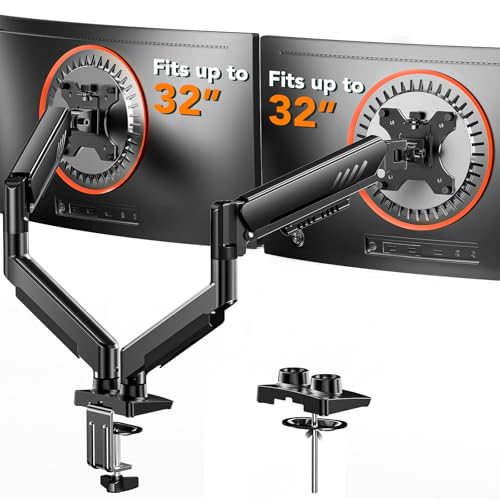 | Maximum Flexibility | Compatibility: 13″ to 32″ screens | Load Capacity: 19.8 lbs per monitor | VESA Compatibility: 75x75mm or 100x100mm | VIEW LATEST PRICE | Read Our Analysis |
| WALI Dual Monitor Stand for 13-32 Inch Screens | 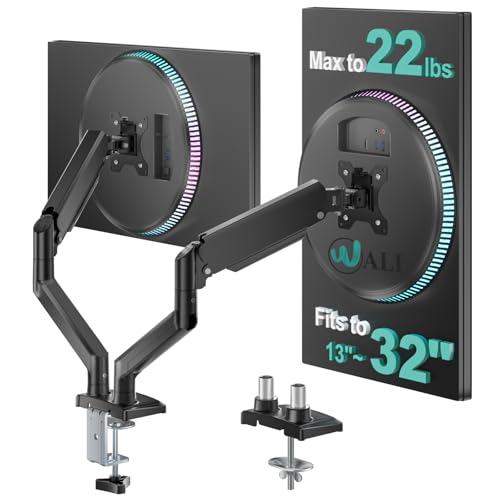 | Ergonomic Excellence | Compatibility: 13″ to 32″ screens | Load Capacity: 22 lbs per monitor | VESA Compatibility: 75x75mm or 100x100mm | VIEW LATEST PRICE | Read Our Analysis |
| VIVO Dual Monitor Desk Mount (STAND-V032) | 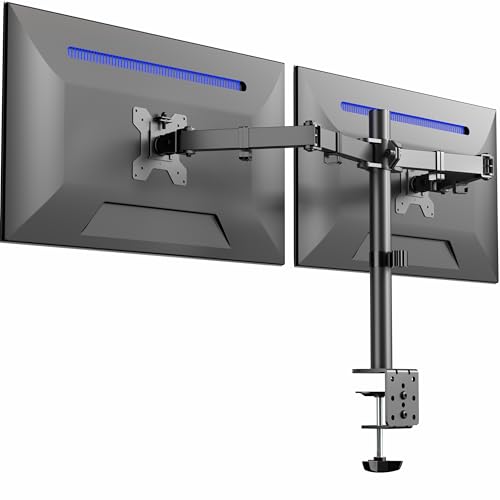 | Heavy-Duty Construction | Compatibility: 13″ to 32″ screens | Load Capacity: 22 lbs per monitor | VESA Compatibility: 75x75mm or 100x100mm | VIEW LATEST PRICE | Read Our Analysis |
| VIVO Dual Monitor Stand for 17 to 32 Inch Screens | 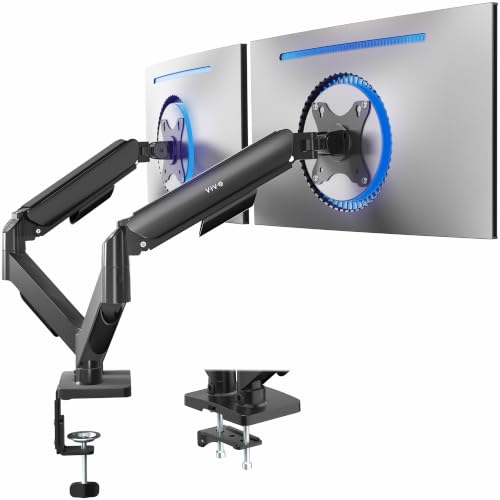 | Space Saver | Compatibility: 17″ to 32″ screens | Load Capacity: 19.8 lbs per monitor | VESA Compatibility: 75x75mm or 100x100mm | VIEW LATEST PRICE | Read Our Analysis |
| HUANUO Dual Monitor Stand (13″–40″) |  | Heavyweight Support | Compatibility: 13″ to 40″ screens | Load Capacity: 26.4 lbs per arm | VESA Compatibility: 75x75mm or 100x100mm | VIEW LATEST PRICE | Read Our Analysis |
| HUANUO Dual Monitor Stand with Adjustable Arms |  | Ideal For Small Spaces | Compatibility: 13″ to 32″ screens | Load Capacity: 19.8 lbs per monitor | VESA Compatibility: 75x75mm or 100x100mm | VIEW LATEST PRICE | Read Our Analysis |
| HUANUO Dual Monitor Mount for 2 Monitors |  | Durable Design | Compatibility: 17″ to 32″ screens | Load Capacity: 22 lbs per arm | VESA Compatibility: 75x75mm or 100x100mm | VIEW LATEST PRICE | Read Our Analysis |
| NB North Bayou Dual Monitor Desk Mount Stand |  | Budget-Friendly Option | Compatibility: Up to 27″ screens | Load Capacity: 4.4 – 19.8 lbs per monitor | VESA Compatibility: 75x75mm or 100x100mm | VIEW LATEST PRICE | Read Our Analysis |
More Details on Our Top Picks
VIVO Dual Monitor Desk Mount (Holds 2 Screens)
The VIVO Dual Monitor Desk Mount is an excellent solution for professionals requiring dual-screen setups, as it accommodates monitor sizes ranging from 13 to 30 inches, thereby providing versatility for various workspace configurations. This mount supports a weight of up to 22 lbs per monitor and employs VESA mounting standards of either 75x75mm or 100x100mm. Featuring a heavy-duty C-clamp for desk attachment, it suits desks up to 3.25 inches thick or includes an optional grommet mount for secure installation. Additionally, it allows multiple adjustments including a +90° to -90° tilt, 360° rotation, and height changes for ideal viewing angles.
- Compatibility:13″ to 30″ screens
- Load Capacity:22 lbs per monitor
- VESA Compatibility:75x75mm or 100x100mm
- Mounting Options:C-clamp or grommet
- Adjustability:Full articulation with tilt, swivel, and rotation
- Cable Management:Included cable management clips
- Additional Feature:3 Year Manufacturer Warranty
- Additional Feature:Heavy-duty C-clamp mounting
- Additional Feature:Portrait/landscape orientation options
EVEO Premium Dual Monitor Mount for 14″-32” Screens
For users seeking an adaptable solution to enhance their productivity, the EVEO Premium Dual Monitor Mount accommodates screens ranging from 14 to 32 inches, making it suitable for various monitor configurations. Constructed from durable alloy steel, this mount supports VESA patterns of 75×75 and 100×100 mm, ensuring compatibility with a wide range of monitors. With a quick installation time of approximately five minutes, it features a sturdy desk clamp or grommet mount option, allowing versatile desk arrangements. The mount’s 360° rotation and ±90° swivel provide ideal positioning, promoting ergonomic efficiency while reducing neck and back strain for improved user comfort.
- Compatibility:14″ to 32″ screens
- Load Capacity:Up to 22 lbs per monitor
- VESA Compatibility:75x75mm or 100x100mm
- Mounting Options:Sturdy desk clamp or grommet
- Adjustability:360° rotation, +90° to -90° swivel
- Cable Management:Integrated cable management system
- Additional Feature:Quick 5-minute installation
- Additional Feature:Ergonomic design for posture
- Additional Feature:Articulating movement type
ErGear Dual Monitor Arm for 13–32″ Screens
Offering a best-suited solution for users needing versatile screen arrangements, the ErGear Dual Monitor Arm effectively accommodates monitors ranging from 13” to 32”, supporting a maximum load of 19.8 lbs. This arm is compatible with VESA mounting patterns of 75x75mm or 100x100mm, so confirm you verify your monitor’s specifications before purchase. Installation is straightforward, requiring no tools for setup, thanks to the one-piece C-clamp and optional bolt-through mount. The arm allows height adjustments up to 17.5” and extends 18.1”, with tilt, swivel, and rotation features optimizing your viewing angles while integrating upgraded cable management for a clean workspace.
- Compatibility:13″ to 32″ screens
- Load Capacity:19.8 lbs per monitor
- VESA Compatibility:75x75mm or 100x100mm
- Mounting Options:C-clamp or bolt-through grommet
- Adjustability:Dynamic angle adjustments, height adjustment
- Cable Management:Upgraded cable clips for organization
- Additional Feature:Tool-free VESA mounting
- Additional Feature:Dynamic independent positioning
- Additional Feature:Tested for 20,000 cycles
WALI Dual Monitor Stand for 13-32 Inch Screens
Designed specifically for users requiring versatile display arrangements, the WALI Dual Monitor Stand accommodates 13 to 32-inch flat and curved LCD/LED screens, supporting a maximum weight of 22 lbs per monitor. Utilizing VESA mounting standards of 75x75mm and 100x100mm, this stand guarantees compatibility across various monitor types. Equipped with dynamic adjustments, it provides swivel capabilities of +90°/-90°, tilt adjustments of +70°/-45°, and 360° rotation, allowing best positioning for ergonomic benefits. In addition, with a maximum extension of 19.3 inches and adjustable height of 17.3 inches, it effectively minimizes neck and eye strain, enhancing user comfort during extended usage.
- Compatibility:13″ to 32″ screens
- Load Capacity:22 lbs per monitor
- VESA Compatibility:75x75mm or 100x100mm
- Mounting Options:C-clamp or hole base
- Adjustability:Tilt, swivel, and height adjustments
- Cable Management:Cable management features included
- Additional Feature:Gas spring mount technology
- Additional Feature:Dedicated US-based support
- Additional Feature:Smooth swivel capabilities
VIVO Dual Monitor Desk Mount (STAND-V032)
The VIVO Dual Monitor Desk Mount (STAND-V032) stands out as an exceptional choice for professionals and gamers who require versatile display arrangements, as it accommodates two monitors ranging from 13” to 32” in size, with a maximum weight capacity of 22 lbs per screen. Constructed from alloy steel and aluminum, this mount provides durability while offering extensive articulation, including +90° to -90° tilt, 180° swivel, and 360° rotation capabilities. Installation is straightforward, utilizing a heavy-duty C-clamp for drill-free mounting, or an optional grommet mount, accompanied by neatly integrated cable management clips for efficient cord organization, enhancing workspace aesthetics.
- Compatibility:13″ to 32″ screens
- Load Capacity:22 lbs per monitor
- VESA Compatibility:75x75mm or 100x100mm
- Mounting Options:C-clamp or grommet
- Adjustability:Tilt, swivel, rotation, height adjustment
- Cable Management:Integrated cable management system
- Additional Feature:Integrated cable management clips
- Additional Feature:Adjustable height along center pole
- Additional Feature:Detachable VESA bracket plates
VIVO Dual Monitor Stand for 17 to 32 Inch Screens
For professionals and gaming enthusiasts seeking an efficient workspace solution, the VIVO Dual Monitor Stand accommodates 17 to 32 inch screens, providing broad compatibility with a weight range of 4.4 lbs to 19.8 lbs. This articulating mount supports VESA 75x75mm and 100x100mm mounting patterns, allowing seamless installation. Remarkably, the mechanical spring adjustment enables tool-less monitor placement, facilitating a tilt of +90° to -90°, a 180° swivel, and a 360° rotation for excellent viewing angles. The assembly process is straightforward, with all necessary hardware included. Designed for both gaming and office environments, it elevates monitors, maximizing valuable desk space efficiently.
- Compatibility:17″ to 32″ screens
- Load Capacity:19.8 lbs per monitor
- VESA Compatibility:75x75mm or 100x100mm
- Mounting Options:C-clamp or grommet
- Adjustability:Tilt, swivel, rotate, height adjustment
- Cable Management:Cable management functionality
- Additional Feature:Pneumatic spring adjustment
- Additional Feature:Open-top VESA plates
- Additional Feature:Suitable for gaming setups
HUANUO Dual Monitor Stand (13″–40″)
If you require a reliable dual monitor stand, the HUANUO Dual Monitor Stand (Model: HNDS7) is an excellent choice, particularly for users with monitors ranging from 13″ to 40″. This model supports a weight capacity of up to 26.4 lbs per arm and offers enhanced stability via a dual C-clamp design, suitable for heavier displays. Height adjustment allows arms to rise up to 21.1″ and extend 25.59″ for deeper desks. With full motion capabilities, monitors swivel from -90° to +90°, tilt -30° to +85°, and rotate 360° to guarantee ideal viewing angles, while integrated USB ports facilitate easy device charging.
- Compatibility:13″ to 40″ screens
- Load Capacity:26.4 lbs per arm
- VESA Compatibility:75x75mm or 100x100mm
- Mounting Options:C-clamp or grommet
- Adjustability:Full motion with height and angle adjustments
- Cable Management:Integrated cable management system
- Additional Feature:Built-in USB ports
- Additional Feature:Enhanced dual C-clamp design
- Additional Feature:Supports deeper desks
HUANUO Dual Monitor Stand with Adjustable Arms
Designed specifically for users with monitors ranging from 13 to 32 inches and a weight capacity of 4.4 to 19.8 lbs per monitor, the HUANUO Dual Monitor Stand with Adjustable Arms presents an adaptable solution for enhancing workspace efficiency. This stand features pneumatic spring desk arms, allowing smooth adjustments in swivel, tilt, and rotation, promoting proper ergonomics by raising monitors to eye level. Additionally, it incorporates dual installation methods—C-clamp and grommet base—to guarantee stable fixation, thereby minimizing monitor movement. With effective cable management capabilities, it organizes wires, optimizing desktop space, ultimately facilitating a clutter-free work environment.
- Compatibility:13″ to 32″ screens
- Load Capacity:19.8 lbs per monitor
- VESA Compatibility:75x75mm or 100x100mm
- Mounting Options:C-clamp or grommet
- Adjustability:Pneumatic spring arm adjustments
- Cable Management:Designed for cable organization
- Additional Feature:Unique structural design
- Additional Feature:Installation manual included
- Additional Feature:50% desktop space savings
HUANUO Dual Monitor Mount for 2 Monitors
Maximizing workplace productivity requires efficient use of screen real estate, and the HUANUO Dual Monitor Mount for 2 Monitors meets this need by supporting two monitors simultaneously, each up to 32 inches in size and weighing no more than 22 lbs. Constructed from aerospace-grade aluminum alloy, this mount provides exceptional stability while preventing sag or wobble during use, ensuring long-term reliability. The mount features adjustable viewing angles, offering +/-90° swivel, +90°/-35° tilt, and 360° rotation, accommodating ergonomic viewing. Installation is user-friendly, supporting C-clamp or grommet mounting options and compatible with most monitors featuring 75x75mm or 100x100mm VESA patterns.
- Compatibility:17″ to 32″ screens
- Load Capacity:22 lbs per arm
- VESA Compatibility:75x75mm or 100x100mm
- Mounting Options:C-clamp or grommet
- Adjustability:Swivel, tilt, rotation, height adjustments
- Cable Management:Cable management system
- Additional Feature:Aerospace-grade aluminum alloy
- Additional Feature:Simple installation in 10 minutes
- Additional Feature:Flexible arm adjustments
NB North Bayou Dual Monitor Desk Mount Stand
The NB North Bayou Dual Monitor Desk Mount Stand (Model H180-G) is an ideal solution for professionals who require an ergonomic workspace that accommodates dual monitors up to 27 inches, enabling a weight capacity of 4.4 to 19.8 pounds per screen. Weighing 6.6 pounds and constructed from durable aluminum, it features dimensions of 34.65 x 4.72 x 25.2 inches. The mount supports VESA compatibility (75x75mm and 100x100mm) and offers both clamp and grommet mounting options for desks of varying thicknesses. Ergonomic adjustments include a maximum extension of 22.1 inches, tilt angles from +85° to -30°, and a 360° rotation, ensuring comfort during prolonged use.
- Compatibility:Up to 27″ screens
- Load Capacity:4.4 – 19.8 lbs per monitor
- VESA Compatibility:75x75mm or 100x100mm
- Mounting Options:Clamp or grommet
- Adjustability:Tilt, swivel, rotation, adjustable height
- Cable Management:Integrated cable management system
- Additional Feature:Max extension 22.1 inches
- Additional Feature:Integrated cable management system
- Additional Feature:Lightweight aluminum construction
Factors to Consider When Choosing a Dual Monitor Mount
When you’re selecting a dual monitor mount, consider monitor size compatibility and weight capacity limits to guarantee proper fit and support. Additionally, evaluate the various mounting options available, as well as adjustability features, which can enhance your ergonomic setup. Finally, ease of installation is essential, as complicated assemblies can lead to frustration and time loss during setup.
Monitor Size Compatibility
Selecting an appropriate dual monitor mount necessitates careful consideration of monitor size compatibility, as various factors impact the stability and functionality of the setup. First, verify that the mount accommodates your monitor sizes, which usually range from 13 inches to 40 inches. Additionally, verify your monitors have compatible VESA mount specifications, typically either 75x75mm or 100x100mm, as this compatibility confirms secure fitting. Also consider that some mounts support flat or curved displays specifically; confirming this aspect is essential for ideal performance. Moreover, assess the mounting arm’s reach and height adjustment capabilities, which should align with your desk dimensions and desired ergonomic positioning, guaranteeing a comfortable workspace while maintaining structural integrity.
Weight Capacity Limits
Weight capacity limits play a significant role in guaranteeing the safe and effective use of dual monitor mounts, as selecting a mount capable of supporting both the individual weights of your monitors and their combined total weight is essential for maintaining structural integrity. When choosing a mount, it’s important to take into account that weight capacities typically range from 19.8 lbs to 26.4 lbs per monitor, depending on the model. Always verify that the total weight of your monitors does not exceed the mount’s rated load capacity, which assures stability and prevents potential damage. Additionally, maintain awareness of VESA compatibility specifications, as many mounts offer specific weight limits, including common capacities of 22 lbs or 26.4 lbs, necessitating careful weight distribution for ideal performance.
Mounting Options Available
A dual monitor mount offers various mounting options, primarily C-clamp and grommet mounts, each designed to suit different installation preferences and desk configurations. C-clamp mounts facilitate easy installation on desk surfaces ranging from 0.39 to 3.25 inches thick without needing to drill, making them suitable for temporary setups. Conversely, grommet mounts require a pre-drilled hole, accommodating desk thicknesses of 0.39 to 2.95 inches, consequently providing a more stable and permanent attachment. It’s essential to evaluate the desk’s dimensions and compatibility with VESA standards of 75x75mm or 100x100mm, ensuring that your chosen mount supports your monitor sizes and weights effectively, thereby contributing notably to the ergonomics of your workspace by allowing ideal eye-level positioning.
Adjustability Features Offered
When considering a dual monitor mount, adjustability features play a significant role in optimizing user experience. Features such as tilting from +90° to -90° enable users to customize viewing angles, effectively reducing glare for more comfortable visibility. In addition, the ability to rotate monitors 360° facilitates smooth shifts between landscape and portrait orientations, enhancing workflow efficiency. Height adjustment options, often allowing monitors to rise several inches above the desk, contribute to improved ergonomic alignment with the user’s eye level, promoting comfort during prolonged use. Some mounts offer dynamic swivel movements up to ±90°, permitting independent positioning for each monitor, thereby enhancing collaborative efforts. Moreover, advanced models may include tool-less mechanical spring adjustments, simplifying the repositioning of monitors with minimal effort.
Ease of Installation
One essential factor to reflect on in the ease of installation for dual monitor mounts is the incorporation of tool-free VESA mounting systems, which greatly streamline the attachment process. Many mounts include detachable VESA bracket plates, allowing for quick monitor attachment and limiting cumbersome setup tasks. Additionally, consider options that provide both C-clamp and grommet mounting methods, as this accommodates various desk thicknesses, enhancing flexibility during installation. Moreover, verify that the included installation documentation and hardware are thorough, which can simplify the setup experience notably, eliminating the need for additional tools or assistance. Finally, quick assembly times—some as short as five minutes—can greatly enhance user satisfaction, promoting prompt usage of your dual monitor setup without unnecessary delays.
Material Durability and Quality
Installation considerations often incorporate not just ease but also the durability and quality of materials used in dual monitor mounts. Opt for mounts constructed from high-quality alloys, such as steel or aluminum, as these materials enhance strength and provide stability for heavier monitors, ideally supporting up to 22 lbs each. It’s important to select mounts that have been rigorously tested for durability, ensuring a long operational lifespan and resistance to wear and tear. Moreover, verify the VESA mounting pattern, typically 75x75mm or 100x100mm, to confirm compatibility with various monitor sizes. Additionally, assess the finishing details and construction quality; protective coatings notably reduce the risk of rust and scratches, thereby ensuring sustained aesthetic and functional performance over time.
Cable Management Solutions
A dual monitor mount’s effective cable management solutions play a crucial role in creating an organized and efficient workspace. Many dual monitor mounts feature integrated cable management systems, like clips or channels, designed to secure cables along the arms or poles, which minimizes visual clutter and prevents tangling. Proper cable management, in turn, enhances airflow around your electronic components, potentially reducing heat buildup, thereby prolonging the lifespan of your devices. Some solutions also permit easy access to ports and cords, making it simple for you to adjust or maintain your setup without the need for disassembly. Ultimately, utilizing these cable management features helps free desk space, contributing to a more efficient and comfortable work environment.
Ergonomic Design Benefits
Choosing a dual monitor mount based on ergonomic design benefits involves evaluating several factors that contribute to user comfort and productivity. An ergonomic mount allows you to adjust screen height, tilt, and swivel, promoting alignment with eye level to reduce neck strain. Proper monitor placement facilitates an open body posture, thereby decreasing shoulder and back discomfort by preventing awkward viewing angles. Additionally, a well-designed mount can clear desk space, reducing clutter and enhancing your work environment’s efficiency. Easily repositioned monitors help minimize glare, mitigating eye strain through customizable viewing angles. Furthermore, adjustable features enable quick shifts between tasks, allowing for comfortable and effective reorientation, ultimately improving overall work productivity and user satisfaction.
Frequently Asked Questions
How Do I Determine the Weight Capacity of a Dual Monitor Mount?
To determine the weight capacity of a dual monitor mount, you should consult the manufacturer’s specifications, which typically detail the maximum load each arm can support, commonly ranging from 10 to 32 pounds per monitor. It’s essential to evaluate the combined weight of your monitors, ensuring it does not exceed the mount’s limit, as balance and stability depend on adhering to these guidelines, thereby preventing any structural failures during usage or installation.
Can I Mount Monitors of Different Sizes on the Same Stand?
Yes, you can mount monitors of different sizes on the same stand, provided the mount’s specifications accommodate the combined weight and size. When evaluating compatibility, verify that the mount supports various VESA patterns and can balance the size disparity. For ideal performance, consider the mount’s adjustability to maintain alignment, allowing both screens to function within the same visual plane. Proper cable management may also be required to prevent tangling and maintain a clean workspace.
What Are the Benefits of Gas Spring Arms in Monitor Mounts?
Gas spring arms in monitor mounts offer enhanced adjustability and ease of use, allowing you to modify the position of your monitors smoothly and without excessive force. This technology provides precise height adjustments, ensuring ideal ergonomics and reducing the risk of strain, particularly for users spending extended periods at screens. Additionally, many gas spring mounts support a range of monitor sizes, offering versatile positioning tailored to your specific workspace requirements and preferences.
Is It Easy to Adjust the Height of Dual Monitor Mounts?
Yes, adjusting the height of dual monitor mounts is generally straightforward, especially with gas spring arms, which provide efficient height modification without excessive force. Many models feature integrated height-adjustment mechanisms that allow you to alter monitor elevation within a specified range, typically 14 to 26 inches. Moreover, some mounts allow for tool-free adjustments, enhancing user convenience. This efficiency is critical in facilitating ideal ergonomic alignment, which can markedly impact user comfort and productivity levels.
Are Dual Monitor Mounts Compatible With All Desk Types?
Dual monitor mounts may not be universally compatible with all desk types, as compatibility depends on the mounting mechanism, which often requires specific desk thickness and surface material. For instance, clamp mounts typically require desks with a thickness of 0.5 to 2.5 inches, while grommet mounts need a pre-drilled hole. Additionally, you should evaluate your desk’s weight capacity and size to guarantee it can support the combined weight of the monitors effectively.