As an Amazon Associate, we earn from qualifying purchases. Some links on this site are affiliate links at no extra cost to you. Our recommendations are based on thorough research and editorial judgment.

10 Best Monitor Light Bars to Enhance Your Workspace Experience

To enhance your workspace experience, consider the top monitor light bars that offer features like adjustable brightness, customizable color temperatures, and eye-care technology. The Samphon light bar provides up to 800 lux illumination, while the PROSmart and OOWOLF models feature tool-free installations and remote controls, respectively. The Quntis Monitor Light Bar offers high CRI tech for color accuracy, and the Xiaomi Mi model supports automatic activation. Additional factors like installation simplicity and power source options further influence your selection, leading to maximum productivity.
Key Takeaways
- Monitor light bars improve workspace illumination, helping to reduce eye strain and enhance focus during prolonged computer use.
- Features like adjustable brightness and customizable color temperatures cater to specific tasks and personal preferences for optimal lighting.
- Asymmetrical designs and flicker-free technology minimize screen glare, promoting a comfortable viewing experience while working.
- Tool-free installation and compatibility with various monitor types ensure easy setup without damaging screens or cluttering desk space.
- Energy-efficient LED options offer longer lifespans and lower energy consumption, making them a sustainable choice for modern workspaces.
| Monitor Light Bar with Dimmable LED Lighting | 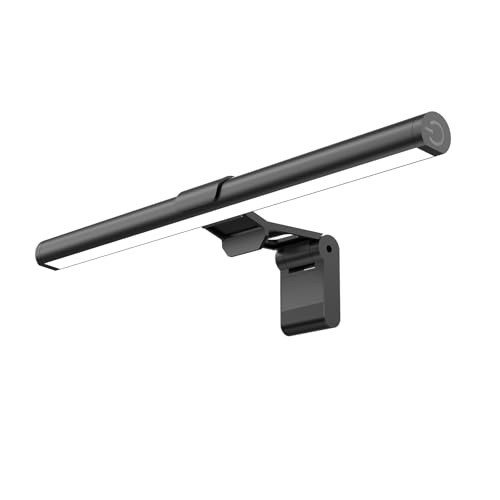 | Best for Eye Care | Light Type: LED | Eye Care Technology: Minimizes digital eye strain | Power Source: USB powered | VIEW LATEST PRICE | Read Our Analysis |
| PROSmart Monitor Light Bar for Home/Office/Game | Best Value | Light Type: Computer Monitor Lamp | Eye Care Technology: Reduces eyestrain | Power Source: USB powered | VIEW LATEST PRICE | Read Our Analysis | |
| OOWOLF Monitor Light Bar with Remote and Dimming | 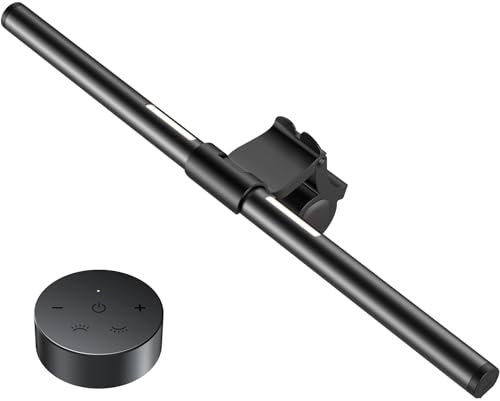 | Most Convenient | Light Type: Light Bar | Eye Care Technology: Reduces blue light hazard | Power Source: Corded electric | VIEW LATEST PRICE | Read Our Analysis |
| Led Desk Lamp – Eye Caring Adjustable Lighting |  | Best Adjustable Options | Light Type: Eye Caring Architect Lamp | Eye Care Technology: No blue light hazard | Power Source: Wired (external power) | VIEW LATEST PRICE | Read Our Analysis |
| Computer Monitor Light Bar with Backlight | Best Dual Functionality | Light Type: Dual Light | Eye Care Technology: Eliminates harmful blue light | Power Source: Corded electric | VIEW LATEST PRICE | Read Our Analysis | |
| Quntis RGB Pro+ Monitor Light Bar with Remote | 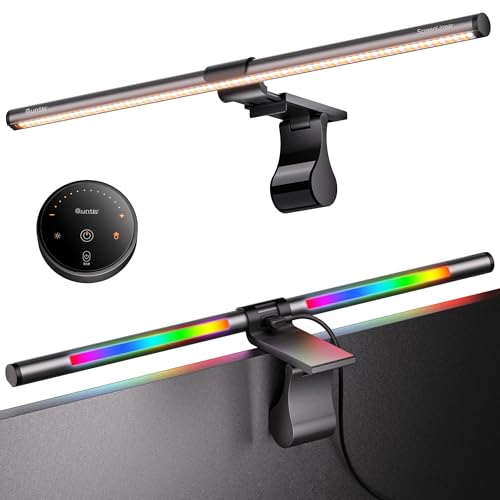 | Best RGB Effects | Light Type: LED | Eye Care Technology: Eye-Care Technology | Power Source: Corded electric | VIEW LATEST PRICE | Read Our Analysis |
| Quntis Curved Monitor Light Bar with RGB Backlight | 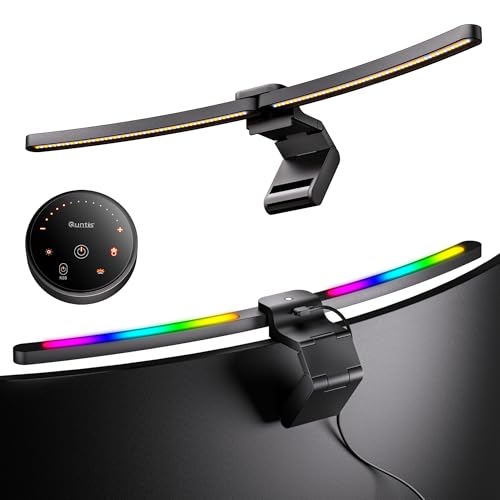 | Best for Curved Monitors | Light Type: Dual Light Bar | Eye Care Technology: Anti-blue light certified | Power Source: Corded electric | VIEW LATEST PRICE | Read Our Analysis |
| Xiaomi Mi Computer Monitor Light Bar with Remote | Best Smart Features | Light Type: Light Bar | Eye Care Technology: Reduces eye fatigue | Power Source: Corded electric | VIEW LATEST PRICE | Read Our Analysis | |
| ONEMIX 42″ LED Desk Lamp with Remote | 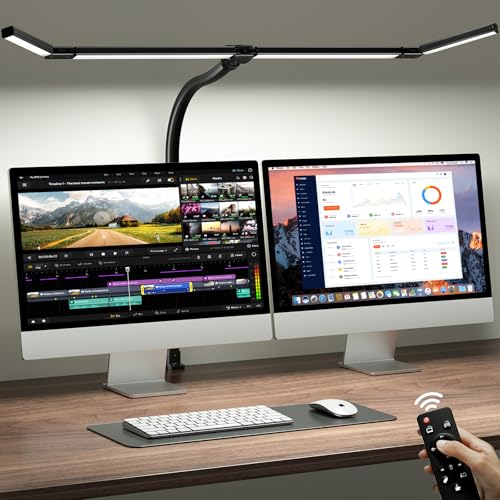 | Best Flexibility | Light Type: LED Desk Lamp | Eye Care Technology: Reduces blue light | Power Source: Corded electric | VIEW LATEST PRICE | Read Our Analysis |
| Quntis Monitor Light Bar with Remote and Dimming |  | Best for Customization | Light Type: Monitor Light Bar | Eye Care Technology: Reduces glare | Power Source: Corded electric | VIEW LATEST PRICE | Read Our Analysis |
More Details on Our Top Picks
Monitor Light Bar with Dimmable LED Lighting
The Monitor Light Bar by Samphon is an ideal choice for individuals seeking enhanced illumination for their workstations or gaming setups, especially due to its dimmable LED lighting feature, which provides customizable brightness and color temperature settings. With brightness levels reaching up to 800 lux and a beam angle of 45 degrees, this light bar effectively targets the screen and desk while minimizing digital eye strain. Its ultrawide design, measuring 11.8 inches, fits most screens securely without occupying desk space. Additionally, powered via USB, it features a mechanical ON/OFF switch and long-press functionality for adjusting brightness seamlessly.
- Light Type:LED
- Eye Care Technology:Minimizes digital eye strain
- Power Source:USB powered
- Adjustable Brightness:Dimmable
- Color Temperature:3000K – 6500K
- Design Type:Space-saving
- Additional Feature:Mechanical ON/OFF switch
- Additional Feature:Patented counterweight clip
- Additional Feature:Ultrawide lighting design
PROSmart Monitor Light Bar for Home/Office/Game
Designed specifically for professionals engaged in extended hours of study or work, the PROSmart Monitor Light Bar stands out with its maximum light output of 250 lumens and asymmetrical optical design that effectively minimizes screen glare. Its space-saving, top-down structure accommodates both curved and flat monitors, while its lightweight aluminum and plastic materials guarantee durability. With dimensions of 15.7 x 0.8 x 0.8 inches, installation is straightforward, requiring no screws and fitting monitors with thicknesses from 0.6 to 1.1 inches. Features such as stepless dimming, adjustable hue settings, and energy efficiency enhance its functionality, making it an ideal choice for various environments.
- Light Type:Computer Monitor Lamp
- Eye Care Technology:Reduces eyestrain
- Power Source:USB powered
- Adjustable Brightness:Brightness adjustment (5% to 100%)
- Color Temperature:2700K – 6500K
- Design Type:Slim design
- Additional Feature:250 Lumens light output
- Additional Feature:Touch control interface
- Additional Feature:Space-saving top-down design
OOWOLF Monitor Light Bar with Remote and Dimming
Offering a sleek and minimalist design, the OOWOLF Monitor Light Bar with Remote and Dimming is an ideal solution for professionals and gamers who require efficient lighting without cluttering their desks. This model features a lightweight aluminum construction, measuring 16.14 x 0.79 x 0.79 inches and weighing only 0.35 kilograms, guaranteeing stability on various screen types. With adjustable color temperatures ranging from 6500K to 3100K, it facilitates changes between cool white for alertness and warm white for relaxation. The built-in remote control enables seamless adjustments to brightness and settings, while high CRI (≥95) guarantees accurate color representation, minimizing eye strain during extended usage.
- Light Type:Light Bar
- Eye Care Technology:Reduces blue light hazard
- Power Source:Corded electric
- Adjustable Brightness:Stepless dimming
- Color Temperature:3100K – 6500K
- Design Type:Minimalist style
- Additional Feature:Remote control adjustments
- Additional Feature:Backlight feature available
- Additional Feature:Flicker-free technology
Led Desk Lamp – Eye Caring Adjustable Lighting
For individuals who frequently engage in extended periods of work at dual-screen setups, the Led Desk Lamp for Office Home presents a multifaceted lighting solution tailored to reduce eye strain while enhancing productivity. This eye-caring architect lamp, featuring a clamp design, operates at 24W and provides 25 lighting combinations, incorporating five color temperatures ranging from 3000K to 5500K and five adjustable brightness levels between 20% and 100%. With its versatile 360° standing and 180° foldable swing arms, along with a 270° rotatable lamp head, the lamp guarantees peak illumination for various tasks while employing energy-efficient LED technology that minimizes glare and flicker.
- Light Type:Eye Caring Architect Lamp
- Eye Care Technology:No blue light hazard
- Power Source:Wired (external power)
- Adjustable Brightness:5 brightness levels (20%-100%)
- Color Temperature:3000K – 5500K
- Design Type:Multi-directional design
- Additional Feature:25 light combination modes
- Additional Feature:Dual screen compatibility
- Additional Feature:Wireless smart remote control
Computer Monitor Light Bar with Backlight
A computer monitor light bar with backlight is an ideal choice for individuals seeking to enhance their workspace, as its dual light functionality provides both front illumination and a unique backlight that minimizes screen glare. The design, comprising matte aluminum, measures 16.14 inches in depth and 0.78 inches in both width and height, ensuring stability while saving desk space. This product features customizable manual dimming and three color temperatures ranging from 3100K to 6400K, enhancing visual comfort. With 78 LED beads, it effectively reduces harmful blue light, thereby creating a healthier viewing environment for prolonged computer activities, such as gaming or reading.
- Light Type:Dual Light
- Eye Care Technology:Eliminates harmful blue light
- Power Source:Corded electric
- Adjustable Brightness:Manual stepless dimming
- Color Temperature:3100K – 6400K
- Design Type:Mounts on the monitor
- Additional Feature:Dual light functionality
- Additional Feature:Touch control switch
- Additional Feature:78 quality LED beads
Quntis RGB Pro+ Monitor Light Bar with Remote
Engineered specifically for users with larger monitors, the Quntis RGB Pro+ Monitor Light Bar enhances desk illumination while minimizing screen glare and eye strain, making it particularly suitable for gamers, students, and professionals engaged in prolonged screen time. Featuring a metal finish and an aluminum body, this 20.08-inch light bar supports an array of 15 RGB backlight modes and four adjustable color temperatures, accommodating diverse activities, including work and gaming. It also boasts a patented sliding weighted clip for easy installation on ultrawide curved monitors. With over 240 DIY lighting combinations, it allows customization, ensuring ideal brightness settings tailored to individual preferences.
- Light Type:LED
- Eye Care Technology:Eye-Care Technology
- Power Source:Corded electric
- Adjustable Brightness:100 brightness levels with dimming
- Color Temperature:3000K – 6500K
- Design Type:Elegant aluminum design
- Additional Feature:15 RGB backlight modes
- Additional Feature:100 brightness levels
- Additional Feature:DIY lighting combinations
Quntis Curved Monitor Light Bar with RGB Backlight
The Quntis Curved Monitor Light Bar with RGB Backlight stands out as an ideal solution for users with large ultrawide monitors exceeding 34 inches, particularly those featuring a curvature between 1000R and 3000R. With patented clamps accommodating screen thicknesses up to 3.54 inches, this light bar extends to 25.74 inches, effectively contouring to monitor curves while eliminating dark edges. Its dual light bar design offers adjustable angles for varied tasks, delivering illumination coverage from 1400 Lux to 500 Lux, along with four brightness levels and an adjustable color temperature range of 3000K to 6500K, ensuring excellent lighting for any user environment.
- Light Type:Dual Light Bar
- Eye Care Technology:Anti-blue light certified
- Power Source:Corded electric
- Adjustable Brightness:Front lights with stepless dimming
- Color Temperature:3000K – 6500K
- Design Type:Foldable dual light
- Additional Feature:Foldable dual light bar
- Additional Feature:Precision light sensor
- Additional Feature:Contours to monitor curves
Xiaomi Mi Computer Monitor Light Bar with Remote
Designed for users seeking efficient workspace lighting that maximizes desk space, the Xiaomi Mi Computer Monitor Light Bar with Remote offers a unique magnetic rotation feature that allows for easy attachment to a variety of monitor sizes. Its asymmetric polished design minimizes screen reflection, enhancing user comfort with extended use. Utilizing a USB Type-C port, the light bar activates automatically when your computer powers on. With a maximum light output of 500 lumens and an energy-efficient 5-watt rating, it provides high-quality illumination through adjustable brightness and color temperature via a 2.4GHz remote, reducing eye strain and ensuring accurate color representation.
- Light Type:Light Bar
- Eye Care Technology:Reduces eye fatigue
- Power Source:Corded electric
- Adjustable Brightness:Brightness adjustable
- Color Temperature:Adjustable color temperature
- Design Type:Asymmetric polished design
- Additional Feature:Magnetic rotation design
- Additional Feature:USB Type-C connectivity
- Additional Feature:Compatible with smart home
ONEMIX 42″ LED Desk Lamp with Remote
Great for those who require versatile lighting solutions, the ONEMIX 42″ LED Desk Lamp with Remote features a 4-segment architect-style light bar, enabling independently rotatable panels that allow users to direct light precisely where it’s needed. This lamp, with dimensions of 42D x 0.78W x 27.7H inches and a weight of 2.64 pounds, emits a brightness of 1800 lumens. It offers adjustable color temperatures between 3200K and 6500K across five levels, providing tailored illumination for various activities. Utilizing energy-efficient LED technology, it minimizes flicker and glare while providing eye-care benefits and supporting a modern aesthetic with a heavy-duty clamp design.
- Light Type:LED Desk Lamp
- Eye Care Technology:Reduces blue light
- Power Source:Corded electric
- Adjustable Brightness:Brightness adjustable
- Color Temperature:3200K – 6500K
- Design Type:Architect-style
- Additional Feature:Flexible arm design
- Additional Feature:4-segment architect-style
- Additional Feature:Heavy-duty metal clamp
Quntis Monitor Light Bar with Remote and Dimming
With its eye-care technology aimed at reducing glare and reflections, the Quntis Monitor Light Bar becomes an excellent choice for professionals engaged in extended periods of work, gaming, or studying. This sleek, minimalist device, measuring 15.7D x 0.78W x 0.78H inches and weighing 580 grams, guarantees compatibility with various monitor types, including over 1000R curved models. Featuring 84 high-quality LED beads, it provides over 900 lux center illumination, while the adjustable color temperature allows for personalized lighting. The user-friendly remote control facilitates quick adjustments of brightness and temperature, promoting a superior viewing experience across diverse tasks.
- Light Type:Monitor Light Bar
- Eye Care Technology:Reduces glare
- Power Source:Corded electric
- Adjustable Brightness:Adjustable brightness
- Color Temperature:Adjustable color temperature
- Design Type:Minimalist and modern design
- Additional Feature:Two-way lighting feature
- Additional Feature:Sliding weighted clip
- Additional Feature:900 lux illumination output
Factors to Consider When Choosing a Monitor Light Bar
When choosing a monitor light bar, consider brightness levels and adjustability to guarantee adequate illumination for your workspace. Additionally, examine color temperature options to maintain an ideal viewing experience while minimizing eye strain, particularly with eye-care technology features that promote visual comfort. Finally, evaluate the design and aesthetics, along with installation and compatibility, to ensure that the light bar integrates seamlessly with your monitor setup.
Brightness Levels and Adjustability
Choosing the right monitor light bar necessitates a careful evaluation of brightness levels and adjustability, as these features directly influence your workspace’s functionality and comfort. Brightness levels can vary considerably; some models provide illumination outputs of up to 800 lux, suitable for tasks requiring focused lighting. Dimming capabilities are essential, allowing adjustment from as low as 5% to 100%, catering to different needs throughout your workday. Stepless dimming options enable fine adjustments, facilitating an exacting preference for light intensity. Additionally, a memory function can enhance user experience by recalling the last used brightness settings, ensuring a consistent workspace environment. When selecting a model, prioritize options that accommodate your specific lighting requirements for ideal productivity.
Color Temperature Options
Color temperature options play an important role in influencing your overall productivity and comfort during various tasks, as they determine the atmosphere created by your monitor light bar. Measured in Kelvin (K), color temperature ranges from warm tones around 2700K-3000K, which foster relaxation, to cool tones hitting 6000K-6500K, which enhance alertness and concentration. By utilizing adjustable settings, you can tailor your lighting according to specific tasks or times of day, thereby optimizing productivity and comfort. Versatile lighting systems with multiple color temperature options cater to diverse environments, such as gaming, studying, or professional settings. Furthermore, configurations featuring high Color Rendering Index (CRI) guarantee accurate color representation, which is crucial for a superior visual experience under varying conditions.
Eye-Care Technology Features
Selecting an effective monitor light bar involves paying close attention to eye-care technology features, which are vital for minimizing visual discomfort during extended usage. Importantly, asymmetrical optical designs help reduce screen glare, while flicker-free technology guarantees stable light output, thereby preventing unnecessary visual fatigue. Furthermore, a High Color Rendering Index (CRI) rating above 90 provides enhanced color accuracy, contributing to true-to-life color representation and further alleviating eye strain. Adjustable color temperatures, ranging from 2700K to 6500K, offer flexibility for different tasks, promoting either focus or relaxation as needed. Additionally, blue light reduction technology is significant, as it mitigates harmful wavelengths that contribute to prolonged eye fatigue during extended screen exposure, optimizing your workspace environment for comfort.
Design and Aesthetics
An effective monitor light bar not only enhances eye comfort but also contributes greatly to the overall design and aesthetics of your workspace, impacting both functionality and visual appeal. When selecting one, consider the dimensions; options range from 11.8 inches to over 20 inches, influencing compatibility with various monitor sizes. The choice of materials, including sleek aluminum and matte finishes, creates a minimalist and modern aesthetic, enhancing your workspace’s visual coherence. Additionally, space-saving designs integrate seamlessly onto monitors, preserving valuable desk space while guaranteeing adequate lighting. Adjustable features, such as brightness control and color temperature, provide customization, which can cater to diverse room styles and user preferences, while a color rendering index (CRI) of 95 or higher assures accurate color reproduction for a superior viewing experience.
Installation and Compatibility
When considering the installation and compatibility of a monitor light bar, it’s essential to evaluate several factors that can greatly influence functionality and ease of use. Many monitor light bars feature patented clips designed to accommodate various monitor thicknesses, allowing secure attachment without damaging the screen. Compatibility with different monitor types is critical, particularly as some are tailored for flat screens, while others suit ultrawide or curved monitors. Installation is typically straightforward; most models employ clip-on designs or mounting systems that require no additional tools for setup. It’s advisable to confirm the dimensions of the light bar to verify it fits comfortably above the monitor, especially when working with larger or unusually shaped screens to maintain an ideal workspace environment.
Power Source Considerations
Power source considerations play a significant role in the functionality and convenience of monitor light bars, especially after evaluating their installation and compatibility with various monitor types. When selecting a model, you should consider whether it’s USB-powered or corded electric, as this influences both installation flexibility and overall usability. USB-powered models facilitate easy connectivity to computers, power banks, or adapters, providing portability across diverse work environments. Conversely, corded electric options generally deliver consistent power output, potentially enhancing brightness and performance during extended usage. Additionally, it’s essential to examine the cable length for USB units to avoid clutter, while energy efficiency remains vital; prioritize light bars equipped with LED technology to minimize energy consumption while maximizing illumination effectively.
Additional Features and Functionality
Selecting a monitor light bar entails considering additional features and functionality that can greatly enhance your workspace experience; for instance, models equipped with stepless dimming and adjustable color temperatures allow you to tailor the lighting to various tasks, ensuring ideal illumination whether you’re engaged in focused work or relaxing during leisure activities. Moreover, options featuring eye-care technologies, such as flicker-free operation and glare reduction, substantially minimize eye strain during extended use. Remote control capabilities provide convenience, enabling adjustments to brightness and color temperature from your desk. Additionally, memory functions that recall previous settings streamline usage, while backlighting options improve ambient lighting, reducing harsh contrasts between the screen and surrounding areas, promoting a more comfortable viewing experience overall.
Frequently Asked Questions
Can Monitor Light Bars Reduce Eye Strain During Long Work Hours?
Yes, monitor light bars can reduce eye strain during long work hours by providing consistent illumination, which mitigates glare from screens. By improving the ambient light level, they help your eyes adjust to the contrast between the screen and surrounding environment. Many models feature adjustable brightness levels, allowing you to customize the intensity based on your workspace conditions. This adaptability can enhance visual comfort, thereby promoting prolonged focus and productivity effectively throughout the day.
How Do I Clean and Maintain a Monitor Light Bar?
To clean and maintain a monitor light bar effectively, you should first unplug the device to guarantee safety. Using a microfiber cloth dampened with a mild cleaning solution, gently wipe the surface to remove dust and fingerprints. Avoid harsh chemicals, as they can degrade the plastic components. Regularly check the positioning to verify it’s properly aligned for ideal light diffusion, enhancing your ergonomic setup without causing unnecessary glare or eye strain.
Are Monitor Light Bars Compatible With All Monitor Sizes?
Monitor light bars are generally compatible with most monitor sizes, typically ranging from 21 to 34 inches diagonally; however, specific mounting mechanisms may vary. You should check the manufacturer’s specifications to verify compatibility with your monitor’s design, as some bars require particular mounting setups. While many models are adjustable, universal fitting isn’t guaranteed. When evaluating options, consider both weight distribution and the available space atop the monitor for ideal installation and performance.
Do Monitor Light Bars Consume a Lot of Energy?
Monitor light bars generally consume minimal energy, averaging between 3 to 10 watts, depending on the model and brightness settings. This low energy draw is beneficial for long usage periods, reducing overall electricity costs. When compared to traditional lamps, which may use upwards of 40 watts, the efficiency of light bars becomes evident. Consequently, if you’re focused on energy conservation and efficient lighting solutions, monitor light bars present a viable option for workspace enhancement.
Can I Use a Monitor Light Bar for Video Conferencing?
Yes, you can use a monitor light bar for video conferencing. They enhance visibility by illuminating your face, which improves on-camera presence. Many models adjust brightness levels, often ranging from 300 to 800 lumens, ensuring adequate lighting in various environments. Additionally, features such as color temperature controls—typically between 2700K and 6500K—enable you to tailor lighting to your preference, enhancing the overall quality and professionalism of your video calls while minimizing glare on screens.